
Why Models Should Have a Professional Link in Bio
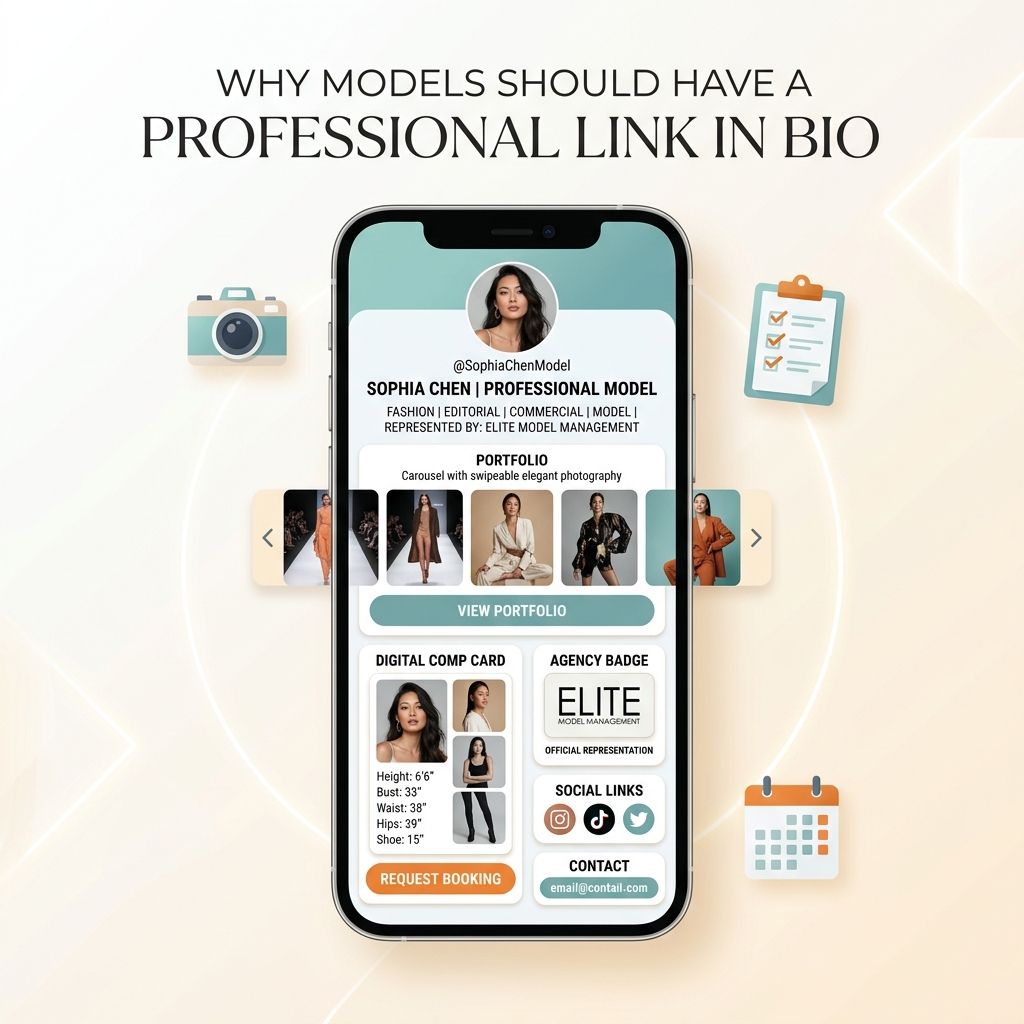
In the fast-paced fashion, commercial, and creator industries of 2026, a model’s social media profile is no longer just a digital scrapbook—it is their primary business storefront, casting portfolio, and booking engine.
Whether you are a signed fashion model represented by a top global agency, a freelance commercial talent, a fitness athlete, or a fashion influencer landing brand sponsorships, prospective clients examine your social profiles before making any casting or partnership decision.
When a casting director, brand strategist, photographer, or PR agent clicks the link in your Instagram or TikTok bio, what do they see?
Do they land on a chaotic, unformatted wall of unlabelled social links? Do they have to hunt through direct messages (DMs) or request a 40MB PDF comp card via email? Or do they land on a sleek, light-themed digital portfolio hub that presents your stats, polaroids, editorial work, and booking contacts in sub-second speed?
If a casting agent experiences friction, slow loading times, or missing stats, they move on to the next model in seconds.
Here is the definitive guide on why models should have a professional link in bio, why light-theme visual design dominates the fashion industry, and how you can turn your social bio link into a 24/7 client booking machine.
The Modern Modeling Dilemma: Comp Card Friction Kills Bookings
Historically, modeling agencies and independent models relied on physical composite cards (comp cards)—printed cardstock featuring 4 to 5 high-fashion photos, exact body measurements, clothing sizes, and agency contact details.
While physical comp cards remain useful at live casting calls, digital casting has shifted almost entirely to mobile screens:
- Over 90% of initial talent scouting happens on mobile devices via Instagram, TikTok, and digital agency portals.
- Casting directors spend less than 5 seconds reviewing a talent’s bio before deciding whether to request a callback or move forward.
- Scattered contact info creates high drop-off: Forcing casting teams to dig through DMs, click external PDF links, or search separate agency websites creates immediate drop-off.
Common Bio Link Mistakes That Cost Models Bookings:
- ❌ The Unverified DM Trap: Listing “DM for bookings” in your bio looks unprofessional and exposes you to spam, fake casting calls, and security risks.
- ❌ PDF Email Attachments: Linking to raw Google Drive folders or 50MB PDF comp cards that load slowly on mobile data networks.
- ❌ Unorganized Link Dumps: Using a generic link tree with dark, unreadable colors, messy buttons, and irrelevant promotional links.
- ❌ Outdated Measurements & Polaroids: Failing to display updated height, bust/chest, waist, hips, and shoe sizes directly on your primary mobile landing page.
To understand how high-converting profile architecture works across creative industries, read our deep-dive on how freelancers can showcase their portfolio with one link.
The Model Bio Link Ecosystem: How It All Connects
Rather than treating your bio link as a basic list of URLs, think of it as your central digital casting hub.
Your professional bio link aggregates traffic from all your active social platforms and directs casting agents, brand managers, and fans into dedicated conversion pathways:
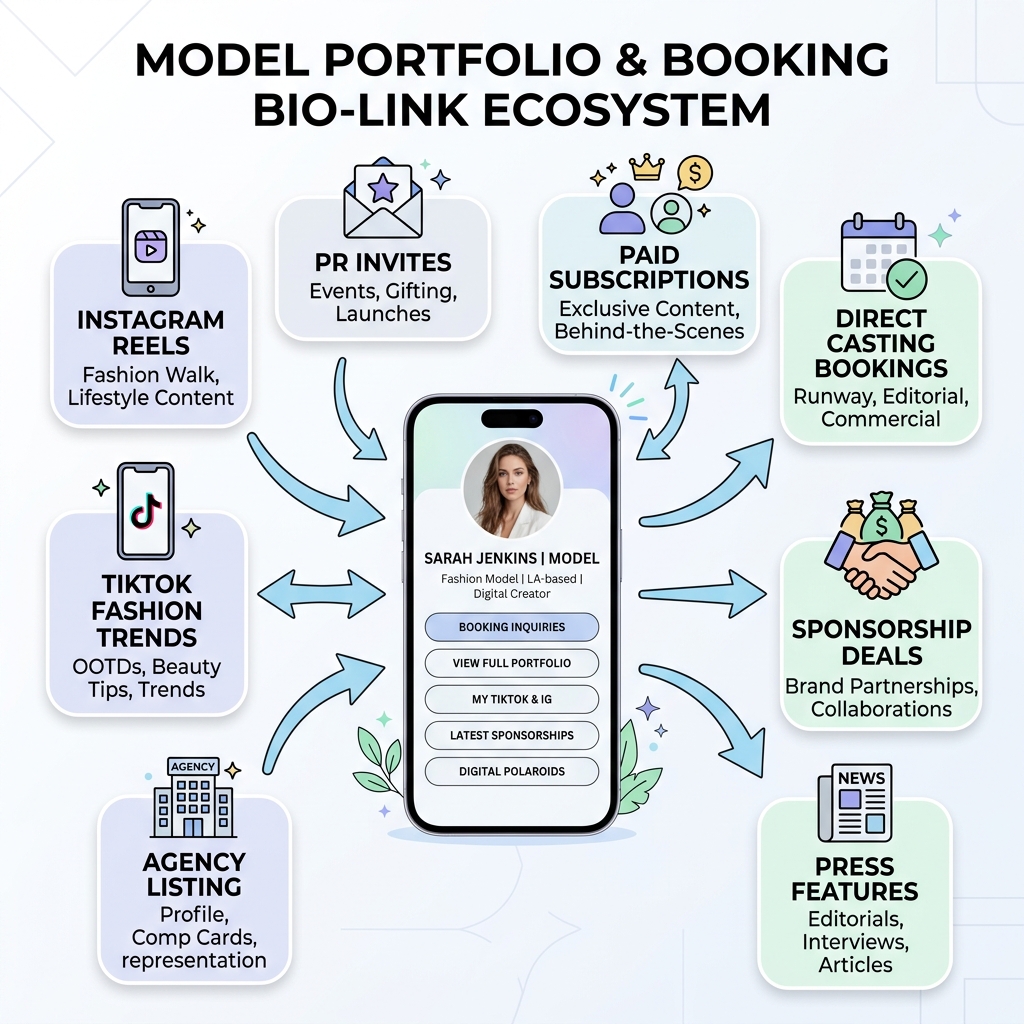
The 4 Core Pillars of a Model’s Digital Hub:
- Digital Comp Card & Measurements Pillar: Instant access to your height, body metrics, clothing sizes, eye/hair color, and downloadable unretouched polaroids (digitals).
- Editorial Portfolio & Runway Video Pillar: High-definition image carousels, runway walk clips, commercial reels, and brand campaign highlights.
- Verified Booking & Management Pillar: Direct click-to-email booking forms, official agency representation badges, and rate cards for commercial/UGC work.
- Multi-Stream Revenue & Monetization Pillar: Links to brand affiliate discount codes, paid subscriber platforms, YouTube vlogs, and fashion press features.
Why Visuals MUST Be in a Light Theme for Models
When designing a bio link page for models, visual aesthetic is non-negotiable.
While dark themes have gained popularity in tech and gaming, high fashion, luxury beauty, and modeling agencies almost universally embrace clean, bright, light-themed visual design.
Here is why a light theme is mandatory for modeling bio links:
+-----------------------------------------------------------------------+
|                LIGHT-THEME VS. DARK-THEME FOR MODELS                  |
+------------------------------------+----------------------------------+
| Light Theme (High Fashion / Clean) | Dark Theme (Tech / Heavy Contrast)|
+------------------------------------+----------------------------------+
| Crisp white/neutral (#FFFFFF)      | Heavy black/dark grey (#0F172A)  |
| Editorial magazine feel (Vogue)    | Gaming / developer software feel |
| Accurate skin tone rendition       | Color distortion on portrait photography |
| High legibility under sunlight     | Screen glare under bright studio lights  |
| Conveys luxury, purity, & trust    | Can appear cluttered or moody    |
+------------------------------------+----------------------------------+
1. Mirrors High-Fashion Editorial Magazines
Look at iconic fashion publications like Vogue, Harper’s Bazaar, Elle, and GQ, as well as elite modeling agency websites (IMG Models, Elite Model Management, Wilhelmina). They all utilize clean white, ivory, and soft grey backgrounds with dark, high-contrast serif and sans-serif typography.
A light theme instantly communicates editorial quality, elegance, and high market value.
2. Preserves Natural Skin Tones and Photo Color Balance
Fashion photos, natural polaroids, and studio portraits are shot and color-graded for neutral or light backgrounds.
Placing portrait photography against pitch-black containers can distort perceived contrast, make skin tones look washed out, and draw visual focus away from the model’s features. Soft neutral card containers (#FFFFFF on #F8FAFC) keep the photographic focus pure.
3. Optimal Visibility Under Bright Daylight and Studio Lighting
Casting directors, stylists, and photographers review talent profiles on phones while on location, on set, or outdoors under natural light. Light-themed layouts with high text contrast (#0F172A text on #FFFFFF cards) remain perfectly readable in direct sunlight without causing visual strain.
4. Activates Psychological Trust and Cognitive Ease
According to cognitive psychology, clean light-mode layouts reduce mental strain and make information easier to digest. For more on how visual clarity drives decision-making, see the psychology behind high-converting landing pages.
5 Critical Reasons Why Every Model Needs a Professional Link in Bio
1. Instant Digital Comp Card & Verified Measurements
Casting directors do not have time to email you asking for your height or shoe size. When casting a runway show, commercial shoot, or fit modeling gig, they work under tight deadlines with strict physical requirements.
A professional bio link allows you to embed a Digital Comp Card section right at the top of your page:
- Key Stats Card: Height, Bust/Chest, Waist, Hips, Shoe Size, Hair Color, Eye Color.
- Location & Mobility: Base city (e.g., “Los Angeles / New York / Paris”), passport status, and willingness to travel.
- Digitals / Polaroids: A dedicated gallery button showcasing unretouched, natural daylight polaroids (front profile, side profile, full body, commercial smile).
2. Streamlined Booking Inquiries & Professional Contact Routing
Telling brands to “DM for bookings” is one of the quickest ways to lose high-paying commercial jobs. DMs get buried under hundreds of fan messages, spam, and unsolicited inquiries.
A dedicated bio link page provides clear, professional contact routes:
- Direct Agency Contact: Include your agency’s official booking email and booker’s name (e.g., “For Editorial & Runway Inquiries: booking@elitemodel.com”).
- Direct Booking Form: For freelance models, embed an automated contact form requesting key client details (Project Type, Usage Rights, Date, Location, Budget).
- Press & Media Kit Button: Downloadable high-res portfolio deck for brand collaborations.
3. Separation of Personal Brand, UGC, and Agency Work
Modern models are rarely just models—they are often content creators, beauty influencers, and UGC (User-Generated Content) creators.
However, mixing agency modeling stats with affiliate discount links and personal vlogs on an unformatted page creates confusion.
A smart bio link tool allows you to organize your links into clean, collapsible Collections & Visual Cards:
- 📸 Portfolio & Agency Digitals (Top Priority)
- 🎬 Commercial Reels & Runway Videos
- 🛍️ Brand Sponsorships & UGC Portfolio
- 🔗 Social Media Profiles & Subscriptions
4. Enhanced Safety, Security, and Scam Protection
The modeling industry unfortunately has its share of fake scouts, unauthorized photographers, and phishing scams.
Having a verified, central bio link hub protects your safety:
- Agency Verification Badge: Feature an official logo badge linking back to your verified profile on your agency’s website.
- Official Communication Disclaimer: Explicitly state “Official bookings handled strictly via agency or verified email below. No booking agreements made via DM.”
- Protects Personal Privacy: Keeps your private phone number and personal email address off public social media bios.
5. Advanced Analytics to Track Agency & Brand Interest
When you send your bio link to casting directors, PR agencies, or brands, how do you know if they actually viewed your portfolio?
With a modern tool like OnlyLink.click, you get real-time analytics showing:
- Total Link Clicks & Page Views: Track daily traffic spikes after major posts or casting submissions.
- Geographic Traffic Breakdown: See which cities (e.g., London, Milan, Tokyo, NYC) are actively viewing your profile.
- Top Performing Links: Know exactly whether casting agents are clicking your comp card, watching your video reel, or opening your booking form.
Traditional Comp Cards vs. Professional Light-Theme Bio Hub
Here is how outdated talent submission methods compare to a modern, light-themed bio link hub:
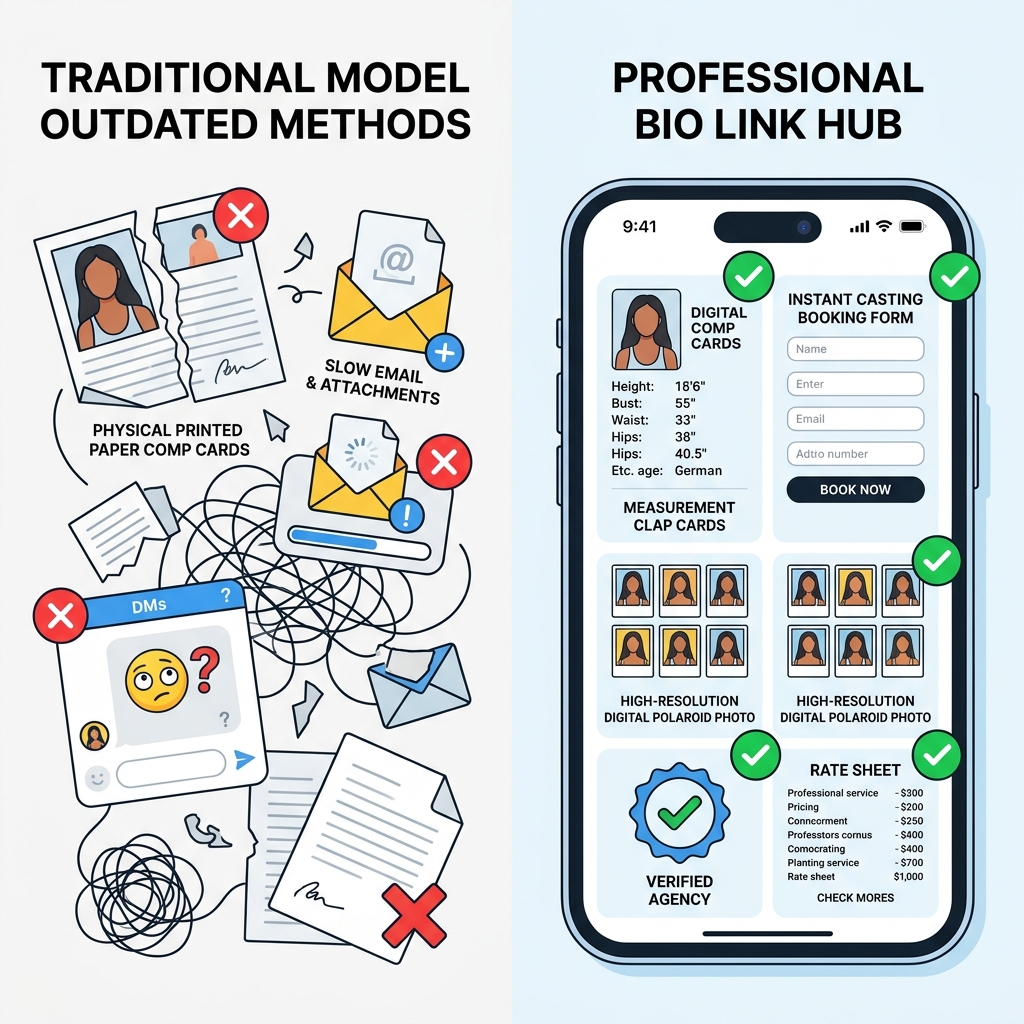
| Feature / Capability | Traditional Printed/PDF Comp Card | Generic Unorganized Link Tree | Optimized Light-Theme OnlyLink Profile Hub |
|---|---|---|---|
| Mobile Accessibility | ❌ Slow 50MB PDF downloads | ⚠️ Basic mobile layout | ✅ Sub-second mobile speed & responsive design |
| Visual Aesthetics | ⚠️ Static print media | ❌ Dark, cluttered, tech-heavy | ✅ Editorial light theme, crisp white cards, luxury feel |
| Measurements Display | ⚠️ Static text (hard to update) | ❌ Missing or buried in text | ✅ Clean, formatted Digital Comp Card widget |
| Video Reel Integration | ❌ Impossible on print/PDF | ❌ Requires opening external apps | ✅ Inline playable runway & commercial video reels |
| Booking Friction | ❌ High (manual email copying) | ⚠️ Generic link buttons | ✅ 1-Click instant booking form & agency routing |
| Safety & Verification | ❌ Easily forged or impersonated | ❌ No verified agency badges | ✅ Official agency verification badge & safety footers |
| Real-Time Analytics | ❌ Zero tracking capabilities | ⚠️ Basic click counts | ✅ Real-time location, device, & click analytics |
Anatomy of a High-Converting Model Bio Link Page
To maximize casting callbacks and brand partnerships, structure your light-theme bio link page in this exact visual hierarchy:
+-----------------------------------------------------------------------+
|                    MODEL BIO LINK PAGE ARCHITECTURE                   |
+-----------------------------------------------------------------------+
|  [AVATAR PHOTO]                                                       |
|  Sophia Chen | Professional Model                                     |
|  Fashion | Editorial | Commercial | High Fashion                     |
|  📍 Los Angeles / NYC | Represented by Elite Model Management         |
+-----------------------------------------------------------------------+
|  [DIGITAL COMP CARD WIDGET - LIGHT NEUTRAL CONTAINER]                 |
|  Height: 5'11" (180cm)  | Bust: 33"  | Waist: 24"  | Hips: 35"        |
|  Hair: Dark Brown       | Eyes: Hazel| Shoe: 8.5 US| Dress: 2 US     |
|  [Button: Download PDF Comp Card & Polaroids]                         |
+-----------------------------------------------------------------------+
|  [FEATURED EDITORIAL PORTFOLIO - SWIPEABLE CAROUSEL]                  |
|  - Vogue Italia Editorial Shot                                        |
|  - Paris Fashion Week Runway Walk (Playable Reel)                     |
|  - Commercial Beauty Campaign                                         |
+-----------------------------------------------------------------------+
|  [PRIMARY CTA - HIGH CONTRAST BUTTON]                                 |
|  📩 REQUEST BOOKING / CASTING INQUIRY                                 |
+-----------------------------------------------------------------------+
|  [AGENCY & SAFETY VERIFICATION BADGE]                                 |
|  Verified Representation: Elite Model Management (LA & NY)           |
|  Direct Booker: john@elitemodel.com                                   |
+-----------------------------------------------------------------------+
|  [SECONDARY LINKS - COLLAPSIBLE COLLECTIONS]                          |
|  ▸ Brand Partnerships & UGC Portfolio                                 |
|  ▸ Press Features & Interviews                                        |
|  ▸ TikTok & YouTube Channels                                          |
+-----------------------------------------------------------------------+
10-Step Optimization Checklist for Models
Follow this step-by-step checklist to launch a high-converting bio link hub today:
- 1. Choose a Clean Light Theme: Select a crisp white background (
#FFFFFF) with soft neutral cards (#F8FAFC) and high-contrast typography (#0F172A). - 2. Use a High-Res Headshot: Set your profile avatar to a professional portrait with natural lighting and a clear view of your face.
- 3. Write an Industry-Specific Bio Header: State your primary model categories (Editorial, Commercial, Fitness, Petite, Curve) and location bases.
- 4. Feature Your Physical Measurements: Place height, bust/chest, waist, hips, and shoe size in a dedicated summary card near the top.
- 5. Add Digital Polaroids: Include unretouched, natural-light polaroid photos (front, profile, full-length).
- 6. Embed a Video Runway Reel: Add a 15-30 second video clip showcasing your runway walk or commercial movement.
- 7. Include Official Agency Badges: Display your representing agency name, booker email, and link to your official agency board.
- 8. Set Up a Direct Booking Contact Button: Make it effortless for casting agents to send job details in one click.
- 9. Organize Secondary Content into Collections: Group brand sponsorships, social channels, and media press into clean expandable tabs.
- 10. Track Profile Analytics: Review weekly click data on OnlyLink.click to see which agencies and locations are viewing your profile.
Build Your Professional Model Bio Link Hub Today
Your modeling career deserves a mobile presentation that matches your talent and professionalism. Don’t let scattered DMs, slow PDF attachments, or outdated link trees cost you your next major campaign or runway booking.
With OnlyLink.click, you can build a stunning, light-themed bio link page customized specifically for models, creators, and artists in under 5 minutes—complete with custom themes, instant media embeds, and powerful analytics.
Ready to elevate your digital casting presence? Create your free professional bio link on OnlyLink.click today.
Ready to build your link in bio?
Create your free OnlyLink page in under a minute unlimited links, analytics and custom designs.
Get started freeKeep reading
QR Codes 101: Bringing Your Bio Link Offline
Learn how QR codes can bridge your offline presence with your online bio link. Discover where to use QR codes, …
Glassmorphism, Gradients, and Wallpapers: Bio Page Design Trends for 2026
Explore the top bio page design trends dominating 2026 — glassmorphism effects, gradient color palettes, and …