Twitch Streamers: Building a Bio Page That Converts Viewers to Followers
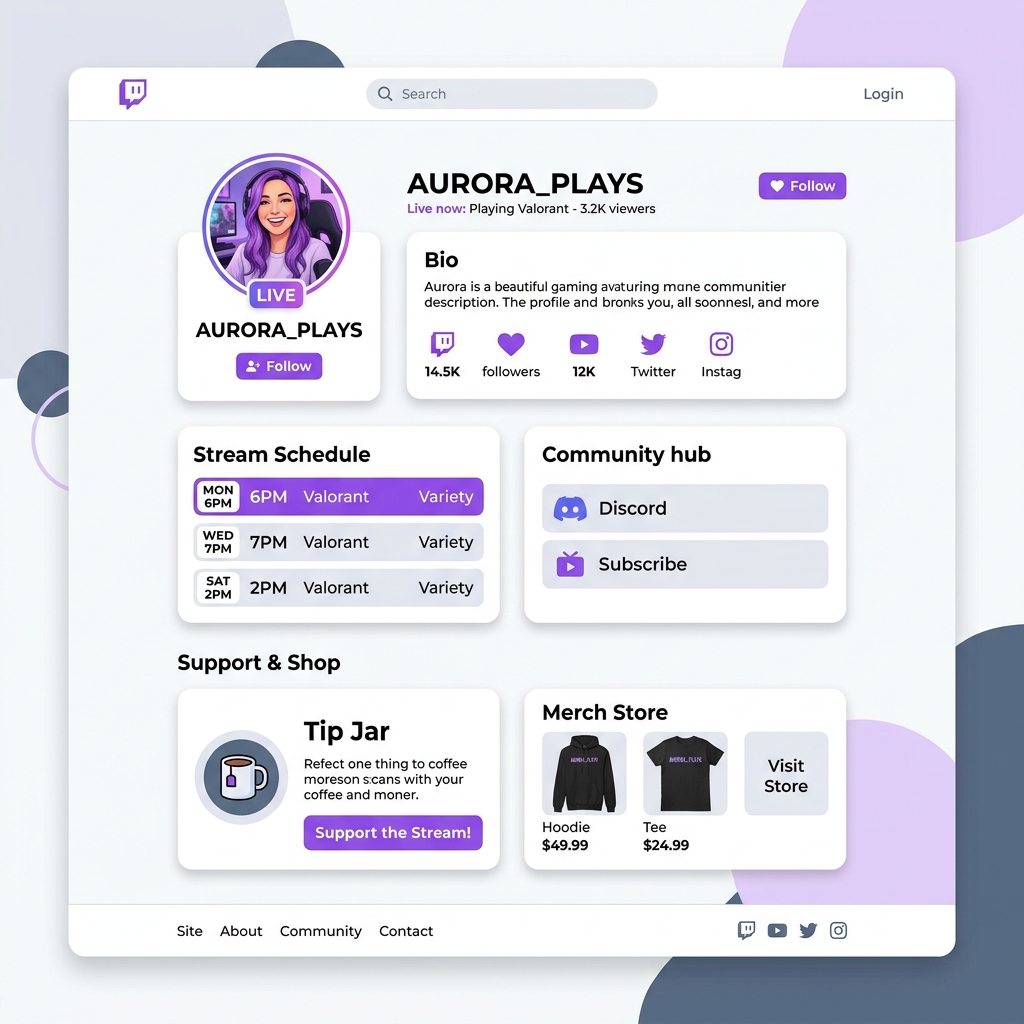
With millions of active daily broadcasters and over 30 million daily active users, Twitch is the premier platform for live gaming streams, esports broadcasts, creative showcases, and interactive Just Chatting sessions. A single hype train, raid from a larger creator, or viral clip on TikTok can bring thousands of first-time viewers into your chat room.
However, streaming veterans know a hard truth: live viewer counts during a broadcast are temporary unless you convert live attention into permanent community equity, owned audience channels, and diversified revenue streams.
When chatters enjoy your stream and tap your Twitch channel profile or check your chat command bot links, you have a fraction of a second to grab their interest. Yet, many streamers rely on messy, unformatted Twitch bio panels or dark, cluttered link trees that confuse mobile visitors and fail to drive conversions.
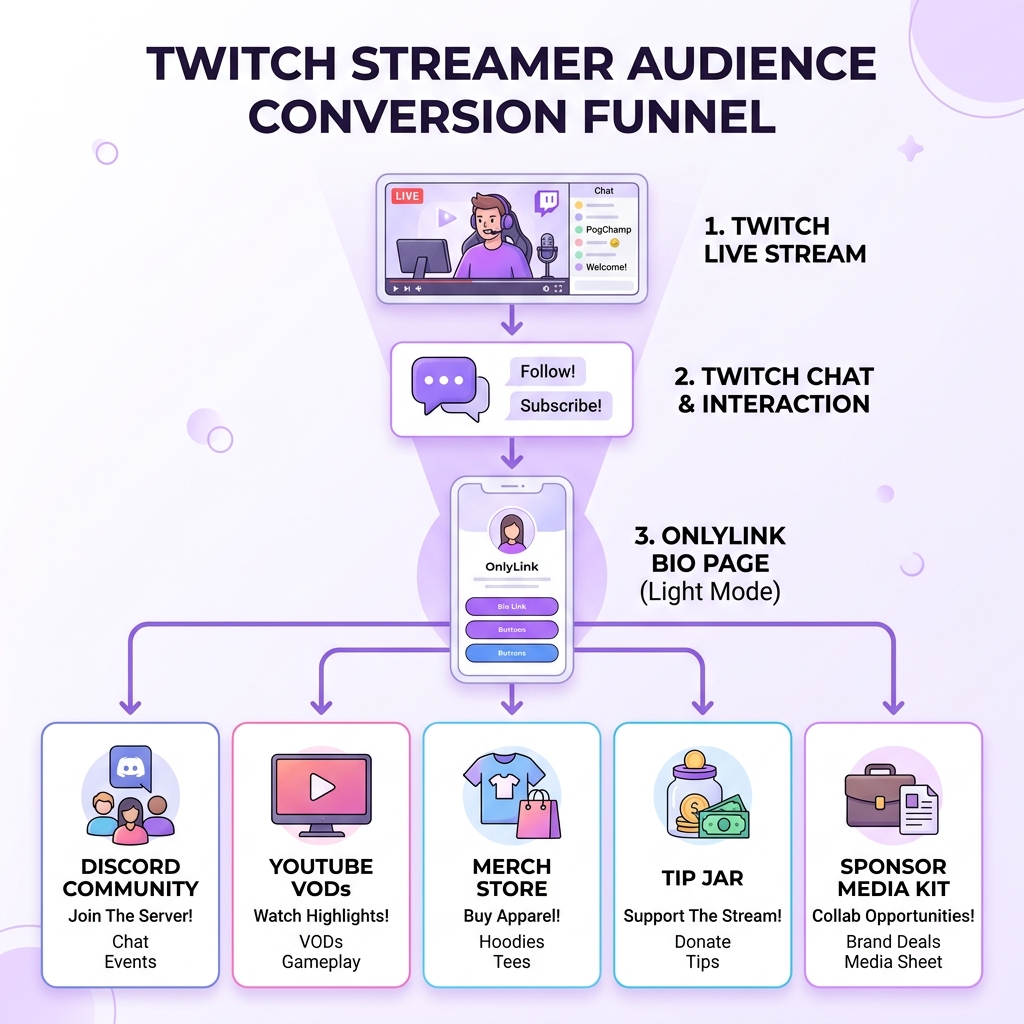
In 2026, top-tier Twitch streamers are elevating their digital presence with sleek, high-converting light-themed link-in-bio landing pages. By funneling traffic from live broadcasts, chat bots, and offline clips into a bright, modern bio hub, streamers effortlessly convert casual viewers into long-term subscribers, Discord members, merch buyers, and sponsor partners.
In this comprehensive guide, we will break down why Twitch streamers need a dedicated bio hub, why light-theme visual design significantly boosts click-through rates, and how you can build your custom streamer hub on OnlyLink.
The Viewer Retention & Funnel Leakage Problem on Twitch
While Twitch offers unmatched live interaction, its platform ecosystem presents several friction points when trying to turn casual stream viewers into permanent followers:
1. Fast-Moving Chat & Lost Command Links
During high-energy streams, live chat scrolls at high speed. Even if your automated chat bot posts your link every 15 minutes, chat messages quickly vanish off screen. Viewers who want to check out your merch, join your Discord, or see your stream schedule often miss the link entirely.
2. Cluttered Native Twitch About Panels
Twitch allows streamers to add markdown extension panels under the video player. However, on mobile devices—where over 50% of Twitch consumption occurs—panels are hidden under separate navigation tabs (“About” / “Links”). Furthermore, standard Twitch bio panels look disjointed, load slowly, and cannot dynamically feature live video clips, interactive forms, or custom theme styling.
3. Off-Stream Viewer Drop-Off
When your stream goes offline, your channel screen turns pitch black. Offline visitors who visit your Twitch page to check when you go live next find static panels with dead links. Without an engaging off-stream landing page, you lose potential followers while you sleep.
4. Walled Garden Risk & Platform Dependence
Relying exclusively on Twitch means your entire community relies on one platform’s recommendation algorithm and subscription split. If Twitch updates its partner revenue percentages or changes discovery features, your stream income and audience reach suffer.
Why Light-Theme Visual Aesthetics Drive Higher Conversions
The visual styling of your bio page directly affects user trust, engagement, and click-through rates (CTR). While dark themes are common in gaming culture, data across conversion landing pages proves that clean, light-theme designs deliver superior conversion results for bio landing hubs.
1. Striking Visual Contrast Against Twitch’s Dark Mode
Twitch’s native desktop web application and mobile app UI are predominantly dark (#0E0E10 dark grey/black background with deep purple accents). When a viewer clicks your bio link and transitions to a bright, crisp, light-themed page (#FFFFFF background with soft pastel purple accents), it creates an instant visual pattern interrupt. The bright canvas naturally pulls eye focus directly toward your call-to-action (CTA) buttons.
2. Editorial Elegance & Brand Professionalism
Light-theme layouts constructed with soft off-white backgrounds (#F8FAFC), frosted glass card overlays, rich slate typography (#0F172A), and vibrant lavender badges evoke modern product quality and editorial polish. Esports organizations, game publishers, and corporate brand sponsors view light-theme bio hubs as professional media kits rather than amateur link lists.
3. Superior Mobile Legibility Outdoor & On the Go
Stream viewers frequently click bio links while commuting or watching streams on mobile devices outdoors. Dark theme landing pages suffer severe reflection glare under daylight, making small text hard to read. Light-theme bio pages maintain flawless visual contrast, ensuring users can clearly read your stream schedule, subscription tiers, and merch store items.
6 Strategic Pillars of a High-Converting Twitch Bio Hub
A high-converting bio hub on OnlyLink serves as your 24/7 digital command center. Here are the six critical pillars to include in your light-theme bio page:
1. Live Status & Embedded Stream Clips
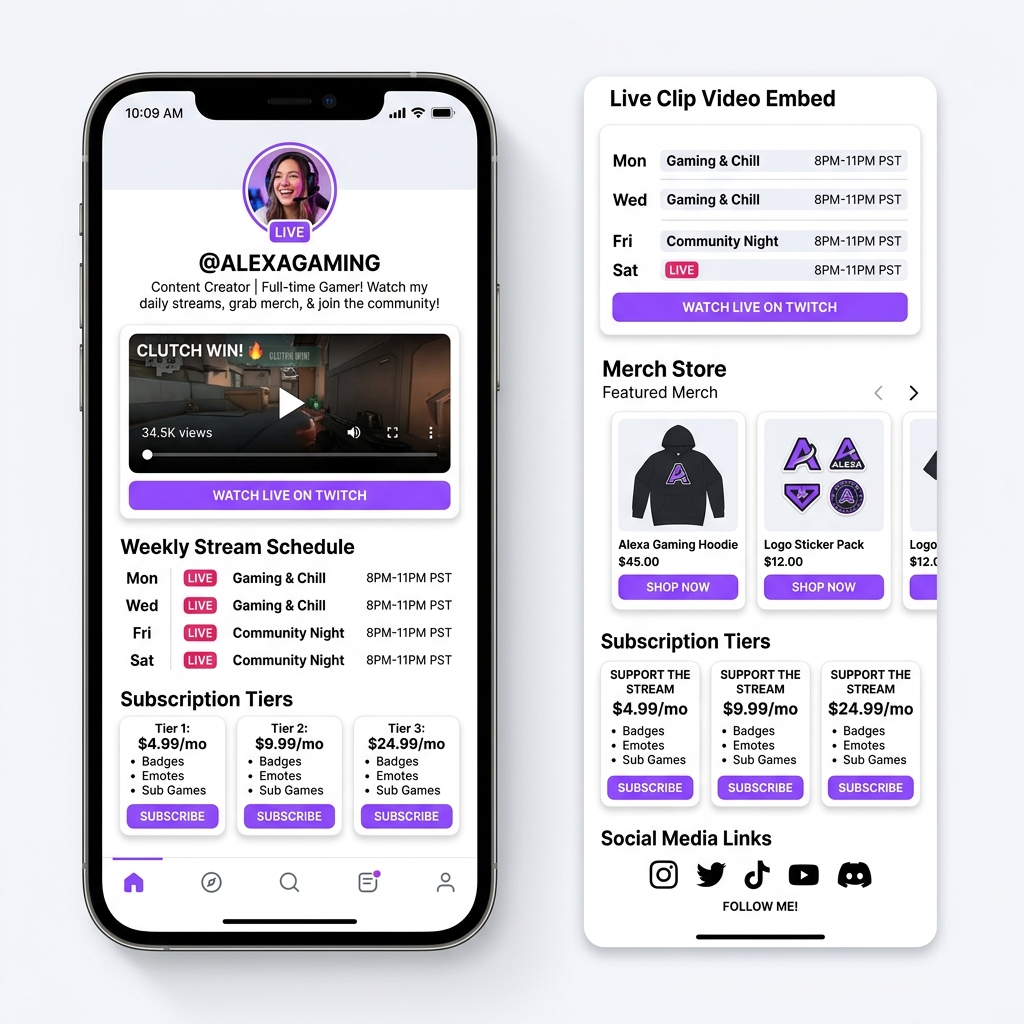
Welcome visitors with your energy! Embed your top Twitch clip, clutch play, or channel trailer right at the top of your light-theme page. OnlyLink’s lightweight video embeds let visitors sample your stream content instantly without leaving your landing page.
2. Dynamic Stream Schedule Widget
Never let a fan wonder when you go live again! Display a clean, color-coded weekly schedule block detailing your broadcast days, start times, and game titles (e.g., Mon/Wed/Fri - 6 PM PST: Valorant Ranked).
3. Discord Community & Secondary Platforms Hub
Twitch chat happens live, but Discord is where your community bonds 24/7. Feature a prominent, light-themed button inviting fans to “Join the Official Discord Community”, along with links to your YouTube VOD channel, TikTok clip highlights, and X (Twitter) profile.
4. Direct Monetization: Tip Jar & Merch Showcase
Monetize your stream beyond native bits and sub splits! Include high-converting cards for:
- ☕ Tip Jar & Support Links: Direct links to Ko-fi, PayPal, or custom donation goals.
- 👕 Official Stream Merch: Showcase thumbnail previews of your hoodies, gaming mats, and stickers with direct checkout buttons.
- 🎁 Throne / Wishlist: Direct viewers to gift items for your stream setup or unboxing streams.
5. Sponsor Media Kit & Commercial Inquiries Card
Streamline sponsor partnerships! Dedicated light-theme cards for “Business & Brand Collaborations” linked to your downloadable press kit or inquiry form show talent managers that you are open for commercial deals.
6. Gaming Setup & Affiliate Gear Showcase
Your chat asks “What headset do you use?” or “What are your PC specs?” dozens of times per stream. Create a dedicated section listing your gaming mouse, monitor, microphone, chair, and PC components with affiliate buy links, turning frequent chat questions into passive affiliate revenue.
Native Twitch Bio Panels vs. Centralized Light-Theme OnlyLink Hub
| Feature / Metric | Native Twitch Bio Panels | Centralized Light-Theme OnlyLink Hub |
|---|---|---|
| Visual Styling | Fragmented markdown tiles on dark UI | Cohesive light-theme UI with soft shadows & crisp typography |
| Mobile Accessibility | Hidden behind separate tabs / slow load | Sub-second load speed, mobile-first touch target cards |
| Media Embeds | Static image banners only | Dynamic clip embeds, schedule widgets & live preview |
| Update Efficiency | Edit individual panels manually on desktop | Edit once in OnlyLink dashboard; updates everywhere instantly |
| Sponsor Perception | Basic gaming bio block | Polished digital media kit & commercial hub |
| Monetization Diversity | Reliant on Twitch bits/subs | Integrates tips, custom merch, affiliate gear & sponsors |
| Analytics & CTR Tracking | Zero outbound click analytics | Comprehensive real-time click tracking & conversion insights |
How to Build Your Twitch Streamer Bio Hub on OnlyLink in 4 Steps
Setting up a high-converting, light-theme link-in-bio page for your Twitch channel takes under 10 minutes on OnlyLink:
Step 1: Sign Up & Choose a Light Theme Template
Create your account on OnlyLink.click and pick a Light Theme UI template. Opt for a crisp off-white backdrop with soft violet or lavender highlights designed specifically for digital creators.
Step 2: Add Avatar, Bio & Featured Clip Embed
Upload your Twitch avatar or logo, craft an engaging bio header (e.g., “Full-time FPS Gamer & Variety Streamer | Live Mon-Fri 6PM PST”), and embed your favourite stream highlight clip near the top.
Step 3: Add Structured Action Cards
Organize your links into clean, visually separated light-mode cards:
- Twitch Channel Live Link (“Watch Live on Twitch”)
- Discord Server Invite (“Join 5,000+ Gamers on Discord”)
- Stream Schedule Card (“Weekly Stream Schedule”)
- Merch & Tip Jar Storefront (“Grab Official Stream Merch”)
- Gaming Gear Affiliate List (“My PC Specs & Stream Gear”)
- Business Inquiry Card (“Sponsorships & Press Kit”)
Step 4: Add Your OnlyLink URL to Twitch & Socials
Copy your customized OnlyLink URL (e.g., onlylink.click/yourstreamername) and paste it into:
- Twitch Social Links: Add it as your primary website link in your Twitch Profile Settings.
- Chat Bot Commands: Set up
!socials,!discord,!merch, and!gearcommands to return your OnlyLink URL in chat. - Offline Stream Banner: Place your OnlyLink URL on your channel’s offline graphics screen.
- TikTok, Instagram & YouTube Bios: Use your single OnlyLink URL across all your social profiles for unified branding.
Elevate Your Twitch Channel & Convert Viewers Today
Twitch live streaming gives you an extraordinary platform to build real-time connections with gaming and creative audiences. But to scale into a full-time content creator in 2026, you must capture that live energy and convert it into multi-platform community growth.
A sleek, light-theme link-in-bio hub built with OnlyLink turns passive stream viewers into active followers, Discord members, merch customers, and long-term supporters.
Ready to level up your Twitch channel’s digital strategy? Build your free light-theme bio hub on OnlyLink today and start converting every view into real channel growth!
Ready to build your link in bio?
Create your free OnlyLink page in under a minute unlimited links, analytics and custom designs.
Get started freeKeep reading
YouTube Creators: Why Your Channel Needs a Link-in-Bio Page
Discover why YouTube creators need a centralized light-theme link-in-bio page to convert video viewers into …
How to Add a Clickable Link on Instagram Stories and Reels
Master the step-by-step guide to adding clickable links on Instagram Stories and Reels. Learn how to convert …