
Selling Digital Products Through Your Link-in-Bio Page: The Complete Guide (2026)
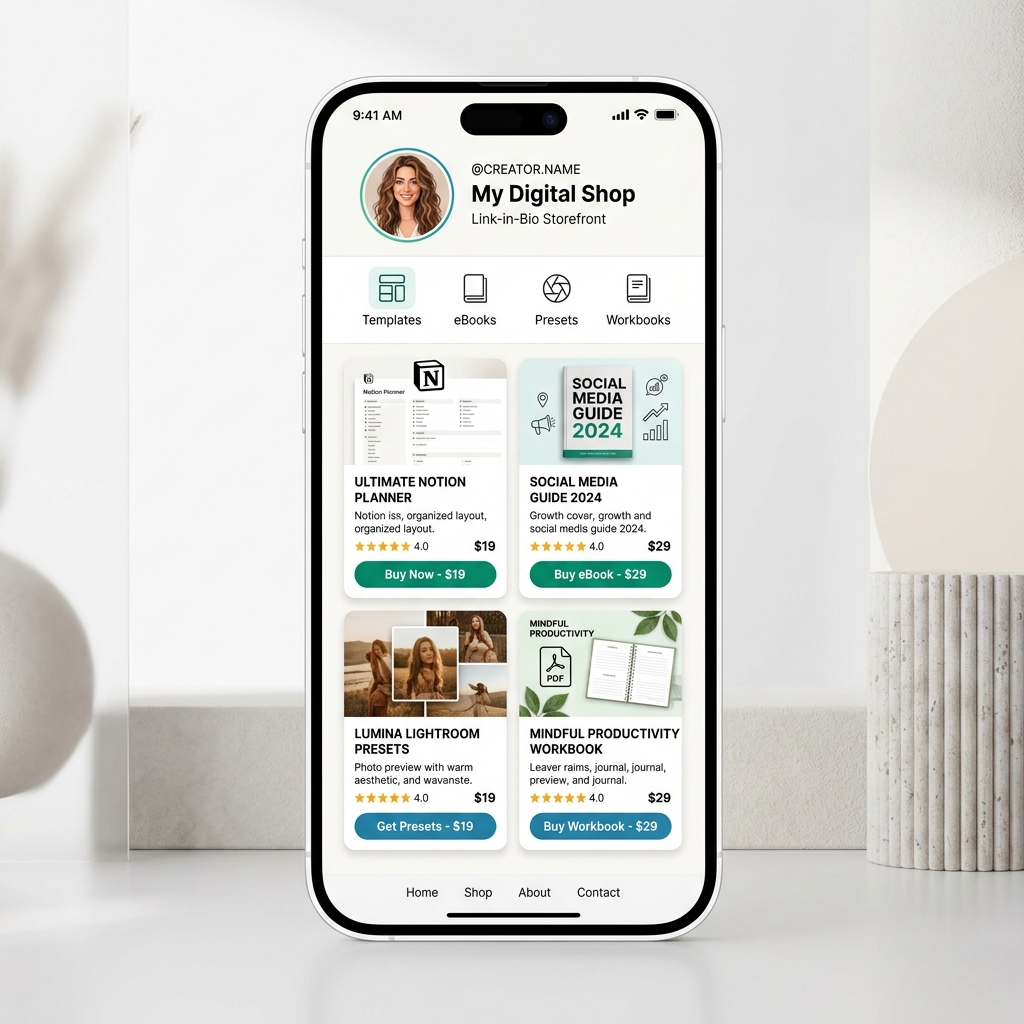
In the 2026 digital economy, selling digital products is the ultimate business model for creators, educators, artists, and independent entrepreneurs.
Unlike physical merchandise that requires inventory management, supplier negotiations, packaging, and shipping logistics, digital products carry near-100% profit margins and can be delivered instantly to customers anywhere in the world—24 hours a day, 7 days a week.
However, many creators face a major bottleneck when monetizing their social media presence: friction between discovering content and completing a purchase.
Every day, hundreds of thousands of potential buyers engage with your social media content on Instagram, TikTok, YouTube Shorts, X, and LinkedIn. When an interested follower taps the single link in your bio, they have reached peak intent.
If that link redirects them to a complex, slow-loading corporate website or an unorganized dark-mode link dump, up to 80% of potential buyers abandon the page before purchasing.
To convert casual social followers into paying customers, top creators rely on light-themed, mobile-optimized link-in-bio storefronts. By combining frictionless 1-click checkout with crisp visual design, a link-in-bio page becomes your most powerful revenue engine.
Here is the definitive guide on how to sell digital products through your link-in-bio page, why light-theme visuals drive dramatically higher conversion rates, and how to build a high-performing digital storefront step by step.
Why Visuals MUST Be in a Light Theme for Selling Digital Products
When building a bio-link digital storefront, visual design and color psychology directly impact your conversion rates and monthly revenue.
While dark mode has its place in code editors and late-night media consumption, the world’s highest-converting e-commerce platforms—including Apple, Shopify, Gumroad, Notion, and Stripe—rely almost exclusively on clean, light-themed visuals.
Here is why light-theme visual design consistently outperforms dark layouts for digital product sales:
1. High Contrast Drives Immediate Call-to-Action (CTA) Recognition
On mobile screens, visitors scan bio-link pages in under 3 seconds. A clean white or soft neutral canvas (#FFFFFF or #F8FAFC) paired with deep slate text (#0F172A) creates maximum visual contrast. When action buttons (such as “Buy Now – $19” or “Download eBook”) are styled in vibrant primary colors like ocean blue, emerald green, or royal indigo, they pop off the screen instantly, guiding the buyer’s eye directly to the conversion point.
2. Superior Legibility in Outdoor Sunlight
Social media consumption happens everywhere: on sunny outdoor commutes, in coffee shops, on public transit, and during lunch breaks. Under direct sunlight or bright ambient lighting, dark-themed pages suffer from heavy screen glare, making product titles and price tags frustratingly unreadable. Light-theme bio pages guarantee crystal-clear legibility under any lighting condition.
3. Accurate Representation of Product Thumbnails & Covers
Whether you are selling Notion workspace templates, Lightroom photo presets, PDF ebooks, or video course guides, dark backgrounds frequently distort image contrast and make dark product mockups blend into the background. A light-theme background preserves color fidelity, making digital cover art look crisp, professional, and tangible.
4. Inspires E-Commerce Trust and Professionalism
Consumers naturally associate clean white layouts with trusted modern storefronts and secure checkout experiences. Dark bio pages can feel cluttered or shadowy to first-time buyers, whereas light-theme layouts evoke openness, transparency, and high quality.
To dive deeper into how cognitive ease and visual hierarchy influence consumer behavior, read our complete guide on the psychology behind high-converting landing pages.
Side-by-Side Comparison: Light Theme vs. Dark Theme Bio Storefronts
| Performance Metric / Feature | Light-Theme Bio Storefront (High Conversion) ✅ | Dark-Theme Bio Page (High Friction) ❌ |
|---|---|---|
| Canvas Background | Pure white (#FFFFFF) / Light Slate (#F8FAFC) | Dark Navy (#0F172A) / Pitch Black (#000000) |
| Outdoor Readability | ☀️ 100% legible under direct sunlight | 🕶️ Severe glare & low mobile visibility outdoors |
| Product Mockup Rendering | 🎨 High contrast; sharp cover & thumbnail colors | 🌫️ Low contrast; dark mockups blend into background |
| Typography Legibility | 📖 Deep slate text (#0F172A) for effortless scanning | 👁️ Low contrast white-on-dark text causes eye fatigue |
| Buyer Trust & Feeling | 🛍️ Feels like an established e-commerce storefront | 🌑 Feels like a basic link bookmark list |
| Conversion Rate Impact | 🚀 Up to 35% higher mobile buy-button CTR | 📉 Higher bounce rate and abandoned carts |
The Digital Product Sales Funnel Architecture
Selling digital products through your link-in-bio page requires a streamlined, 4-stage mobile sales funnel that eliminates every unnecessary step between interest and delivery.
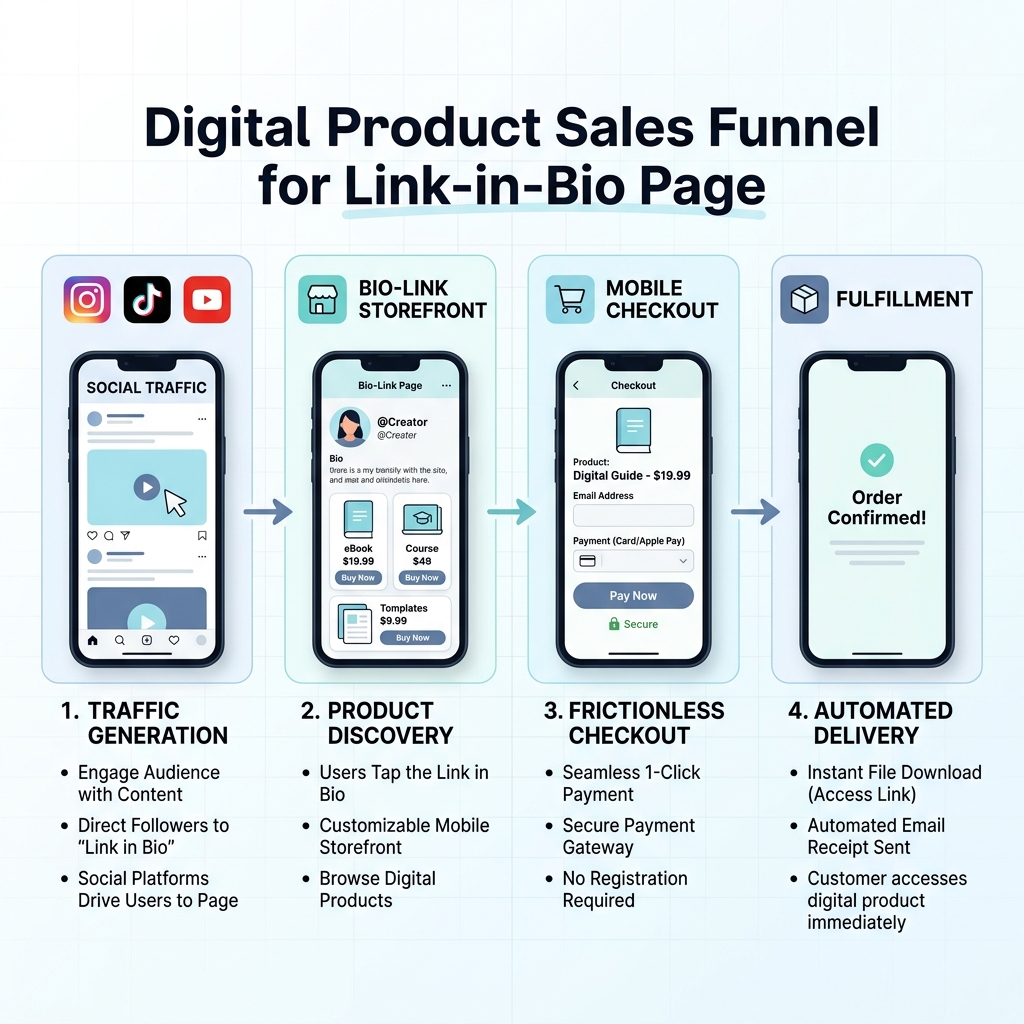
The 4 Stages of the Link-in-Bio Sales Funnel:
Stage 1: Social Traffic Generation (Top of Funnel)
Your audience discovers your content through short-form video (TikTok, Instagram Reels, YouTube Shorts), educational posts on X/LinkedIn, or long-form videos. Every call-to-action (CTA) in your content directs followers to the single link in your bio (e.g., “Grab my complete Notion Content Planner in the link in my bio!”).
Stage 2: Product Discovery on Light-Theme Bio Storefront
When visitors tap your link, they land on your custom light-theme bio page. Within seconds, they see your creator avatar, a brief bio statement, and structured digital product cards displaying product covers, clear descriptions, star ratings, and price tags ($9, $19, $49).
Stage 3: Frictionless Mobile Checkout (Point of Sale)
Instead of forcing visitors through multi-page website redirects or requiring them to create an account with a password, your bio storefront offers integrated 1-click checkout. Customers can pay instantly using Apple Pay, Google Pay, or credit card directly on mobile.
Stage 4: Automated File Delivery (Fulfillment)
As soon as the payment processes, the customer receives an instant download link on screen along with an automated email receipt containing their digital files (PDF, ZIP, Notion link, MP3, or video access link). You earn passive revenue, and the customer gets instant gratification.
For a complete breakdown of how to build a unified revenue funnel across all platforms, read how creators are making money with their link-in-bio page.
Top Digital Products to Sell in Your Bio Link (By Niche)
Virtually any knowledge, asset, or creative skill can be packaged into a digital product. Here are the top-selling digital product formats across popular creator niches:
1. Productivity Templates & Digital Workspaces
- Notion Templates: Content planners, habit trackers, student study hubs, client portals, budget trackers.
- Spreadsheets (Google Sheets / Excel): Financial calculators, workout loggers, investment trackers, small business bookkeeping sheets.
- Design Assets (Canva / Figma): Social media carousels, slide deck templates, brand kit guidelines, media kit layouts.
2. Educational Guides, eBooks & Mini-Courses
- PDF Playbooks & Guides: “The Ultimate Guide to Remote Work”, “30-Day Fitness & Meal Plan”, “SEO Strategy for Freelancers”.
- Cheatsheets & Prompt Libraries: ChatGPT prompt swipe files, copywriting frameworks, midjourney prompt guides.
- Micro Video Courses: Short 30-to-60-minute video tutorials hosted on unlisted links with downloadable workbooks.
3. Creative Assets & Digital Media
- Photographers & Videographers: Lightroom presets, LUT packs, film grain overlays, stock video footage.
- Musicians & Audio Engineers: Vocal sample packs, drum kits, MIDI melody loops, sheet music PDFs.
- Artists & Illustrators: Procreate brush packs, digital wall art printables, coloring books, 3D blender assets.
4. Specialized Services & High-Ticket Bookings
- 1-on-1 Strategy Calls: Paid 30-minute coaching or audit sessions integrated with your calendar link.
- Custom Portfolio Reviews: Resume reviews, code reviews, design audits.
Anatomical Breakdown of a High-Converting Light-Theme Bio Storefront
To maximize conversion rates, your bio page layout must balance visual clarity, social proof, and seamless navigation.
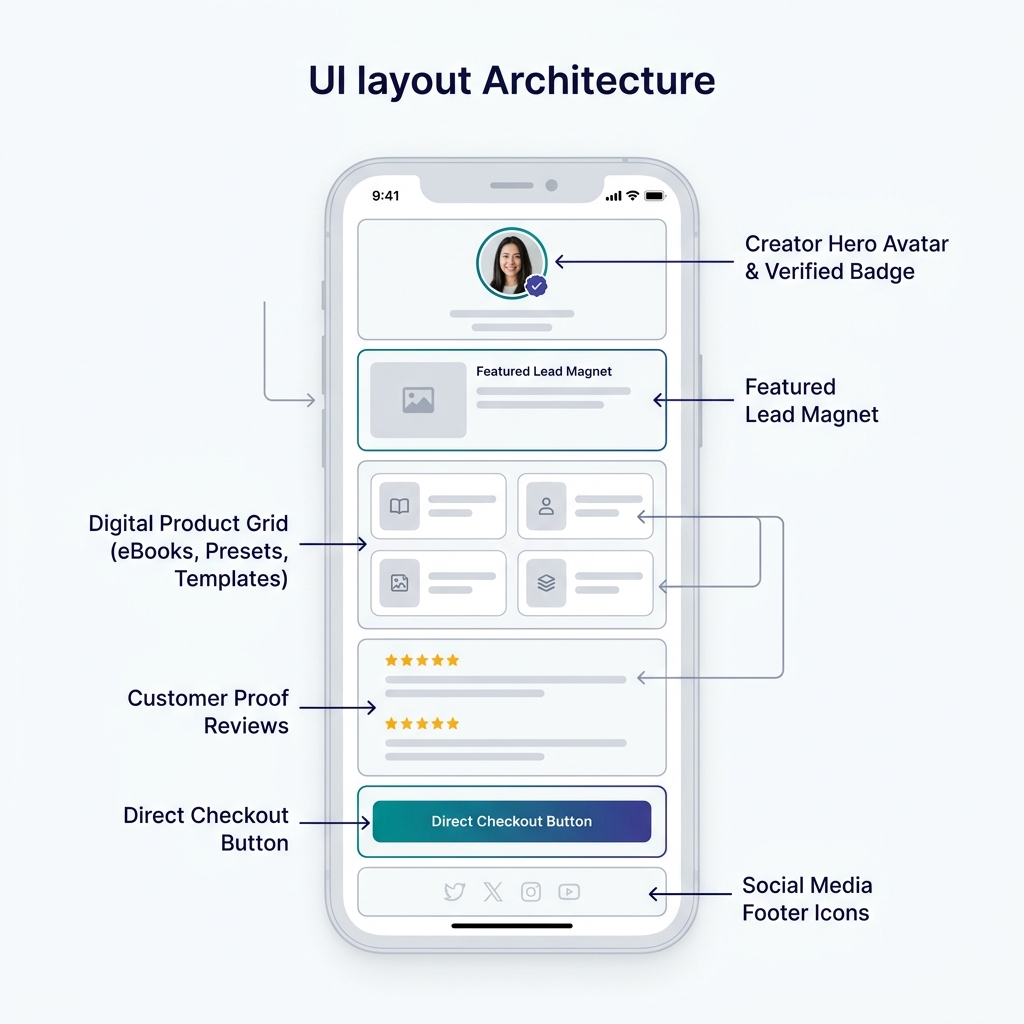
Core Elements of an Optimized Digital Storefront:
1. Creator Hero Avatar & Verified Header
- High-Resolution Avatar: A warm, professional profile photo featuring a clean background.
- Clear Value Proposition: A 1-sentence bio stating who you are and how your products help your audience (e.g., “Helping 50,000+ creators build and monetize digital products.”).
2. Featured Lead Magnet (Free Product)
Position a free digital resource (e.g., “Free 5-Page Content Checklist”) near the top to capture email addresses from visitors who aren’t ready to buy yet. This builds your owned email subscriber list for future launches.
3. Structured Digital Product Grid
- Product Cards: Styled with clean white cards (
#FFFFFF), light gray borders (#E2E8F0), and soft drop shadows. - Visual Previews: High-quality 1:1 square mockups or 16:9 thumbnails showing the product in action.
- Price Tags & CTA Badges: Bold price tags (e.g., $19.99) next to vibrant action buttons (“Get Instant Access”).
4. Social Proof & Customer Reviews
Display star ratings (⭐⭐⭐⭐⭐ 4.9/5) and snippet testimonials directly under your flagship products. Social proof drastically reduces buyer hesitation for micro-digital purchases.
5. Integrated Social Icons & Footer
Position your Instagram, TikTok, YouTube, and X icons cleanly at the bottom of the page so they don’t distract from your primary purchase buttons.
To learn how to structure your bio page elements for peak conversion, check out our guide on the anatomy of a high-converting link-in-bio page.
Step-by-Step: Setting Up Your Digital Shop on OnlyLink
Setting up your digital product storefront on OnlyLink takes less than 15 minutes. Here is the step-by-step setup workflow:
Step 1: Select a Light-Theme Preset Canvas
Log in to your OnlyLink dashboard and navigate to the Appearance tab. Choose a crisp, high-contrast light theme template such as Minimalist White, Light Slate, or Soft Pastel. Ensure your text color is set to dark slate or deep navy for maximum legibility.
Step 2: Upload Your Digital Assets & Create Product Cards
Navigate to Storefront / Links and click Add New Digital Product:
- Title: Give your product a clear, benefit-driven title (e.g., “Flagship Freelancer Invoice & Proposal Template”).
- Description: Write 2–3 bullet points highlighting what’s included.
- Price: Set a competitive price (e.g., $15, $29, $49).
- File Upload: Upload your PDF, ZIP, or provide your Notion template share link.
- Cover Image: Upload a high-resolution, light-theme product preview graphic.
Step 3: Connect Instant Mobile Payment Gateways
Connect your preferred payment processor (Stripe, PayPal) with 1-click integration. OnlyLink supports Apple Pay, Google Pay, and major credit cards, allowing buyers on mobile devices to complete purchases in seconds via biometric authentication (Face ID / Touch ID).
Step 4: Configure Automated Email Delivery
Customize your automated buyer receipt email. Add a warm thank-you message, download instructions, and a link to join your free community or newsletter.
Step 5: Embed Your Bio Link Across All Social Profiles
Copy your unique OnlyLink URL (e.g., onlylink.click/yourname) and add it to the bio field of your Instagram, TikTok, YouTube, X, and LinkedIn profiles. Mention your digital product in your post captions and video CTAs to drive continuous traffic.
For broader strategies on increasing digital sales, read our guide on increasing online sales with a better link-in-bio.
4 Common Mistakes to Avoid When Selling Digital Products
Avoid these common pitfalls to ensure your link-in-bio storefront maintains high conversion rates:
❌ 1. Choice Overload (Listing 20+ Products at Once)
When visitors are presented with too many options, decision fatigue sets in, leading to zero sales. Limit your bio page to 3 to 5 core digital products, featuring your top seller prominently at the top.
❌ 2. Dark, Low-Contrast Theme Designs
Dark backgrounds with low-contrast gray or purple text reduce mobile readability, distort product colors, and cause higher page bounce rates under daylight. Stick to clean, light-theme visuals.
❌ 3. Forcing Multi-Page Account Registration
Requiring customers to create a username and password just to download a $10 PDF causes massive checkout abandonment. Keep checkout frictionless by requiring only an email address and payment method.
❌ 4. Neglecting Email Lead Magnets
Over 90% of your bio link visitors will not buy on their first visit. If you don’t offer a free lead magnet (e.g., a free PDF checklist or mini-guide in exchange for their email), you lose the opportunity to nurture them via email marketing.
Start Selling Digital Products Today with OnlyLink
Your social media audience is ready to support your work and purchase your digital products. All you need is a sleek, light-themed bio-link storefront that makes discovering and buying your products effortless.
Whether you are launching your first $10 Notion template, selling Lightroom presets, or distributing an educational eBook, OnlyLink provides the tools, light-theme aesthetics, and frictionless checkout you need to build a thriving digital business.
👉 Build your light-theme digital product bio page on OnlyLink now!
Ready to build your link in bio?
Create your free OnlyLink page in under a minute unlimited links, analytics and custom designs.
Get started freeKeep reading
QR Codes 101: Bringing Your Bio Link Offline
Learn how QR codes can bridge your offline presence with your online bio link. Discover where to use QR codes, …
Glassmorphism, Gradients, and Wallpapers: Bio Page Design Trends for 2026
Explore the top bio page design trends dominating 2026 — glassmorphism effects, gradient color palettes, and …