Podcasters: Driving Listeners to Every Platform from One Link
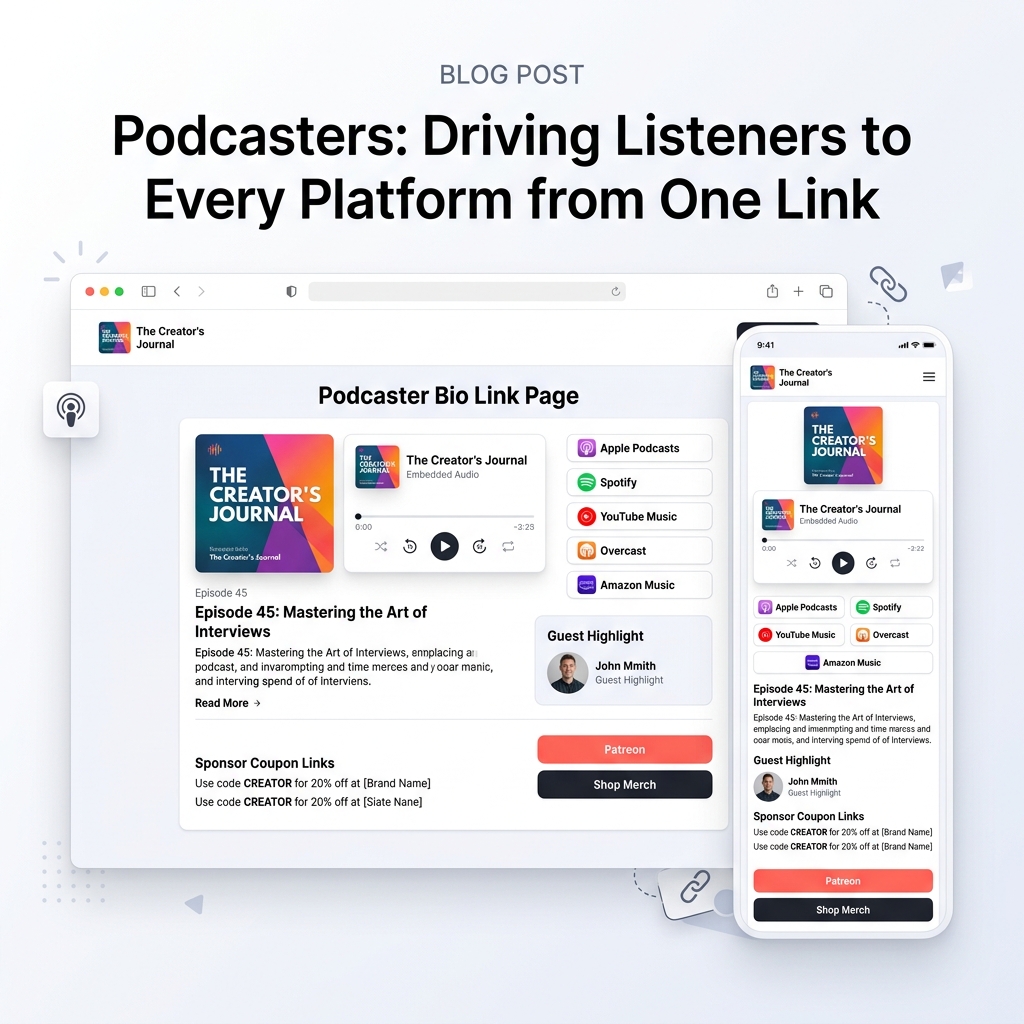
As a podcaster, show host, or audio producer in 2026, your audience is more fragmented than ever.
Some of your listeners stream exclusively on Apple Podcasts, others are devoted Spotify users, tech-savvy fans prefer Overcast or Pocket Casts, and video-podcast enthusiasts watch on YouTube Music.
When promoting a new episode across Instagram Reels, TikTok clips, X (Twitter) threads, LinkedIn, or newsletter blasts, you face a major challenge: how do you send followers to their preferred listening app without causing friction?
If you force iOS users to click a Spotify link—or make Android users navigate an Apple Podcasts URL—up to 60% of prospective listeners bounce before pressing play.
To maximize episode downloads, sponsor conversions, and listener retention, you need a mobile-first, light-themed podcast bio link hub that auto-detects devices, embeds instant audio previews, and provides one-tap links to every major podcast platform.
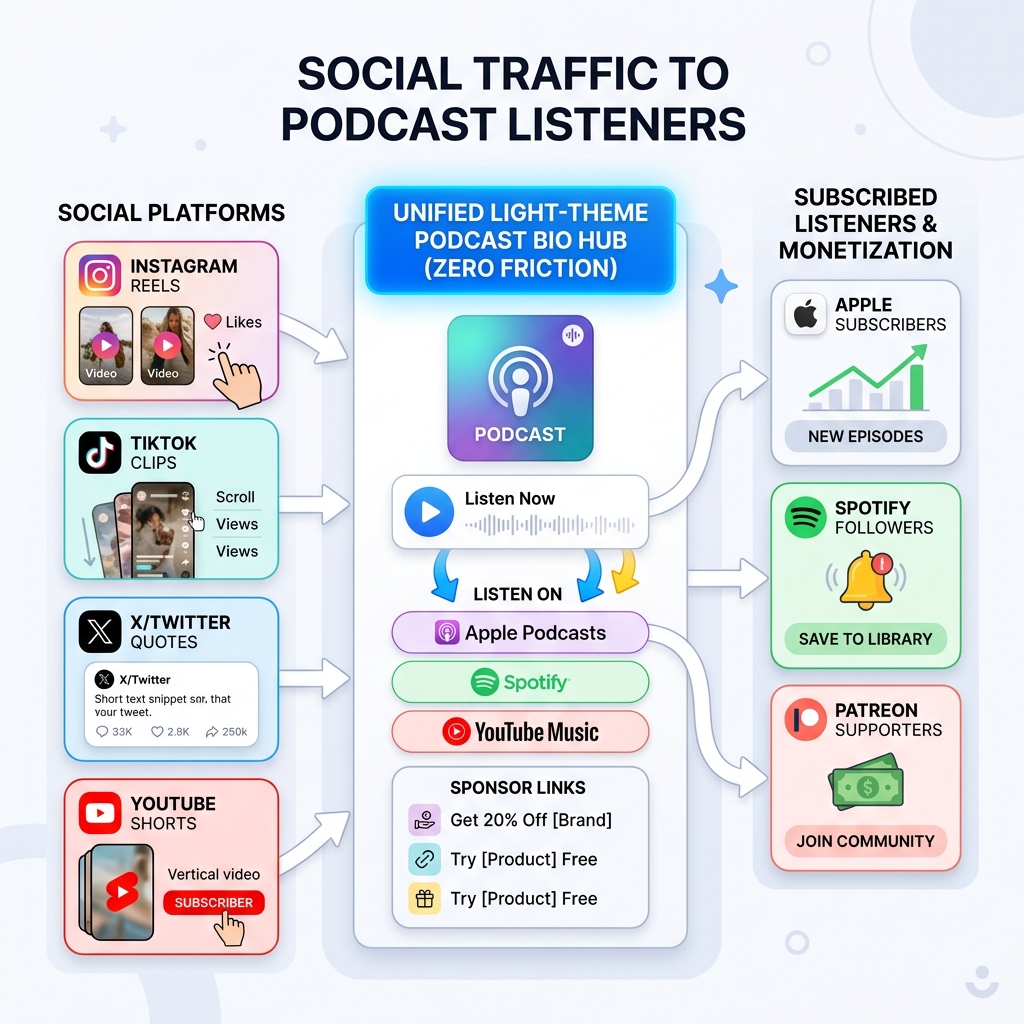
The Social Media to Podcast Listener Funnel
Converting casual social media scrollers into loyal, subscribed podcast listeners requires a seamless funnel:
Traditional Bio Links vs. Smart Light-Theme Podcast Hub
| Feature | Generic Link Tree ❌ | Light-Theme Podcast Bio Hub ✅ |
|---|---|---|
| Audio Playback | None; forces users to leave the page | Embedded audio player widget for instant 30-sec sample playback |
| Platform Deep Linking | Plain URL text without icon hierarchy | Branded app buttons (Apple, Spotify, YouTube, Overcast) |
| Show Notes & Guest Bios | Hidden on separate website sub-pages | Highlighted episode summary, guest headshots, & key takeaways |
| Sponsor Promo Codes | Lost in long episode descriptions | Dedicated sponsor coupon cards with 1-click copy functionality |
| Monetization Touchpoints | Missing or buried | Integrated Patreon membership, merch store, & email signup |
As discussed in our guide on how creators increase revenue with a link in bio, reducing steps between discovery and consumption significantly boosts conversion rates.
Why Light-Theme Visual Design Matters for Podcast Bio Pages
Visual clarity plays a crucial role when visitors scan your bio link on a mobile device:
+-----------------------------------------------------------------------+
|                    LIGHT THEME PODCAST HUB ADVANTAGES                 |
+-----------------------------------------------------------------------+
| 1. Instant App Icon Recognition (Apple Purple, Spotify Green, YouTube)|
| 2. High-Contrast Readability (#0F172A Slate on #FAFAFC Light Slate)   |
| 3. Highlighting Sponsor Promo Cards with Soft Border Shadows          |
| 4. Executive Show Polish (Matches Apple Podcasts & Spotify Web UI)    |
+-----------------------------------------------------------------------+
3 Visual Reasons Light Theme Drives More Downloads:
- Instant Platform Icon Recognition: Podcast app logos (Spotify Green, Apple Purple, YouTube Red, Amazon Blue) stand out with maximum visual pop against clean white (
#FFFFFF) or soft slate (#FAFAFC) card backgrounds. - Daylight & Mobile Screen Legibility: Listeners clicking your bio link from social media are often on mobile devices outdoors or on the move. High-contrast dark charcoal text (
#0F172A) on light surfaces eliminates reflections and makes episode summaries skimmable in a split second. - Clean Audio Player Contrast: Progress bars, play buttons, and duration timers in an embedded audio player widget look crisp and inviting on light-mode surfaces.
The 4 Pillars of a High-Converting Podcast Bio Link Hub
Structure your OnlyLink podcast bio page using four core pillars:
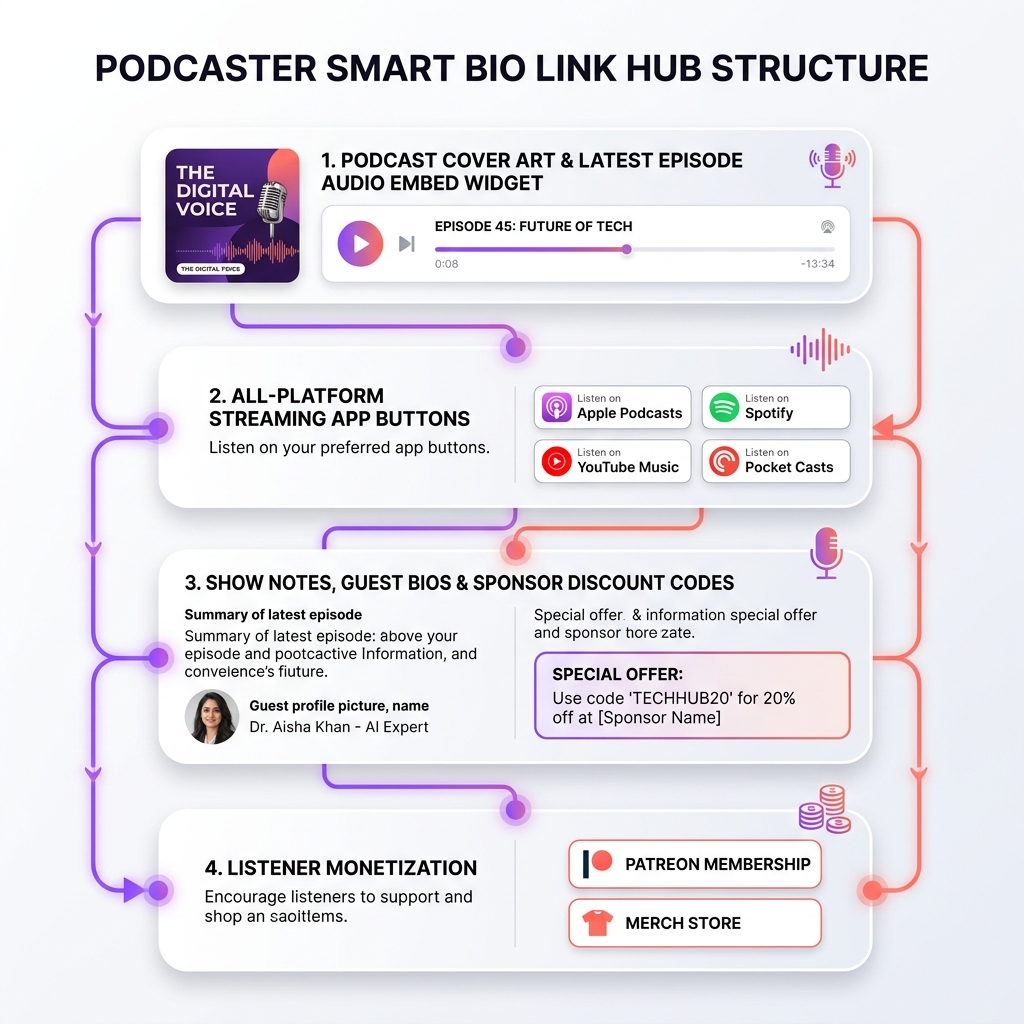
Pillar 1: Show Artwork & Embedded Audio Player Widget
Grab immediate interest at the top of your page:
- Podcast Cover Art & Title: High-resolution show artwork paired with your podcast tagline.
- Embedded Audio Preview Widget: Allow visitors to press play and listen to your latest episode or show trailer directly inside the bio link without opening an external app.
- Current Episode Title & Guest Headshot: Highlight the featured guest’s name, title, and topic.
Pillar 2: All-Platform Streaming Buttons
Eliminate friction by offering direct buttons to every major listening directory:
- Primary Apps: Apple Podcasts, Spotify, YouTube Music.
- Independent & Android Apps: Overcast, Pocket Casts, Amazon Music, iHeartRadio, Castbox.
- RSS Feed Button: Direct RSS feed link for power listeners and custom podcast apps.
Pillar 3: Episode Show Notes, Guest Links & Sponsor Coupons
Turn your bio page into a valuable resource center for each episode:
- Episode Key Takeaways: Bulleted summary of key timestamps and discussion topics.
- Guest Socials & Mentioned Resources: Direct links to your guest’s website or book.
- Sponsor Discount Cards: Highlighting sponsor promo codes (e.g., “Use code CREATOR for 20% off at [Sponsor Brand]”) with easy copy-paste interaction.
Pillar 4: Listener Monetization & Community Growth
Convert active listeners into paying supporters and email subscribers:
- Patreon / Membership Tier Buttons: Direct link to exclusive bonus episodes or ad-free feeds.
- Merch Store Links: Showcase show t-shirts, mugs, or stickers.
- Newsletter Signup CTA: Capture listener emails to notify them when new episodes launch.
5 Proven Strategies to Grow Podcast Downloads from One Link
1. Update Your Bio Link for Every Episode Launch
Whenever you drop a new episode, update your top audio embed widget and episode headline to feature the new topic. Read our guide on when to refresh your bio link for optimal workflow timing.
2. Leverage Short-Form Video Clips (Reels, TikTok, Shorts)
Post a 30-second audio/video teaser on Instagram Reels or TikTok with a strong verbal call-to-action: “Hit the link in our bio to listen to the full episode on Apple or Spotify!”
3. Track Platform Analytics & Listener Preferences
Use OnlyLink analytics to see which platform buttons (Apple vs. Spotify vs. YouTube) receive the most clicks. This data helps you tailor your show notes and audience calls-to-action.
4. Provide One Link to Guests for Easy Cross-Promotion
When interviewing high-profile guests, send them your single OnlyLink bio URL. They can share one link in their social bios that accommodates all of their own followers regardless of what podcast app they use.
5. Cross-Link Your Full Website & Social Media
Ensure your podcast bio page connects seamlessly to your broader brand footprint. Check out our insights on building a digital identity beyond social profiles and the anatomy of a high-converting link in bio page.
How to Set Up Your Podcast Bio Link on OnlyLink in 5 Minutes
Setting up your podcast hub on OnlyLink is quick and effortless:
- Claim Your Podcast Handle: Register a handle matching your podcast name (e.g.,
yourpodcast.onlylink.click). - Choose a Light Theme Preset: Select a clean light-themed template with high-contrast card styling.
- Embed Your Audio Player & Cover Art: Paste your latest episode audio embed code or RSS player.
- Add Streaming App Buttons: Add 1-tap buttons for Apple Podcasts, Spotify, YouTube Music, and Overcast.
- Add Sponsor Cards & Patreon Links: Include current sponsor promo codes and community membership links.
- Publish to All Bio Slots: Put your new OnlyLink URL in your Instagram bio, TikTok profile, X account, and email signatures.
Turn Every Bio Click into a Subscribed Listener
Don’t let fragmented streaming platforms stand between your show and your audience. By consolidating your podcast ecosystem into a light-themed, high-converting bio link hub, you make it effortless for any listener to find, stream, and subscribe to your show.
Ready to grow your podcast downloads?
Create your free OnlyLink podcast bio page today and connect your show to listeners on every platform!
Ready to build your link in bio?
Create your free OnlyLink page in under a minute unlimited links, analytics and custom designs.
Get started freeKeep reading
Artists and Illustrators: Selling Prints Through Your Bio Page
Discover how digital artists, illustrators, and painters can turn a single light-themed bio link into a …
Freelance Developers: Turning Your Bio Link into a Portfolio
Discover how freelance developers, software contractors, and full-stack engineers can convert a single …