LinkedIn Bio Links: A Guide for Professionals and Freelancers
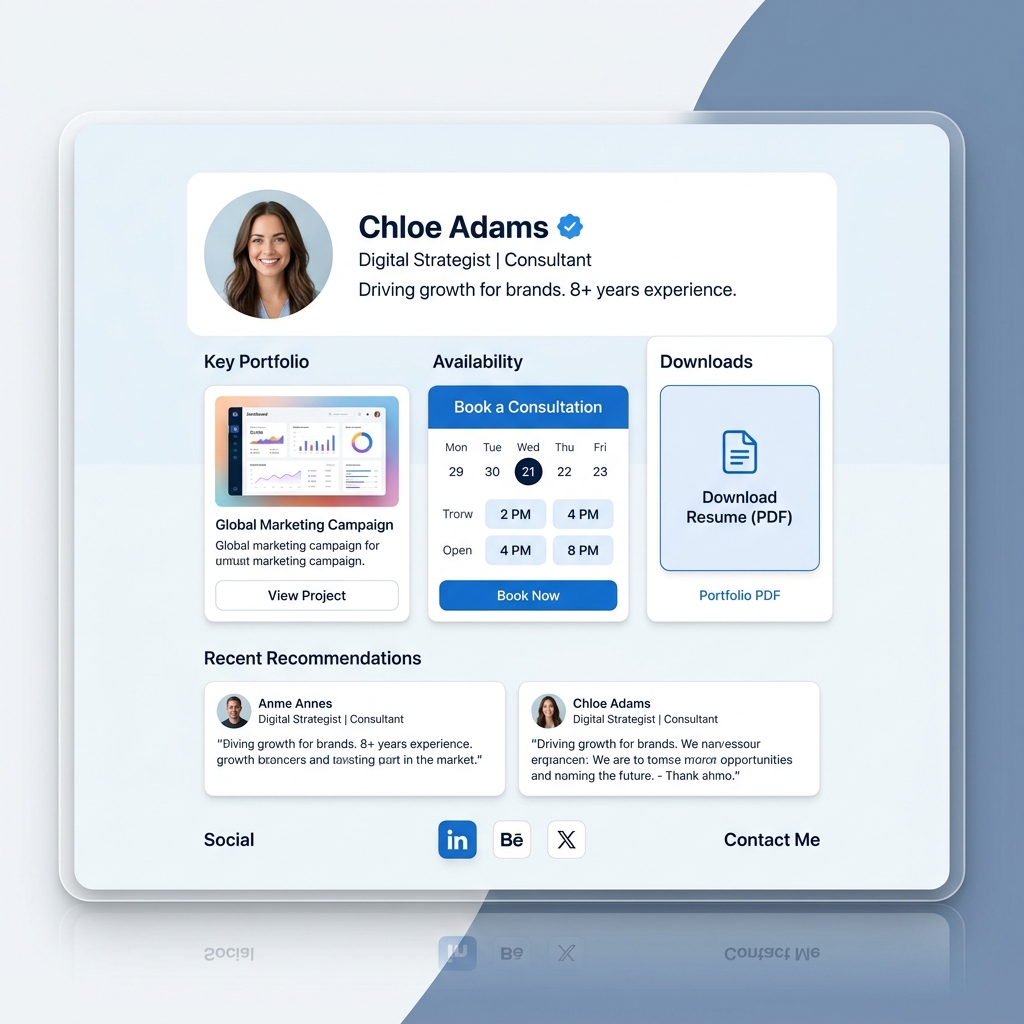
With over 1 billion members worldwide, LinkedIn is the world’s most powerful B2B network and professional marketplace. Every day, recruiters, corporate executives, agency owners, prospective clients, and hiring managers browse millions of profiles to find talent, consultants, software engineers, designers, and freelance specialists.
A well-crafted headline and a viral LinkedIn post can draw thousands of profile views to your page. However, many professionals face a critical conversion bottleneck: profile views and profile impressions are meaningless unless you guide decision-makers into taking real business action.
When a prospective client or recruiter visits your LinkedIn profile, they shouldn’t have to hunt through text-heavy experience sections or search external sites to evaluate your work. In 2026, top-performing consultants, freelancers, and executives are solving this challenge by adding a sleek, high-converting light-themed link-in-bio page directly to their LinkedIn profile header.
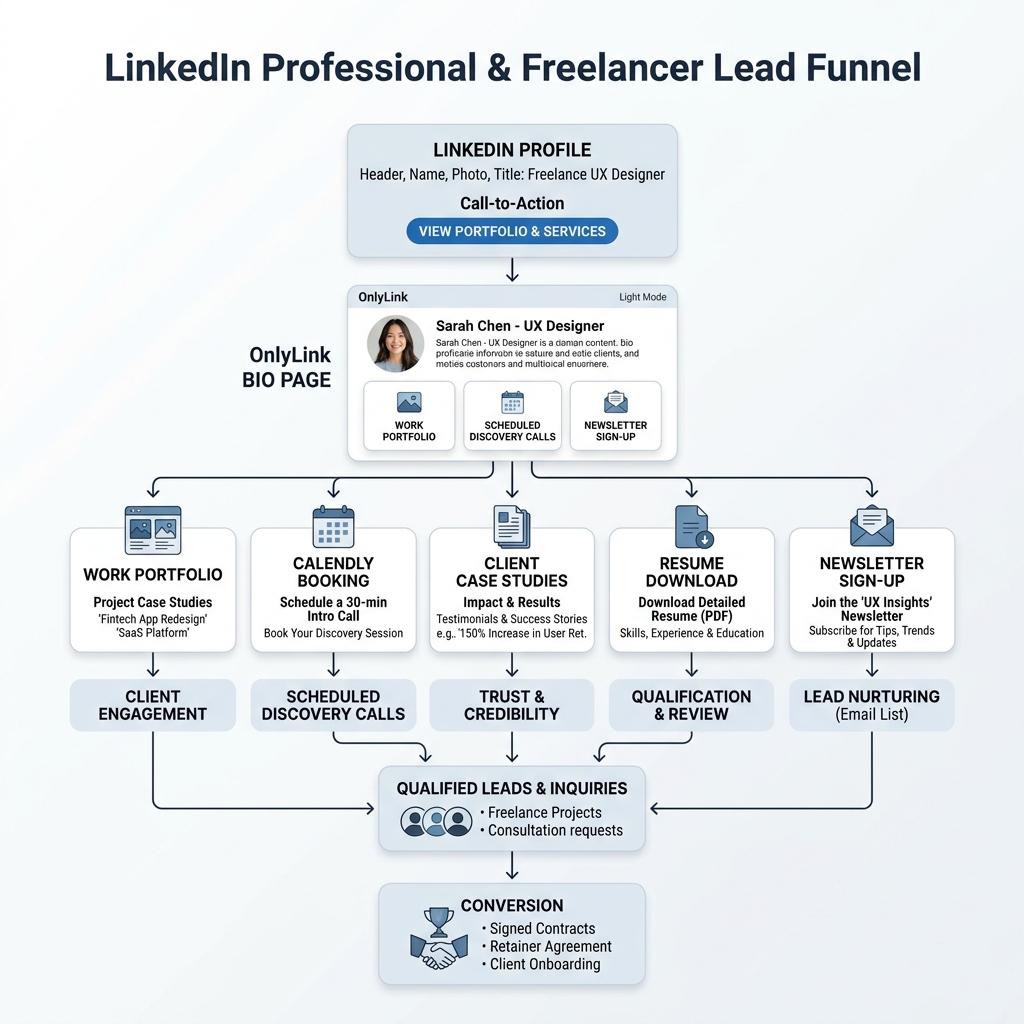
By funneling profile traffic into a centralized professional hub, you turn casual profile visits into booked discovery calls, portfolio downloads, newsletter subscriptions, and high-ticket client retainer contracts.
In this guide, we will explore how LinkedIn bio links work, why light-theme design aesthetics project authority and corporate trust, and how you can build your custom professional hub using OnlyLink.
The Hidden Conversion Problem on Standard LinkedIn Profiles
While LinkedIn excels at professional discovery, its profile architecture presents several operational hurdles for freelancers and business professionals:
1. The Single Website Link Bottleneck in Profile Headers
LinkedIn allows creator profiles and standard accounts to feature a single custom link in the profile header (directly below your location and follower count). Pushing visitors to a single static homepage, a Google Drive folder, or a generic contact page forces prospective clients to guess where to go next.
2. Buried Work Samples & PDF Attachments
LinkedIn’s “Featured” section allows you to attach media, links, and posts. However, mobile scrollers rarely tap through multi-card carousels. Heavy PDF attachments often fail to render quickly on mobile devices, leading to immediate visitor drop-off.
3. Outbound Link Penalties in LinkedIn Posts
LinkedIn’s feed algorithm heavily penalizes posts that contain external URLs in the post body. To keep users on their platform, LinkedIn reduces the organic reach of external link posts by up to 60%. Savvy professionals place their links in their profile header bio link and direct post readers to “Check the link in my profile bio!”
4. Lack of Direct Booking & Lead Qualification Features
Standard LinkedIn messaging (InMail) is notorious for sales spam and unread messages. Serious clients and decision-makers prefer a streamlined 1-click calendar booking link (e.g., Calendly or SavvyCal) or a structured inquiry form where they can state their project budget upfront.
Why Light-Theme Aesthetics Are Essential for Professional Credibility
Visual styling determines how prospective clients perceive your expertise, attention to detail, and professional standards. While dark themes have popularity in gaming, data across B2B landing pages shows that crisp, light-theme designs achieve higher trust ratings and conversion performance.
1. Seamless Corporate Brand Alignment
The modern corporate world—from tech startups to Fortune 500 enterprises—communicates using bright, clean visual identity systems. A light-theme bio hub featuring pristine off-white canvas backgrounds (#FFFFFF / #F8FAFC), subtle slate borders (#E2E8F0), deep navy typography (#0F172A), and professional blue accent badges (#2563EB) feels like a natural extension of executive web design.
2. Crisp Visual Contrast Against LinkedIn’s Interface
LinkedIn’s web and mobile interfaces feature light grey backgrounds (#F4F2EE or #F3F4F6) with dark blue headers. A bright, clean light-themed bio landing page maintains visual harmony while highlighting call-to-action (CTA) buttons with high contrast, immediately pulling focus to your primary offer.
3. Maximum Readability & Mobile Polish
Decision-makers often review freelancer portfolios and consultant profiles on mobile devices during travel or meetings. Light-theme bio pages deliver superior legibility under varying ambient lighting conditions, ensuring your client testimonials, case study metrics, and service packages remain crystal clear.
6 Key Components of an Executive-Grade LinkedIn Bio Page
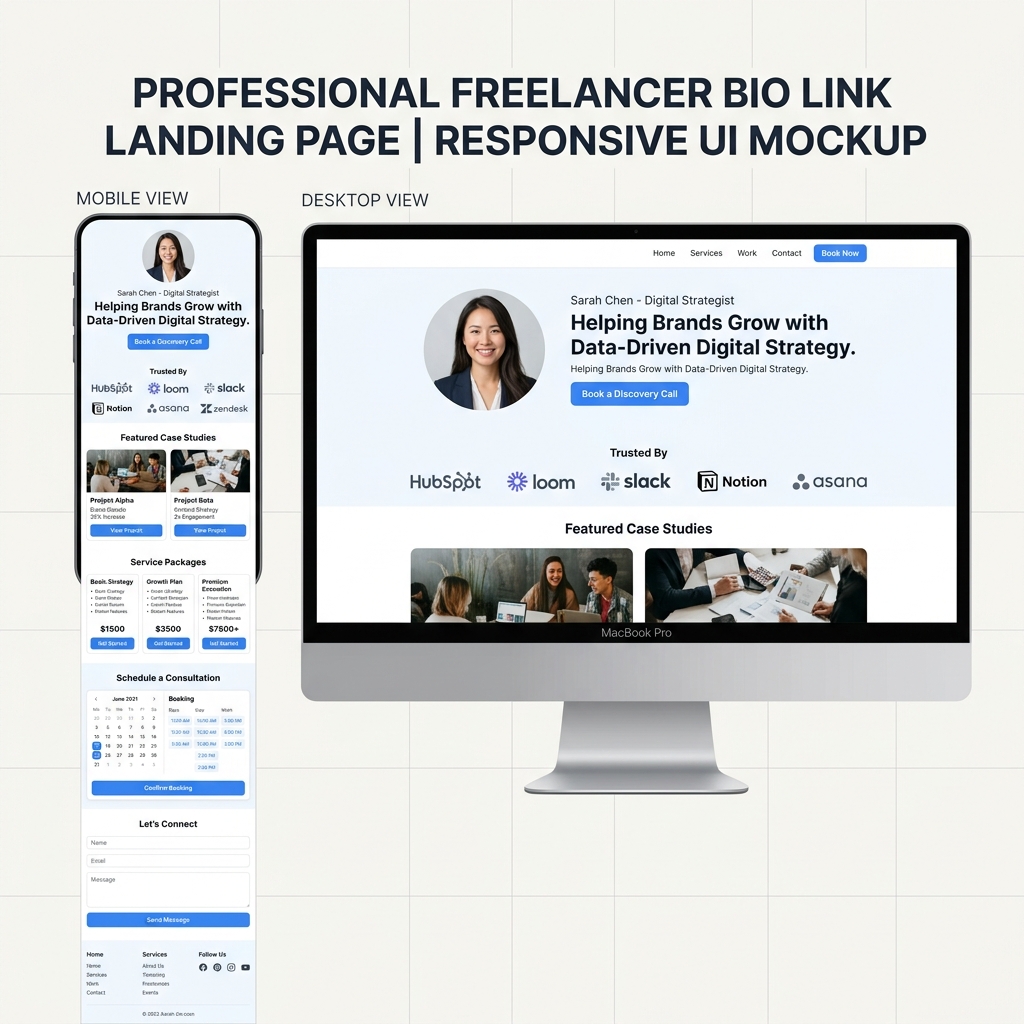
A high-converting bio hub on OnlyLink is more than a list of URLs—it is a compressed digital presentation of your professional value proposition. Here are six essential elements to include:
1. Featured Case Studies & Visual Work Portfolio
Show, don’t just tell! Display visual preview cards of your top 3–4 client projects, software builds, or design case studies. Include quantifiable impact metrics right on the card (e.g., “SaaS Onboarding Redesign: +145% Conversion Increase”).
2. Embedded Consultation & Discovery Call Booking
Eliminate back-and-forth scheduling emails! Embed your Calendly, SavvyCal, or Hubspot booking calendar directly onto your light-theme page so qualified leads can book a 15-minute discovery call in seconds.
3. One-Click Resume & Media Kit Downloads
Make it effortless for recruiters and conference organizers to access your credentials. Feature clean download cards for your latest PDF Resume, Executive Bio, or Keynote Speaker Media Kit.
4. Client Social Proof & Testimonial Wall
Build instant trust! Showcase client logos (e.g., “Trusted by teams at Slack, Notion, and HubSpot”) and glowing recommendations from past executives or satisfied clients.
5. Transparent Service Packages & Project Scope Cards
Qualify your incoming leads before they even reach out! Outline your core service offerings (e.g., UI/UX Design Sprint, Technical Audit, Fractional CMO Services) with clear scope deliverables and starting price points.
6. Owned Thought Leadership & Newsletter Capture
Algorithms change, but your email subscriber list remains yours forever. Feature a 1-click email sign-up box for your LinkedIn Newsletter, Substack, or industry insights digest.
Standard LinkedIn Profile vs. Centralized Light-Theme OnlyLink Hub
| Feature / Dimension | Standard LinkedIn Profile | Centralized Light-Theme OnlyLink Hub |
|---|---|---|
| Visual Styling | Standardized corporate text fields | Bespoke light-theme card UI with soft shadows & brand colors |
| Portfolio Showcase | Buried carousels in Featured section | Visual case study cards with live metrics & media previews |
| Client Booking | Requires InMail or external search | Embedded 1-click calendar booking (Calendly/SavvyCal) |
| Lead Qualification | Unstructured messaging inbox | Structured inquiry form & budget qualification cards |
| Credential Access | Heavy PDF attachments | Instant 1-click resume & press kit downloads |
| Audience Ownership | Restricted by LinkedIn reach algorithms | Direct email newsletter subscriber list capture |
| Analytics & Insights | Basic profile view numbers | Detailed real-time click tracking & conversion analytics |
How to Set Up Your LinkedIn Bio Hub on OnlyLink in 4 Easy Steps
Building a professional, high-converting bio page for your LinkedIn profile takes less than 10 minutes on OnlyLink:
Step 1: Create Account & Select a Professional Light Theme
Sign up on OnlyLink.click and pick a Light Theme UI template. Select a clean white canvas with professional slate or executive blue accents and modern typography.
Step 2: Upload Your Headshot & Executive Bio Header
Upload a high-resolution professional headshot, write a 1–2 sentence value proposition (e.g., “Helping B2B SaaS startups scale MRR through data-driven product design”), and add your location and verified credentials.
Step 3: Add Structured Action Cards
Organize your professional links into visually distinct light-mode cards:
- Discovery Call Card (“Book a 15-Min Strategy Session”)
- Case Study Cards (“Featured Work & Impact Results”)
- Services & Scope Card (“Freelance & Advisory Services”)
- Resume & Press Kit Download (“Download 2026 Resume (PDF)”)
- Testimonial Wall Card (“What Past Clients Say”)
- Newsletter Subscription Form (“Subscribe to Product Strategy Weekly”)
Step 4: Add Your Unique OnlyLink URL to LinkedIn
Copy your unique OnlyLink URL (e.g., onlylink.click/yourname) and add it to:
- LinkedIn Profile Header Link: Paste it into the custom link field in your profile editing settings. Set your custom link anchor text to “View Portfolio & Book Call →”.
- Featured Section: Create a featured link card pointing directly to your OnlyLink hub.
- Post Call-To-Action: End your top-performing LinkedIn posts with: “Want to work together? Check the link in my profile bio!”
- Email Signature & Resume Header: Include your OnlyLink URL in your professional email signature and resume document.
Take Control of Your Professional Identity & Lead Generation
LinkedIn provides incredible exposure to decision-makers across every industry. But to convert that visibility into high-paying client contracts, consulting projects, and career opportunities, you need a high-converting digital home.
A sleek, light-theme bio link hub powered by OnlyLink presents your work, client proof, and booking options with executive-level polish.
Ready to elevate your LinkedIn presence? Create your free light-theme professional bio hub on OnlyLink today and turn profile views into real career growth!
Ready to build your link in bio?
Create your free OnlyLink page in under a minute unlimited links, analytics and custom designs.
Get started freeKeep reading
Twitch Streamers: Building a Bio Page That Converts Viewers to Followers
Learn how Twitch streamers can build a high-converting, light-theme link-in-bio page to convert live stream …
YouTube Creators: Why Your Channel Needs a Link-in-Bio Page
Discover why YouTube creators need a centralized light-theme link-in-bio page to convert video viewers into …