
How to Optimize Your TikTok Bio for More Conversions (Step-by-Step Guide)
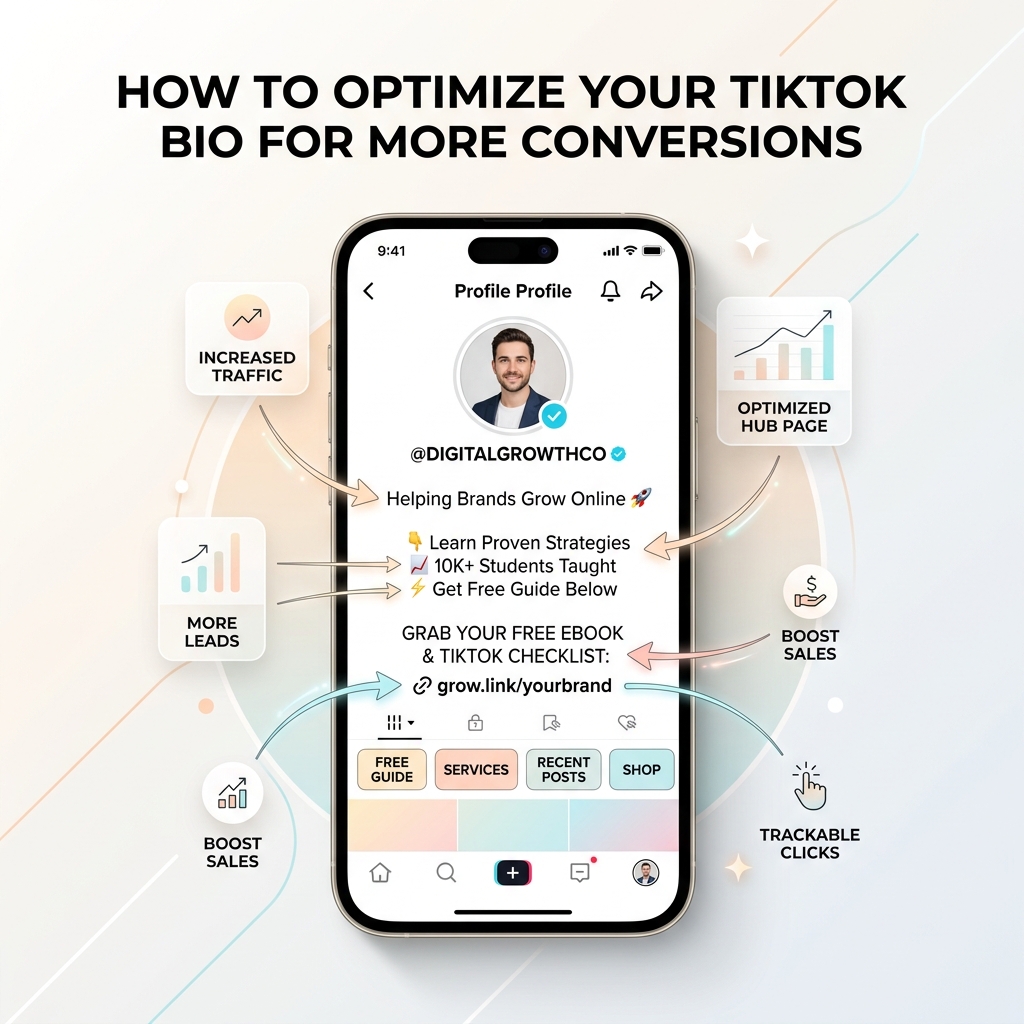
TikTok is single-handedly the most explosive organic reach platform of modern digital media. A single 15-second video can generate hundreds of thousands—or even millions—of views overnight. But as creators, marketers, and e-commerce brand owners quickly discover, views and likes don’t build a business on their own.
When scrollers hit “follow” after watching your video, a high percentage of them tap over to your profile page. That tiny digital real estate is your conversion engine. If your TikTok bio is vague, cluttered, or lacks a clear call-to-action (CTA), hundreds of thousands of potential buyers will scroll away without clicking a single link.
With TikTok limiting your bio to just 80 characters and a single clickable URL slot, every word, emoji, and layout element must earn its place.
In this ultimate guide, you’ll learn how to optimize your TikTok bio for maximum conversions, complete with battle-tested copy formulas, directional visual cues, and light-themed landing page best practices that turn casual scrollers into email subscribers and paying customers.
1. The Anatomy of a High-Converting TikTok Bio
Before diving into copywriting formulas, let’s break down the essential components that make up a top 1% converting TikTok profile:
- Profile Avatar & Handle: A high-contrast, professional image or logo that is instantly recognizable even in tiny thumbnail format.
- Bio Copy Hook (Max 80 Characters): A razor-sharp headline stating who you help, what you deliver, and why visitors should care.
- Directional Visual Cue: An explicit emoji indicator (like
👇or➡️) pointing straight at your profile link slot. - Clickable Link Slot: A fast-loading, light-themed bio hub page (powered by OnlyLink) that organizes your top offers into a frictionless mobile experience.
2. Craft a High-Impact 80-Character Bio Hook
With only 80 characters available on TikTok (compared to Instagram’s 150), brevity is your secret weapon. You don’t have space for long bios or generic phrases like “Living my best life ✨” or “DM for collabs”.
The 3-Part Bio Formula
To convert cold profile visitors, structure your bio around three core pillars:
[Target Audience / Niche] + [Value Offered / Social Proof] + [Direct Call to Action 👇]
High-Converting Bio Copy Transformations
| Niche / Creator Type | Weak Bio (Low Conversions) | High-Converting Bio (High Conversions) |
|---|---|---|
| E-Commerce Brand | “Sustainable eco-friendly clothing for everyone. Free shipping over $50.” | "🌱 100% Organic Eco-Wear. 50k+ Happy Customers. Get 15% Off Below 👇" |
| Coach / Educator | “Digital marketer sharing tips & tricks. Follow for daily business content.” | "🚀 I help creators scale to $10k/mo. 📥 Free Creator Playbook 👇" |
| Fitness / Wellness | “Gym rat & workout enthusiast. Plant-based meal plans available.” | "💪 20-Min At-Home Workouts. Lost 30lbs? Start Free 7-Day Plan 👇" |
| Digital Products | “Notion templates, finance trackers & budgeting tools for freelancers.” | "⚡ #1 Budget Tracker for Freelancers. Download Free Sample 👇" |
| Personal Brand | “NYC based content creator. Lifestyle, fashion & daily vlogs.” | "👗 Daily Chic Style Guides. Shop My Exact Outfits 👇" |
Notice how high-converting bios immediately tell the visitor what’s in it for them and tell them exactly where to click.
3. The TikTok Bio to Conversion Funnel
Converting short-form video viewers into buyers requires a streamlined, low-friction journey. Below is the proven 4-stage funnel architecture that powers successful TikTok monetization strategies:
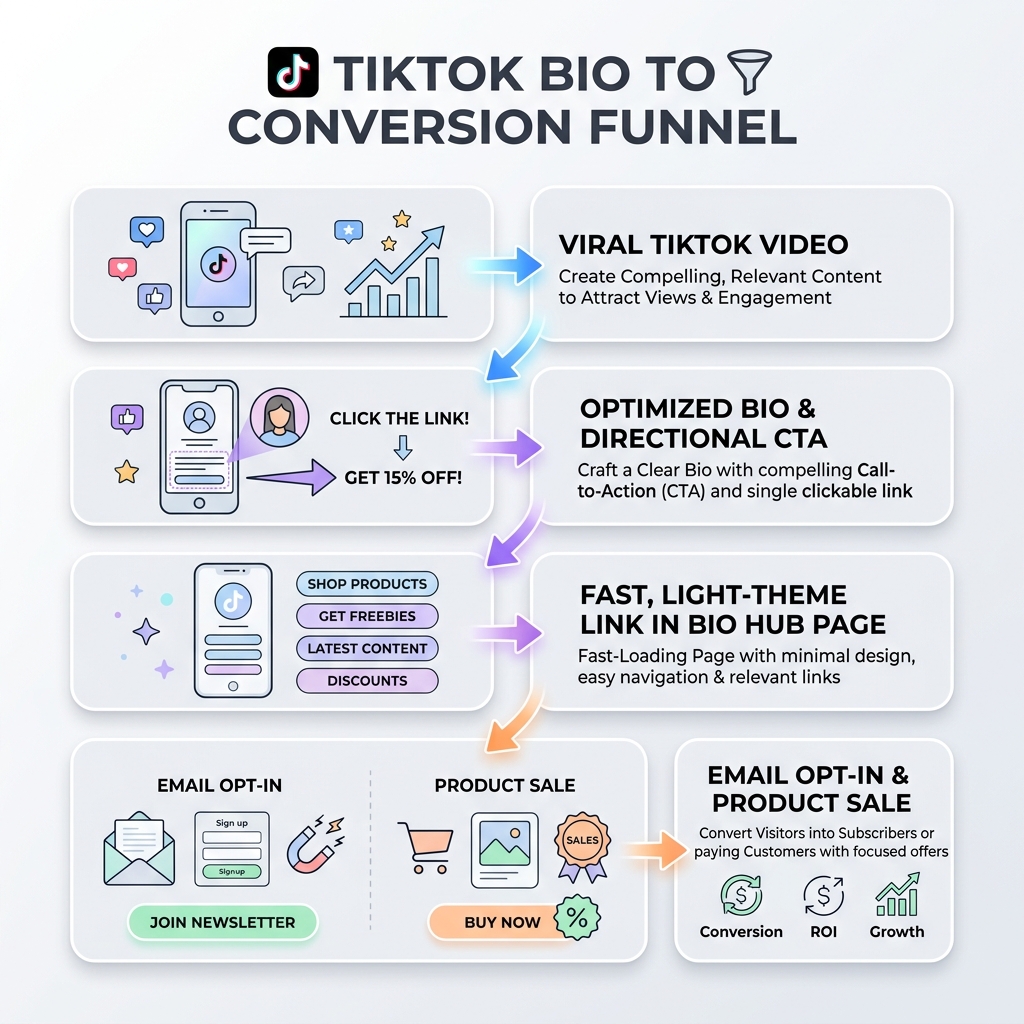
The 4 Stages Explained:
- Viral Video Discovery: Attract top-of-funnel attention with engaging, problem-solving, or entertaining short video content.
- Profile Bio & Directional CTA: Direct scrollers from your profile header down to your bio link using clear copy and visual pointers (
👇). - Fast Light-Theme Link in Bio Hub: Send visitors to a clean, fast-loading mobile page that features a light background, strong typography, and primary CTA cards.
- Monetization / Lead Capture: Capture the visitor’s email via an embedded form or direct them to a one-click checkout.
4. Use Directional Arrows & Visual Anchors
Human eyes naturally scan mobile screens from top to bottom. Because the clickable website link sits directly under the bio text box on TikTok, adding downward-pointing arrows (👇) at the end of your bio creates an explicit visual cue.
Why Visual Anchors Boost Click-Through Rate (CTR):
- Reduces Cognitive Overhead: Visitors don’t have to guess what link goes with what offer.
- Creates Urgency: Pairing an arrow with a incentive-driven CTA (e.g. “Claim 20% Discount 👇”) prompts immediate action.
- Frame Alignment: It bridges the text description directly to the interactive URL element beneath it.
5. Build a Light-Themed, Frictionless Bio Landing Page
Once a follower taps your bio link, the battle for conversion moves to your landing page. This is where many creators lose up to 70% of their traffic due to slow load speeds or poor visual design.
Why Light Theme Visuals Drive Higher Mobile Conversions
When designing your bio link page on OnlyLink, opting for a clean light theme (bright white background, crisp charcoal typography, and subtle pastel card highlights) offers key performance benefits:
- Maximum Contrast & Readability: Mobile users often browse TikTok in high-brightness environments or outdoors. Light background themes ensure maximum text legibility under direct sunlight.
- Instant Trust & Professionalism: Clean white space and minimalist light interfaces mirror modern SaaS and premium e-commerce design languages, instilling immediate trust.
- Visual Hierarchy: Essential call-to-action buttons (like “Get Free Guide” or “Shop New Arrivals”) stand out dramatically when set against clean white surfaces with soft drop shadows.
- Lightning Mobile Speed: Light-themed minimal CSS payloads render instantly on mobile browser WebViews inside TikTok.
+-------------------------------------------------------+
|  [ Profile Photo ]                                   |
|  @yourbrand  • Verified Creator                       |
|                                                       |
|  +-------------------------------------------------+  |
|  |  🔥 TOP OFFER: Grab Free TikTok Growth Guide     |  |
|  |  [ Download PDF Now ]                           |  |
|  +-------------------------------------------------+  |
|                                                       |
|  +-------------------------------------------------+  |
|  |  🛍️ Shop Best Sellers (15% Off Code: TIKTOK15)  |  |
|  +-------------------------------------------------+  |
|                                                       |
|  +-------------------------------------------------+  |
|  |  📺 Watch Latest YouTube Studio Tour             |  |
|  +-------------------------------------------------+  |
+-------------------------------------------------------+
6. How to Enable the Clickable Website Link on TikTok
TikTok enforces specific account requirements before allowing a clickable website link in your profile bio:
Account Types & Requirements:
- Business Account (Instant Link Access): Switch your TikTok account to a Business Account (Settings > Account > Switch to Business Account). In many regions, registering your business details grants instant access to the profile website link slot regardless of follower count.
- Personal Account (1,000 Follower Requirement): If you remain on a Personal Creator account, TikTok unlocks the clickable website field automatically once you reach 1,000 followers.
Pro Tip: If you haven’t reached 1,000 followers yet, include a simple, readable short URL (e.g.,
onlylink.click/yourname) in your bio text and explicitly mention it in your video verbal CTAs.
7. Match Your TikTok Content Callouts to Your Bio Link
Your TikTok bio doesn’t exist in a vacuum—it works in tandem with your video content. To maximize link clicks:
- Verbal End-Screen CTAs: In the last 3 seconds of your video, state the explicit benefit of visiting your bio link (e.g., “Download the complete 10-step template at the link in my bio!”).
- On-Screen Text Stickers: Add a high-contrast text overlay near the end of your video: “Link in Bio 🔗”.
- Pinned Comment Strategy: Immediately after publishing a video, add a pinned comment: “Grab the free guide mentioned in this video at the link in my profile! 👇”.
8. Track, Measure & A/B Test Your Bio Link Performance
Optimization is an ongoing process. To know whether your bio changes are actually driving more sales or leads, monitor these core metrics:
- Profile Visit to Link Click Rate (CTR):
(Total Bio Link Clicks / Total Profile Views) * 100- Target Benchmark: Aim for a 5% to 12% CTR on your bio link.
- Bio Landing Page Conversion Rate:
(Form Submissions or Sales / Total Bio Link Visits) * 100- Target Benchmark: 15% to 30% for lead magnets; 3% to 8% for direct product sales.
Using OnlyLink’s analytics dashboard, you can track real-time click counts, referral sources, link device types, and geographic location to continuously refine your top-performing offers.
The 5-Minute TikTok Bio Optimization Checklist
Before publishing your updated bio, run through this final audit checklist:
- Headline: Does your bio state your exact audience and value in under 80 characters?
- CTA & Emojis: Did you include a downward arrow (
👇) pointing directly at the link slot? - Account Setup: Is your clickable website link active and working on mobile?
- Landing Page Theme: Is your bio link hub designed in a clean, high-contrast light theme for fast mobile loading?
- Lead Capture: Is your #1 high-value offer placed at the very top of your bio page?
Ready to Turn TikTok Scrollers into Paying Customers?
Build a fast, beautiful, light-themed bio link hub in under 60 seconds with OnlyLink. Unlimited custom links, real-time analytics, and conversion-optimized mobile templates.
Ready to build your link in bio?
Create your free OnlyLink page in under a minute unlimited links, analytics and custom designs.
Get started freeKeep reading
Adding a Tip Jar: Ko-fi, Patreon, and Buy Me a Coffee in Your Bio
Discover how to add a tip jar to your link-in-bio page using Ko-fi, Patreon, and Buy Me a Coffee. Learn why …
How Creators Are Making Money with Their Link-in-Bio Page
Discover how modern creators turn single bio links into multi-stream revenue hubs. Learn the top monetization …