
How Lawyers Can Build a Professional Online Information Hub
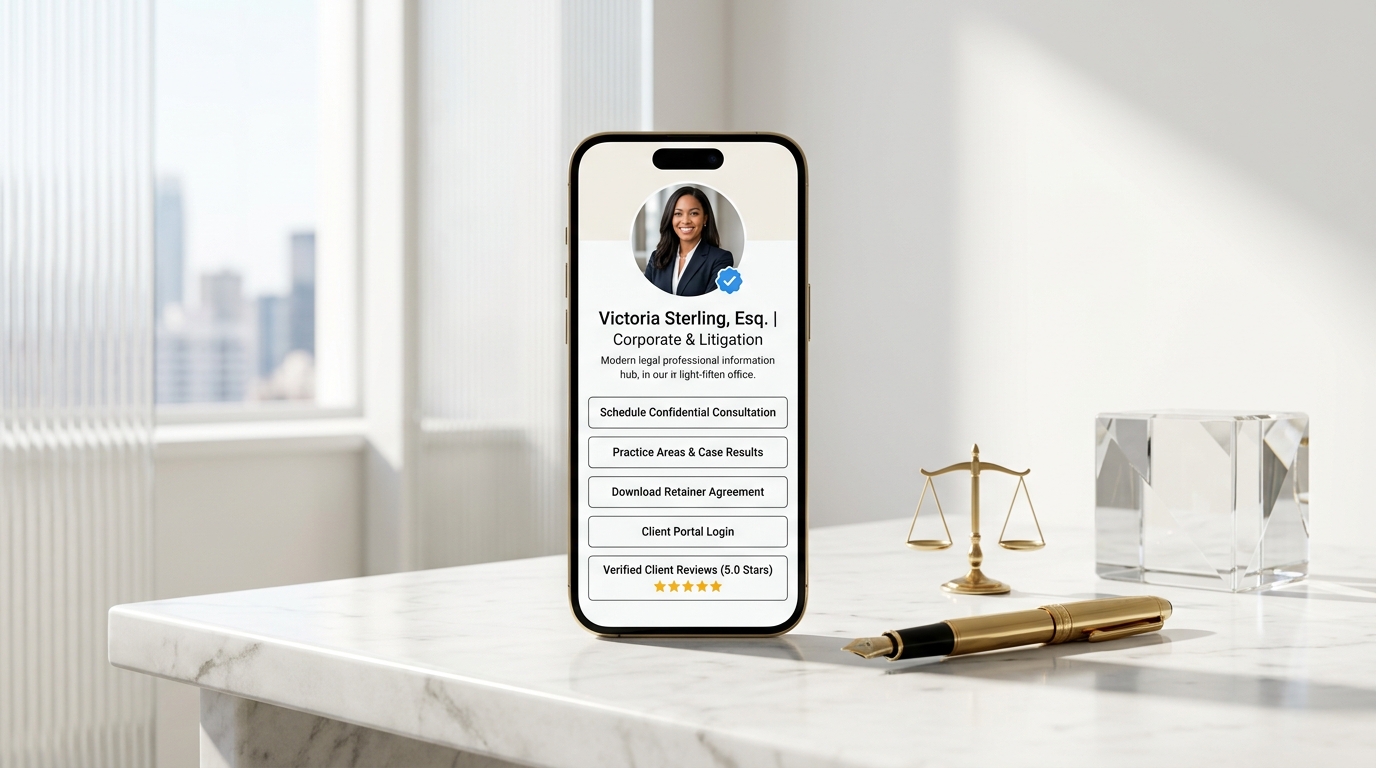
It is 4:45 PM on a Thursday afternoon. You just concluded a heated three-hour motion hearing at the county courthouse.
As you step into the courthouse corridor, adjust your briefcase, and pull your smartphone from your jacket, your screen lights up with a flurry of urgent messages:
- 📱 A LinkedIn message from a tech founder: “Counsel, we just received a cease-and-desist letter regarding our trademark. Can we schedule an emergency call tomorrow morning? What is your intake process?”
- 📩 An email from a prospective corporate client: “A partner at Wilson & Co. referred us to you for our Series A financing. Where can we review your practice credentials and standard retainer terms?”
- 💬 A text from a current litigation client: “Hi Victoria, where do I upload the subpoena responses? I lost the client portal link from last week’s email.”
- 💼 A contact request from a CLE conference organizer: “We need your high-res headshot, bio, and downloadable contact card for next month’s panel.”
If you are a practicing attorney or law firm managing partner in 2026, this high-stakes scenario is your everyday reality.
The practice of law demands rigorous analytical precision, uncompromised confidentiality, and deep professional trust. Yet, while legal tech has modernized case research and billing software, the way attorneys present themselves and intake prospective clients online remains stuck in 2008.
Most attorneys still rely on bulky, 20-page desktop websites burdened with slow loading times, buried practice areas, and intimidating 30-field contact forms. Alternatively, they share disconnected PDF fee schedules or generic link aggregators that look informal and fail to convey the prestige of legal counsel.
The result? High-value prospective clients drop off, referral momentum stalls, and billable hours are lost to administrative back-and-forth.
The modern solution is a streamlined, ethical, light-themed Legal Online Information Hub powered by OnlyLink.click.
In this comprehensive guide, we will explore why mobile-first information hubs are revolutionizing legal marketing, the psychology of light-theme aesthetics in law, and how you can launch an authoritative digital front door in minutes.
The 3 Critical Bottlenecks Damaging Modern Legal Practices
Clients searching for legal representation are often experiencing acute stress: navigating a contractual dispute, facing regulatory scrutiny, launching a high-stakes startup, or going through a sensitive family transition.
Over 82% of prospective legal clients research and vet attorneys directly from mobile devices before ever dialing a phone number or booking a consultation.
Yet, traditional law firm digital presence creates three severe friction points:
1. The Mobile Usability & Speed Penalty
Traditional law firm websites are bloated with heavy stock photography of gavels and leather-bound books, complex nested menus, and third-party tracking scripts.
On a 5G or mobile cellular connection outside a courthouse, these sites take 4 to 7 seconds to load. Industry studies demonstrate that when page load exceeds 3 seconds, over 53% of mobile visitors abandon the page and turn to a competing firm.
2. Fragmented Client Intake & Information Disconnect
Prospective clients need quick answers to three foundational questions:
- Do you handle my specific legal issue?
- What are your credentials and peer reputation?
- How do I schedule an initial confidential evaluation?
When this information is scattered across buried subpages, obscure blog archives, or password-protected PDFs, clients experience decision fatigue and give up.
3. Ethical Advertising Ambiguity & Compliance Gaps
Attorneys are bound by stringent ethics rules (such as ABA Model Rules 7.1, 7.2, and 7.3) governing legal advertising, specialization claims, and confidentiality disclosures. Many modern link-in-bio tools fail to accommodate required state bar disclaimers, clear jurisdictional notices, or secure encrypted portal handoffs.
Disorganized Legal Practice vs. The OnlyLink Light-Theme Hub
To understand how an integrated mobile hub transforms your client acquisition workflow, compare the traditional fragmented approach with a centralized legal hub:
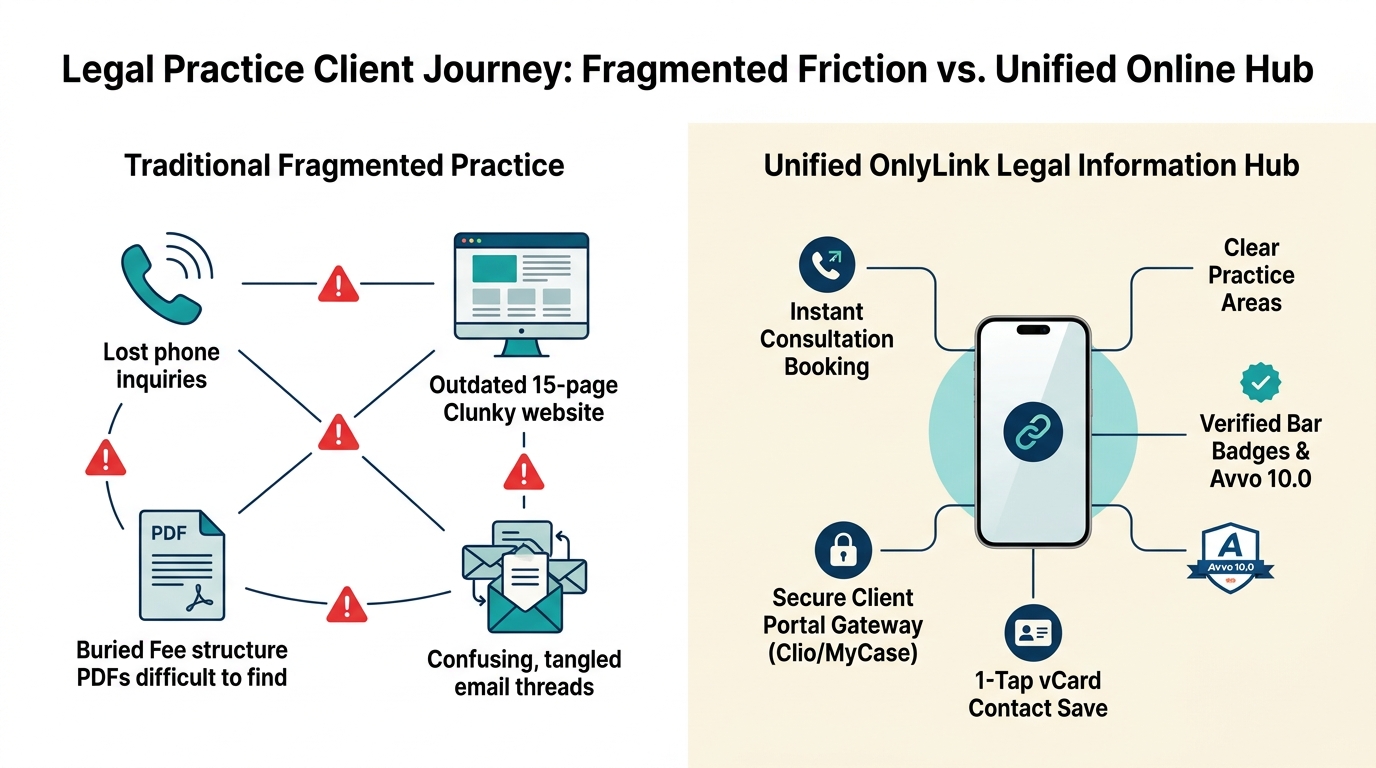
Side-by-Side Comparison: Traditional Practice vs. OnlyLink Legal Hub
| Feature | 🌪️ Traditional Fragmented Legal Practice | ⚡ OnlyLink Light-Theme Legal Hub |
|---|---|---|
| First Impression | Bloated desktop site or generic, dark link tree | Crisp, luminous light-theme aesthetic (#FFFFFF & #F9F9FB) |
| Mobile Speed | 4–8 seconds with heavy uncompressed assets | Sub-second instant load (< 0.4s) on any mobile network |
| Practice Area Clarity | Buried across 15 nested website dropdowns | Clear, categorized practice cards with concise scopes |
| Intake Process | Intimidating 30-field forms or phone tag | Streamlined 4-step confidential evaluation scheduler |
| Trust Badges | Buried on a distant “About Us” sub-tab | Prominent Bar admissions, Avvo 10.0 & Martindale badges |
| Client Portal Access | Lost in forgotten client email threads | 1-click direct link to secure Clio / MyCase login |
| In-Person Networking | Paper business cards that get lost or discarded | 1-tap vCard save directly to iPhone / Android contacts |
| Ethics Compliance | Often missing required jurisdictional disclosures | Built-in persistent legal disclaimer and attorney advertising notices |
Why Light-Theme Visuals Are Essential for Legal Professionals
Design psychology plays a decisive role in client perception. While dark mode and neon gradients are popular in gaming, crypto, or entertainment, the legal profession is anchored in transparency, authority, precision, and clarity.
┌────────────────────────────────────────────────────────────────────────┐
│             THE LIGHT-THEME PSYCHOLOGY IN LEGAL BRANDING               │
├────────────────────────────────────────────────────────────────────────┤
│                                                                        │
│   Pristine White Canvas (`#FFFFFF`) ➔  Signals Ethical Transparency    │
│   Deep Navy & Slate (`#0A192F`)     ➔  Establishes Authority & Weight   │
│   Subtle Gold Accents (`#C5A880`)   ➔  Reflects Excellence & Prestige  │
│   High-Contrast Dark Charcoal       ➔  Flawless Daylight Readability   │
│                                                                        │
└────────────────────────────────────────────────────────────────────────┘
Key Advantages of Light-Theme UI for Attorneys:
- Uncompromised Daylight Readability: Clients and corporate executives often look up your credentials while walking on the street, standing in courthouse foyers, or riding in taxicabs. Dark-themed interfaces suffer from heavy reflection and glare under natural daylight; a crisp, high-contrast light theme remains effortlessly legible.
- Psychological Reassurance of Openness: Legal disputes are accompanied by anxiety. Clean, light layouts with generous whitespace evoke calm, order, and competence—reassuring clients that their legal matters are in methodical, capable hands.
- Harmonious Alignment with Legal Documentation: Contracts, briefs, judicial opinions, and formal correspondence are rendered in black text on white paper. A light-theme digital presence seamlessly matches the visual language of the legal system.
The 4-Stage Legal Client Conversion Funnel
Converting casual referrals and social traffic into retained legal clients requires an intentional, frictionless path:
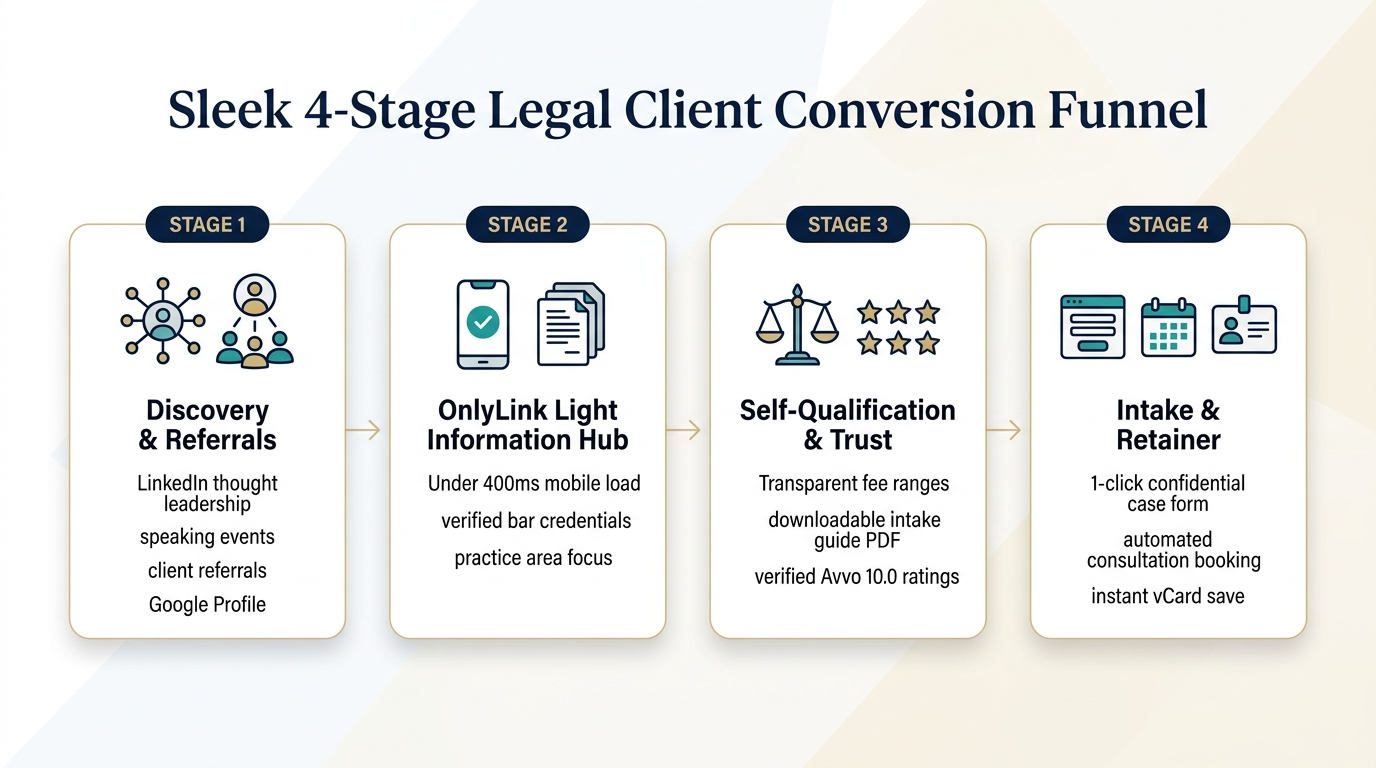
Stage 1: Discovery & Referrals
Prospective clients discover your practice through multiple touchpoints:
- High-impact LinkedIn commentary on legal developments and regulatory shifts.
- Speaking engagements at industry panels and CLE webinars.
- Word-of-mouth recommendations from existing clients and peer attorneys.
- Your Google Business Profile and local directory listings.
Every touchpoint points to your unified OnlyLink URL: onlylink.click/yourfirm.
Stage 2: The OnlyLink Light Information Hub
When the prospect taps your link, your profile renders in less than 400 milliseconds. They are immediately greeted by your verified credentials, primary practice concentrations, and an aura of institutional authority.
Stage 3: Self-Qualification & Trust Building
Before reaching out, clients want validation. On your hub, they can:
- Review transparent consultation fee policies or contingency guidelines.
- Download a complimentary “2026 Startup Legal Checklist” or “Commercial Lease Negotiation Guide”.
- Verify your 10.0 Superb Avvo rating, Martindale-Hubbell AV Preeminent status, or verified Google reviews.
Stage 4: Confidential Intake & Retainer
Friction is eliminated. The client taps a single button to:
- Complete a 2-minute mobile-friendly conflict-check intake questionnaire.
- Automatically book a 30-minute Zoom or in-person case evaluation via Clio Grow or Calendly.
- Save your full contact card (
.vcf) directly to their phone with one tap.
The Anatomy of an Award-Winning Attorney Bio Hub
Here is what an elite, ethical light-theme legal information hub looks like on a modern smartphone:
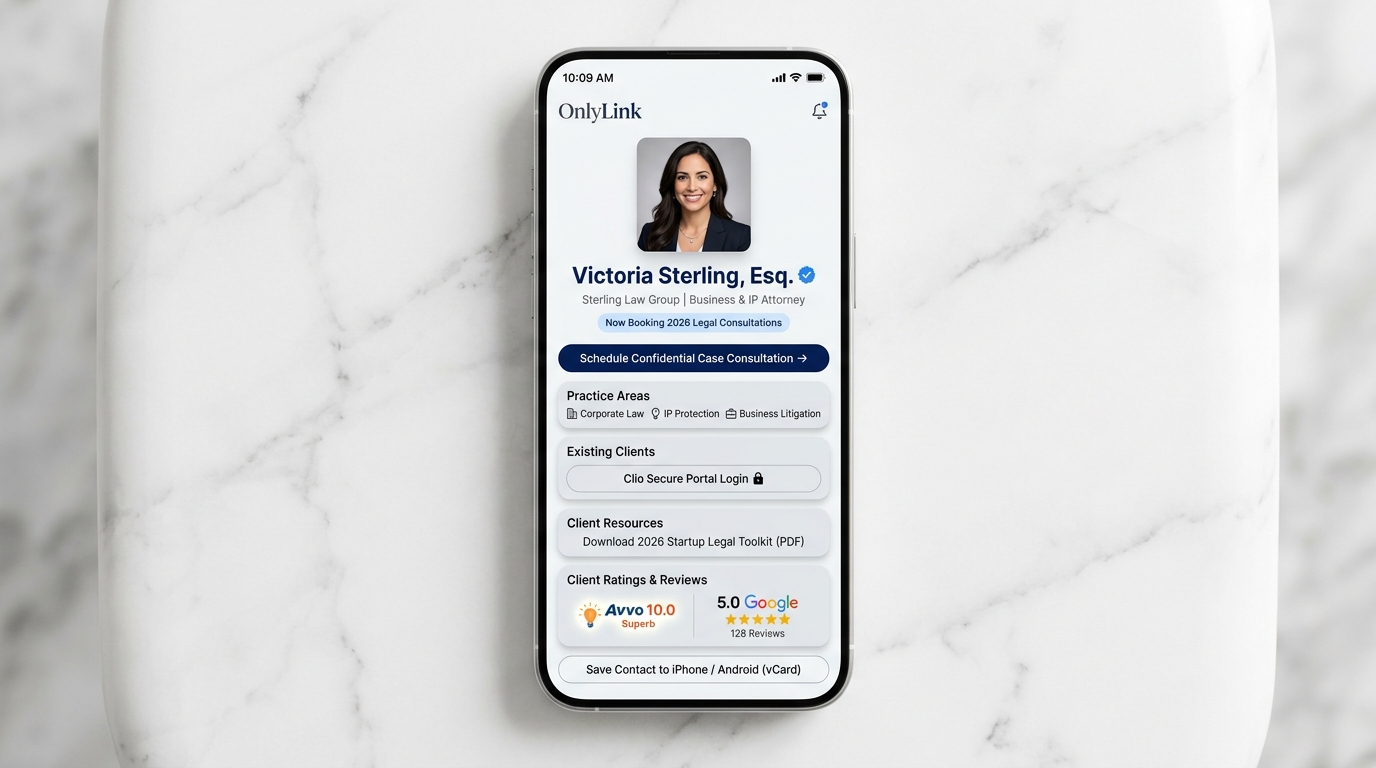
Structural Breakdown of the Hub Layout
<!-- Structural Architecture of an Ethical Legal Information Hub -->
<section class="legal-info-hub">

  <!-- 1. Header & Official Verification -->
  <header class="attorney-header">
    <img src="/avatar-victoria-sterling.jpg" alt="Victoria Sterling, Esq." class="attorney-avatar">
    <h1>Victoria Sterling, Esq.</h1>
    <p class="law-firm">Sterling Law Group · Corporate & Business Litigation</p>
    <div class="status-pill">⚖️ Now Accepting Select 2026 Corporate Matters</div>
  </header>

  <!-- 2. Primary High-Priority Call to Action -->
  <div class="primary-action">
    <a href="#consultation" class="btn-navy-gold">📅 Schedule Confidential Case Consultation →</a>
  </div>

  <!-- 3. Practice Area Directory -->
  <div class="card-group">
    <div class="practice-card">
      <h3>🏛️ Practice Concentrations</h3>
      <p>Corporate Governance · Tech IP Licensing · Commercial Contract Disputes</p>
    </div>
  </div>

  <!-- 4. Client Utilities & Portals -->
  <div class="card-group">
    <a href="https://clio.com/login" class="portal-card">
      🔒 <strong>Existing Clients:</strong> Access Clio Secure Portal
    </a>
    <a href="/downloads/startup-legal-guide-2026.pdf" class="resource-card">
      📄 <strong>Free Resource:</strong> 2026 Startup Legal & Compliance Checklist (PDF)
    </a>
  </div>

  <!-- 5. Peer Recognition & Verified Ratings -->
  <div class="social-proof-grid">
    <div class="badge-card">Avvo 10.0 Superb Rating</div>
    <div class="badge-card">5.0 ★ Google Client Reviews (128 Reviews)</div>
  </div>

  <!-- 6. Seamless Contact Persistence -->
  <div class="vcard-action">
    <a href="/attorney.vcf" class="btn-vcard">📲 Save Attorney Contact to iPhone / Android</a>
  </div>

  <!-- 7. Mandatory Legal Ethics Disclaimer -->
  <footer class="legal-disclaimer">
    <p><strong>Attorney Advertising.</strong> Prior results do not guarantee a similar outcome. Submitting an inquiry through this information hub does not establish an attorney-client relationship. Licensed to practice in the State of California and U.S. District Court.</p>
  </footer>

</section>
Visual Design Specifications for Legal Hubs:
- Background Canvas: Crisp optical white (
#FFFFFF) or subtle warm porcelain (#F9F9FB). - Card Architecture: Clean white surface panels with fine border outlines (
border: 1px solid #EBECEF), gentle 14px rounded corners, and delicate elevation shadows (box-shadow: 0 2px 12px rgba(0,0,0,0.04)). - Primary Accents: Deep sovereign navy (
#0A192For#1E293B) for command buttons, paired with soft metallic gold (#C5A880) and rich emerald teal (#0D9488). - Typography: Prestigious serif headers (Merriweather or Playfair) balanced by ultra-legible, neutral sans-serif body typography (Inter).
4 Key Pillars of an Online Legal Information Hub
Pillar 1: Practice Area Focus & Matter Pre-Qualification
Attorneys often waste hours on initial telephone calls with individuals whose legal matters fall outside their practice domain or budget.
Your OnlyLink hub should explicitly outline your core practice concentrations:
- Corporate & Securities: Entity formation, seed financings, commercial contracts, M&A.
- Intellectual Property: Patent filings, trademark registration, IP litigation.
- Commercial Litigation: Partnership disputes, breach of contract, arbitration.
- Estate Planning: Revocable trusts, probate administration, asset protection.
By including a brief 1-sentence descriptor beneath each practice card, you gently educate prospective clients before they submit an inquiry, filtering out unaligned cases.
Pillar 2: Trust Signals, Verified Badges & Ethical Compliance
Clients need immediate reassurance that you are an admitted attorney in good standing.
Your hub should clearly display:
- State Bar Admissions: “Member, State Bar of California & New York Bar”.
- Industry Accreditations: Super Lawyers, Best Lawyers, Martindale-Hubbell AV Preeminent, or Avvo 10.0 Superb rating.
- Firm Disclaimers: Every legal profile must include clear disclaimers that information provided does not constitute legal advice and that submitting a form does not create an attorney-client relationship until an engagement agreement is signed.
Pillar 3: Frictionless Intake & Client Portal Gateways
Streamlining your digital front door benefits both prospects and existing clients:
- Automated Conflict Check Form: Direct prospective clients to a short Typeform or Clio Grow questionnaire to gather basic adversary names and matter summaries.
- Direct Calendar Booking: Offer qualified prospects the option to book a paid or complimentary 20-minute preliminary evaluation directly into your calendar.
- Secure Client Portal Access: Provide active clients with a prominent button linking directly to your practice management platform (Clio Connect, MyCase, or PracticePanther) to upload discovery documents and view billing invoices.
Pillar 4: In-Person Courtroom & Conference Networking
Your OnlyLink hub is not limited to your social media bio—it replaces the outdated paper business card in every physical environment:
- Courthouse & Deposition Exchanges: When opposing counsel or court reporters ask for your contact details, let them scan your custom OnlyLink QR code directly from your smartphone lock screen.
- CLE & Industry Conferences: Include your custom QR code on presentation slides or panel materials so attendees can download your contact information and presentation outline in one tap.
- Law Firm Reception Displays: Place a sleek acrylic light-theme QR code standee on your reception desk for visiting clients and co-counsel.
To explore the mechanics of offline QR integration, read our detailed guide on bringing your bio link offline with QR codes.
4-Day Implementation Roadmap for Law Firms & Attorneys
Transforming your online information hub does not require weeks of billable downtime. Follow this 4-day action plan:
┌────────────────────────────────────────────────────────────────────────┐
│               4-DAY LAW FIRM HUB IMPLEMENTATION PLAN                   │
├────────────────────────────────────────────────────────────────────────┤
│                                                                        │
│  DAY 1: Practice Focus & Compliance Audit                              │
│  • Define 3–4 primary practice areas. Draft mandatory ethics disclaimer.│
│                                                                        │
│  DAY 2: Build Your OnlyLink Light-Theme Hub                            │
│  • Select a clean white/navy light palette. Upload professional headshot│
│  • Configure practice area cards and verified bar badges.              │
│                                                                        │
│  DAY 3: Connect Intake & Client Tools                                  │
│  • Link Clio / MyCase client portal. Embed calendar scheduler.         │
│  • Upload downloadable legal guide PDF and generate vCard.             │
│                                                                        │
│  DAY 4: Deploy Across All Channels                                     │
│  • Update LinkedIn, email signature, Google Business Profile & bios.   │
│                                                                        │
└────────────────────────────────────────────────────────────────────────┘
Day 1: Practice Focus & Compliance Audit
- Identify the highest-margin matters you want to attract this year.
- Formulate clear, transparent descriptions of what you handle (and what you refer out).
- Prepare your jurisdiction’s required attorney advertising disclaimer and confidentiality notice.
Day 2: Build Your OnlyLink Light-Theme Hub
- Sign up for your free account at OnlyLink.click.
- Select a refined light-theme style that projects authority (pure white canvas, deep navy accents, crisp typography).
- Upload a professional, approachable headshot and insert your official firm name and bar admissions.
Day 3: Connect Intake & Client Utilities
- Integrate your calendar scheduling tool (Clio Grow, Calendly, or Acuity).
- Add a secure link for active clients to log into their case portal.
- Add your downloadable vCard so clients can save your office number and direct email with a single tap.
Day 4: Deploy Across All Touchpoints
- Replace lengthy, broken URLs in your LinkedIn profile, Twitter/X bio, and email signature with your concise
onlylink.click/yournamelink. - Update your firm’s Google Business Profile website link to ensure local mobile searchers land on your lightning-fast hub.
- Save your custom QR code to your phone’s photo favorites for instant in-person sharing.
For more strategies on crafting a standout personal identity, explore our guide on building your professional identity beyond LinkedIn.
Frequently Asked Questions (FAQ)
Does using a bio link comply with ABA legal advertising rules?
Yes, provided you adhere to standard ethics guidelines. Ensure your hub includes your primary office address, jurisdictional bar admissions, and a clear disclaimer stating: “Attorney Advertising. Prior results do not guarantee a similar outcome. Transmitting information via this site does not create an attorney-client relationship.” OnlyLink allows you to include persistent footer disclaimers directly on your page.
Can an OnlyLink hub replace our entire law firm website?
For solo practitioners, boutique advisory practices, and specialized litigators, an OnlyLink hub frequently outperforms traditional multi-page websites on mobile. It loads in under 400 milliseconds, presents essential credentials immediately, and guides visitors straight to a consultation. If you maintain a larger desktop firm website, your OnlyLink hub serves as your high-speed mobile concierge, ensuring mobile visitors never get lost.
How do we handle conflict checks before consultations?
You should configure your booking button to route prospective clients to a brief intake form (via Clio Grow, LawPay, or Typeform) where they submit the opposing parties’ names and matter overview. Clearly state that all consultations are contingent upon preliminary conflict clearance.
Can I include links to secure payment processing for retainers?
Yes. You can add a dedicated card titled “Make a Secure Retainer or Invoice Payment” linking directly to your LawPay or Clio Payments gateway, providing clients with an effortless, PCI-compliant payment option.
Conclusion: Own Your Firm’s Digital Front Door
In the legal profession, your reputation is built over decades of rigorous advocacy, client loyalty, and hard-won expertise.
Don’t let that hard-earned reputation be undermined by a slow, outdated website or disorganized communication channels.
By deploying an authoritative, light-themed legal information hub on OnlyLink.click, you provide prospective clients with the modern, transparent, and frictionless experience they deserve—while freeing up your time to focus on what you do best: practicing law.
Ready to elevate your legal practice’s online presence? Create your free OnlyLink page today and establish an elite digital front door for your firm in minutes.
Ready to build your link in bio?
Create your free OnlyLink page in under a minute unlimited links, analytics and custom designs.
Get started freeKeep reading
How Dentists Can Share Appointment Booking, Clinic Details, and Patient Resources
Discover how modern dental clinics, orthodontists, and cosmetic practices build a high-speed, light-theme …
How Wedding Photographers Can Organize Packages, Galleries, and Booking Inquiries
Turn your Instagram, TikTok, and Pinterest followers into booked weddings. Discover how modern wedding …