
How Home Service Contractors Can Turn Social Profiles Into Quote Requests
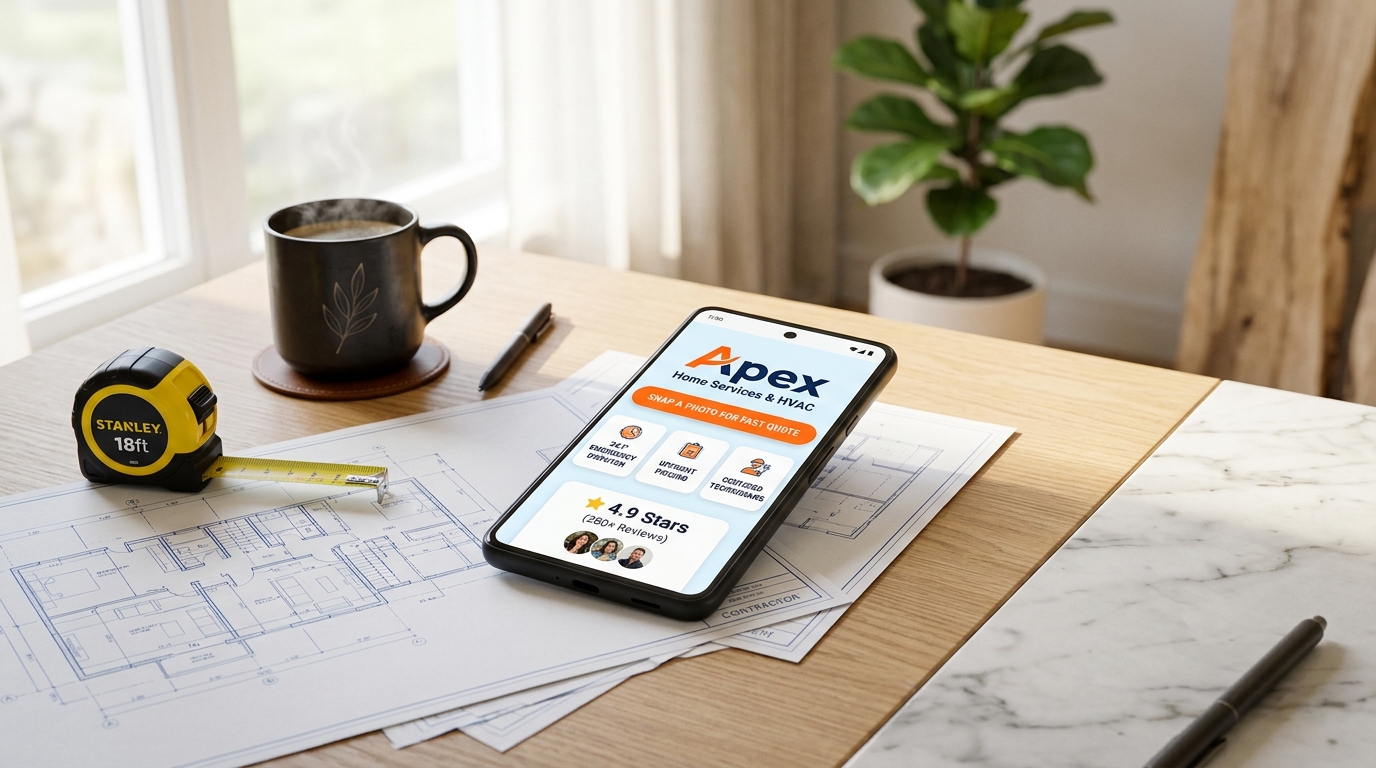
It is 11:30 AM on a sweltering Tuesday in mid-July.
You are perched inside a cramped, 120-degree attic crawlspace, kneeling on ceiling joists with a flashlight in your mouth, a multimeter in one hand, and a cordless drill in the other. Sweat is stinging your eyes as you diagnose a fried capacitor on a residential split-system air conditioner.
In your utility belt pocket, your smartphone is vibrating incessantly:
- 💬 Facebook Messenger 1: “Hi! Our AC unit completely shut off an hour ago. The house is already 86 degrees and we have an infant. Can you send someone today, and what do you charge for a service call?”
- 📸 Instagram DM 2: “Loved your reel showing that custom bathroom shower tile install! Can you give me an estimate on gutting a 60 sq ft master bath in Oakridge?”
- 📞 Missed Call (Voicemail): “Hello, this is Robert on Elm Street. There’s water dripping through our kitchen ceiling from the second-floor pipe. Please call me back right away!”
- 📩 Email Intake: “Found your truck parked on 4th Street. Do you do 200-amp electrical service upgrades, and are you licensed and insured in our township?”
- 💬 Nextdoor Notification: “3 neighbors tagged your business in a post asking for reliable local roof repair contractors after last night’s hail storm.”
If you run a plumbing, HVAC, electrical, roofing, remodeling, or general contracting business in 2026, this relentless pressure is your everyday reality.
The skilled trades represent the backbone of local communities. When homeowners experience a burst pipe, dead furnace, or leaking roof, they need qualified, licensed help immediately. Yet, while power tools, diagnostic cameras, and dispatch software have leaped into the digital age, the way most contractors handle initial client intake, display their credentials, and collect quote requests remains stuck in the era of paper carbon-copy work orders.
Most contractors either tell homeowners to “Call for a quote”, hide their contact info behind slow desktop websites that take 8 seconds to load on mobile, or send prospective clients into the black hole of unmonitored Instagram and Facebook DMs.
The consequences are brutal: contractors spend up to 12 hours a week playing phone tag while on active job sites, high-value emergency jobs slip away to competing companies with instant booking buttons, and hours are wasted on unqualified tire-kickers who refuse to provide project details.
The modern solution is an ultra-clean, high-speed, light-themed Contractor Quote & Service Hub powered by OnlyLink.click.
In this tactical guide, we will break down why mobile-first intake hubs are transforming trade business profitability, unpack the psychology of light-theme UI for contractors, and show you how to launch a high-converting quote machine in under 30 minutes.
The 3 Critical Bottlenecks Costing Contractors Thousands Every Week
Over 78% of modern homeowners discover and vet home service contractors directly on their smartphones—often while standing in front of a leaking water heater, browsing a local Facebook group on lunch break, or scanning a truck wrap at a red light.
Yet, traditional contractor communication channels fail homeowners at the exact moment their purchase intent peaks:
1. The “Call During Business Hours” Phone Tag Nightmare
Homeowners hate leaving voicemails, and they rarely answer unknown return calls while at work.
When a homeowner’s air conditioner fails at 8:30 PM or water drips into a bucket, they want an immediate digital path to request help. If your Instagram profile or Google page only displays a static phone number that goes to voicemail because you are working on a ladder, over 64% of homeowners will simply tap the back button and call the next contractor on Google Maps.
2. The Blind Estimate Trap & The 20-Question DM Loop
When homeowners message you: “How much does a new water heater cost?”, you cannot give an accurate estimate without basic technical facts:
- Is it natural gas, propane, or electric?
- How many gallons (40, 50, or 75)?
- Where is it located (basement, attic, closet)?
- Is there an expansion tank or direct venting required?
Doing this back-and-forth by manual texting or DM wastes hours of your evening. Without an instant photo-upload intake form, you spend valuable time driving across town for on-site quotes that could have been accurately estimated from two clear smartphone photos.
3. The Trust Deficit & Unseen Credentials
Homeowners are understandably protective of their homes. They worry about scam handymen, fly-by-night operators who damage property, or workers who lack worker’s comp insurance.
When your social link leads to a generic link tree or an error page, skepticism rises. Homeowners need to see your state license number, general liability coverage badge, verified service area zip codes, and 5-star Google review rating the instant they click your link.
Fragmented Contractor Chaos vs. The OnlyLink Light-Theme Hub
To visualize how a dedicated mobile quote hub transforms your daily field operations and lead quality, compare traditional disorganized contracting with a unified OnlyLink hub:
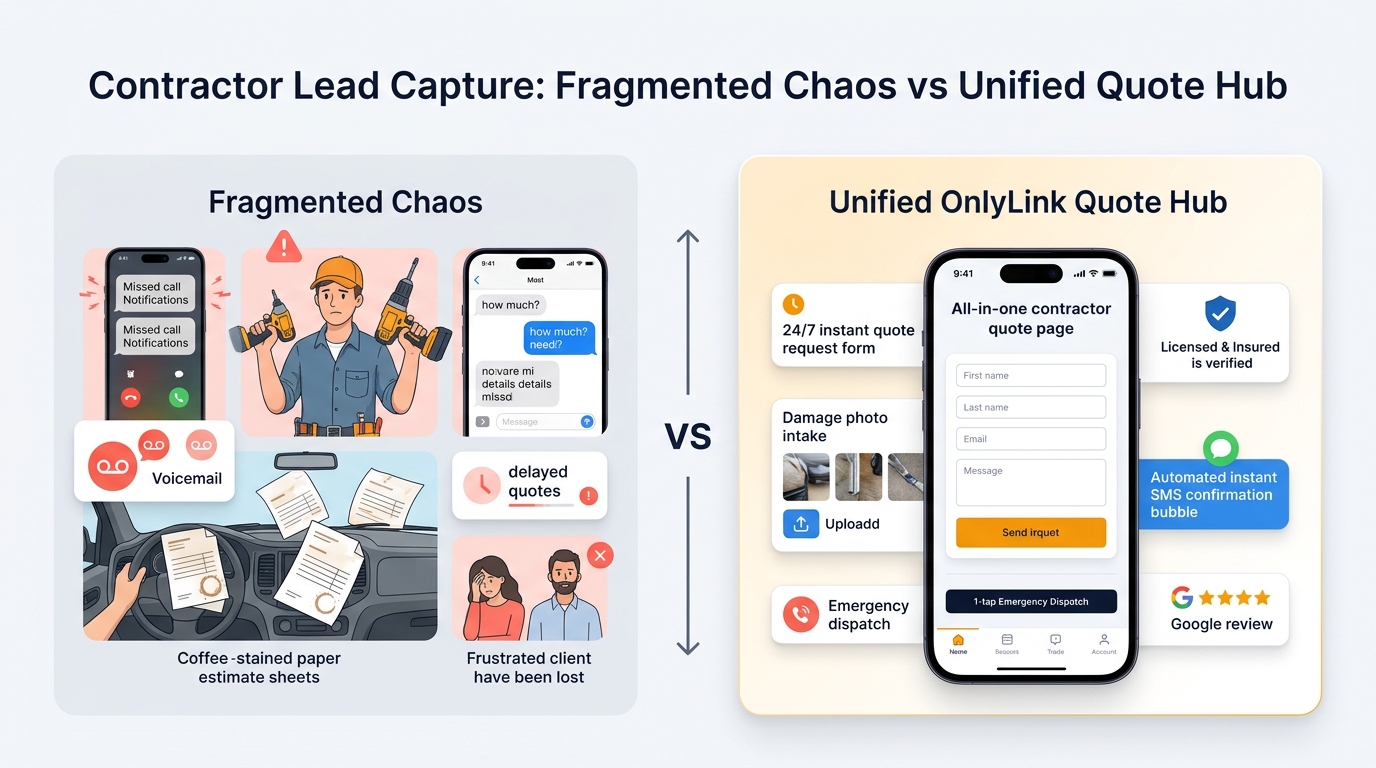
Side-by-Side Comparison: Traditional Contractor vs. OnlyLink Quote Hub
| Feature | 🌪️ Traditional Fragmented Contractor | ⚡ OnlyLink Light-Theme Contractor Hub |
|---|---|---|
| First Impression | Missing website or messy desktop site built in 2012 | High-speed, professional light-theme layout (#FFFFFF & #F8FAFC) |
| Mobile Load Speed | 5–8 seconds with heavy uncompressed job photos | Instant sub-second load (< 0.4s) on cellular 5G networks |
| Emergency Triage | Voicemail that sits unlistened to for 4 hours | Prominent 1-tap 24/7 Emergency Dispatch call button |
| Quote Intake | Manual phone calls or endless DM texting | 60-second photo-upload quote request form |
| Job Scope Accuracy | Blind guesses without visual context | Homeowner uploads damage/equipment photo directly |
| Credential Proof | Buried on an obscure state licensing portal | Verified State License #, Bonded & Insured badges upfront |
| Service Radius | Vague “We serve the greater metro area” | Exact list of covered zip codes, towns & response times |
| Field Software Sync | Scrawled notes on coffee-stained receipts | Direct link into Jobber, Housecall Pro, or ServiceTitan |
| In-Person Referrals | Paper cards that get lost in client junk drawers | 1-tap vCard button saving contractor phone & email to phone |
| Review Generation | Inconsistent verbal reminders after job wrap | 1-tap Google Review QR code on invoice and truck wrap |
Why Light-Theme Visuals Are Essential for Trades & Contractors
In construction, remodeling, and mechanical trades, your digital aesthetic establishes your credibility long before you arrive at a homeowner’s front door.
While dark themes, high-contrast neon highlights, and moody palettes are common in gaming, streetwear, or developer tools, home services depend on cleanliness, architectural transparency, safety, and operational precision.
┌────────────────────────────────────────────────────────────────────────┐
│             THE LIGHT-THEME PSYCHOLOGY IN TRADE BRANDING               │
│                                                                        │
│   Pristine White & Light Slate (`#FFFFFF` / `#F8FAFC`)                 │
│   ➔ Evokes Architectural Cleanliness, Organization & Trust             │
│                                                                        │
│   High-Visibility Safety Amber & Orange (`#F59E0B` / `#EA580C`)        │
│   ➔ The Universal Language of Trade Action, Urgency & Fast Dispatch    │
│                                                                        │
│   Industrial Navy & Slate Charcoal (`#0F172A` / `#334155`)             │
│   ➔ Communicates Engineering Rigor, Stability & Licensed Authority     │
│                                                                        │
│   High-Contrast Dark Charcoal Typography                               │
│   ➔ Guarantees 100% Daylight Legibility on Glaring Outdoor Screens     │
│                                                                        │
└────────────────────────────────────────────────────────────────────────┘
Key Advantages of Light-Theme UI for Home Service Contractors:
- Flawless Sunlight Legibility on Job Sites & Driveways: Both contractors and homeowners frequently interact with your bio link outdoors—standing in bright driveways, on curbs checking truck signage, or outside home supply stores. Dark themes suffer severe mirror-like glare and reflections in direct sunlight. A high-contrast light theme ensures your phone number, license badges, and quote forms remain effortlessly readable in broad daylight.
- Subconscious Perception of Cleanliness & Professionalism: Homeowners dread the stereotype of the messy contractor who tracks muddy boots across living room rugs and leaves sawdust in air vents. A bright, immaculate light-themed mobile directory immediately signals that your team is organized, clean, and respectful of high-end homes.
- High-Converting Visual Hierarchy: Pairing a luminous white background with energetic safety amber or orange action buttons creates an instinctive call to action. Homeowners instantly spot where to tap for emergency repairs or quote requests without scanning confusing dropdown menus.
The 4-Stage Contractor Client Journey & Quote Funnel
Turning casual social followers, neighborhood recommendations, and truck wrap impressions into paid, profitable contractor invoices requires a friction-free, four-stage digital funnel:
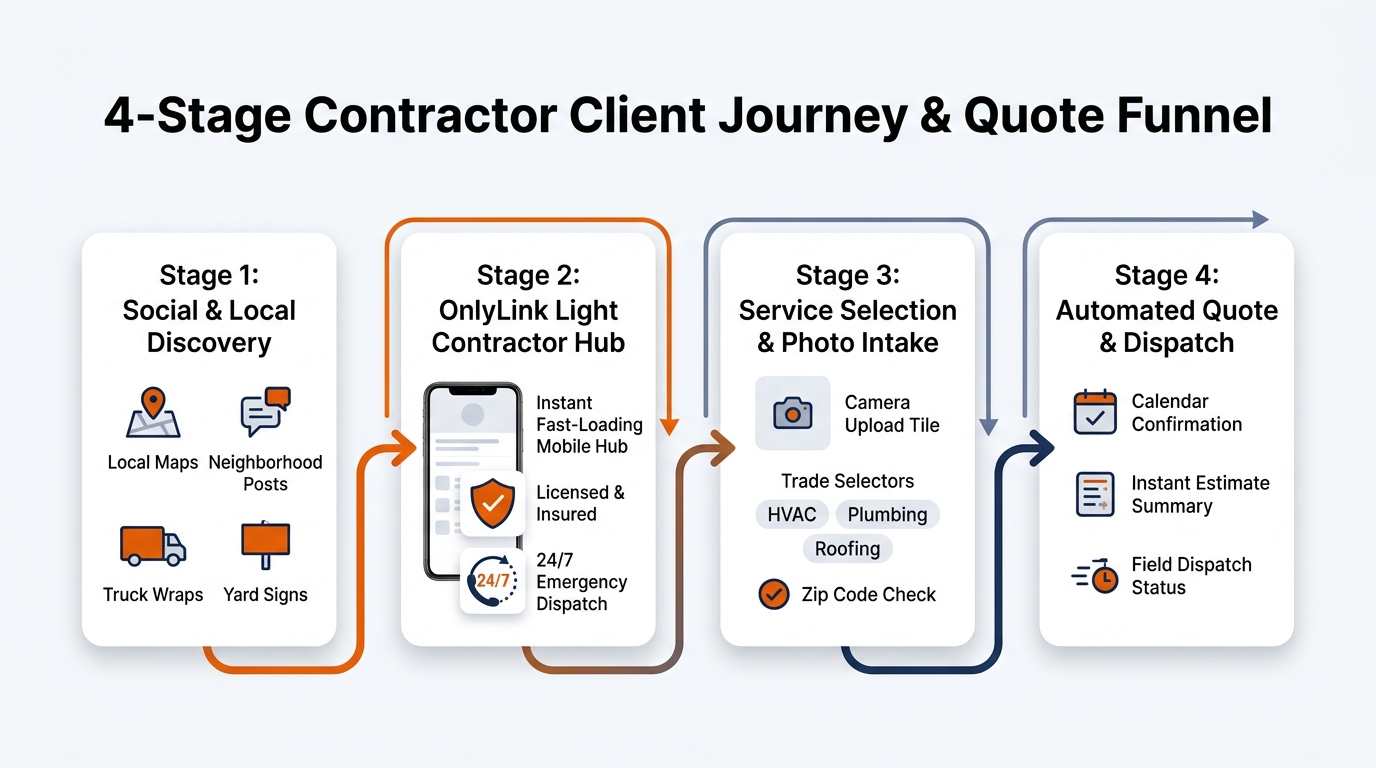
Stage 1: Social & Local Discovery
Homeowners discover your trade business across primary local channels:
- Facebook Neighborhood Groups & Nextdoor: Neighbors asking: “Who is an honest plumber who won’t rip me off?” and tagging your business.
- Instagram & TikTok Project Showcases: 15-second satisfying time-lapses of custom tile showers, freshly paved driveways, or neatly bent electrical conduit.
- Google Local Services Ads & Maps: Searching “furnace repair near me” or “emergency electrician 24/7”.
- Offline Fleet Branding: High-visibility magnetic truck decals, yard signs in client lawns, and branded van wraps parked in active subdivisions.
All traffic converges on your branded, easy-to-remember OnlyLink address: onlylink.click/apexservices.
Stage 2: The OnlyLink Light Contractor Hub
The homeowner taps your link and lands on a page that loads in under 400 milliseconds. They are immediately greeted by:
- A bold, professional trade company logo with your core trades (e.g., HVAC, Plumbing & Electrical).
- Clear credibility markers: "🛡️ State Licensed & Insured #ROC-339210".
- A dynamic real-time status pill: "🟢 Active Crews Dispatched · 24/7 Emergency Repairs Available".
Stage 3: Service Selection & Photo Intake
Before reaching for the phone, the homeowner self-selects their need:
- They choose their specific service category (e.g., AC Breakdown, Panel Upgrade, Drain Clearing, or Bathroom Remodel Estimate).
- They use the Instant Photo Quote Intake to snap two pictures of their existing equipment or project area with their smartphone camera.
- They enter their zip code to confirm they are within your standard primary service radius.
Stage 4: Automated Quote Dispatch & Job Booking
With full technical context captured, your business acts with lightning speed:
- The quote request automatically routes into your field management software (Jobber, Housecall Pro, ServiceTitan, or direct SMS alert).
- You review the uploaded photo and zip code, send a flat-rate estimate or diagnostic dispatch window within 15 minutes, and collect a digital signature.
- For true emergencies, the homeowner taps the primary red emergency hotline button for instant phone dispatch.
The Anatomy of an Award-Winning Contractor Bio Hub
Here is what an elite, high-converting light-theme contractor quote directory looks like on a modern smartphone:
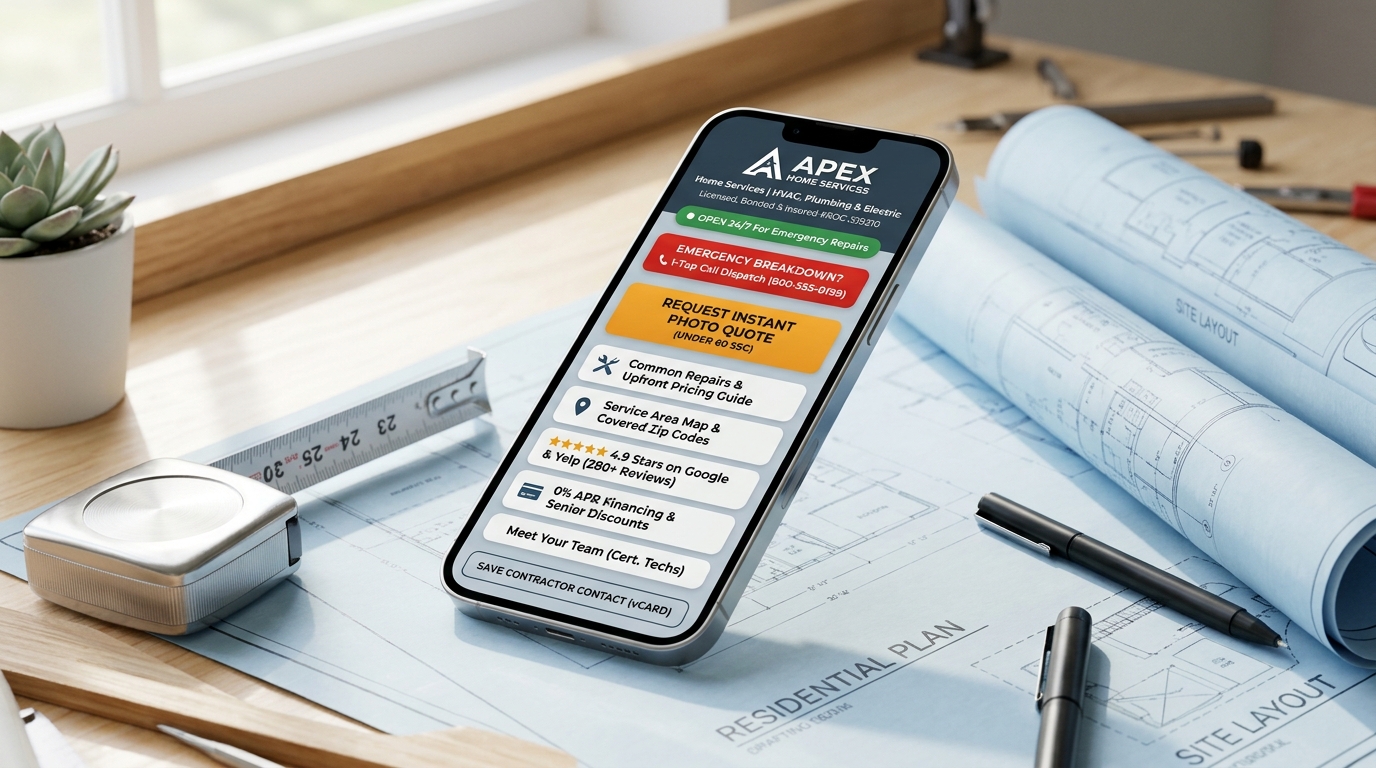
Structural Breakdown of the Hub Architecture
<!-- Structural Outline of a High-Converting Contractor Quote Hub -->
<section class="contractor-quote-hub">

  <!-- 1. Contractor Header & Verified License Proof -->
  <header class="contractor-header">
    <img src="/avatar-apex-contractors.jpg" alt="Apex Home Services" class="contractor-logo">
    <h1>Apex Home Services</h1>
    <p class="trade-subtitle">Heating, Cooling, Plumbing & Electrical Specialists</p>
    <div class="credentials-bar">
      <span>🛡️ State Licensed & Bonded #ROC-339210</span>
      <span>⭐ 4.9 Stars (280+ Reviews)</span>
    </div>
    <div class="status-pill">🟢 Crews on Duty: Same-Day Emergency Service Open</div>
  </header>

  <!-- 2. Urgent Emergency Dispatch Callout -->
  <div class="emergency-action">
    <a href="tel:6025550199" class="btn-emergency">
      🚨 Emergency Breakdown? 1-Tap Call Dispatch: (602) 555-0199 →
    </a>
  </div>

  <!-- 3. Primary High-Converting Hero Action Button -->
  <div class="primary-action">
    <a href="#request-quote" class="btn-amber-quote">
      📸 Snap a Photo & Request Instant Quote (Under 60 Sec) →
    </a>
  </div>

  <!-- 4. Trade Categories & Upfront Pricing Guides -->
  <div class="service-card-group">
    <a href="/hvac-services" class="trade-card">
      <div class="icon">❄️</div>
      <div class="info">
        <h3>Air Conditioning & Heating</h3>
        <p>Diagnostics, Tune-ups, Repairs & System Replacements · From $89</p>
      </div>
    </a>
    <a href="/plumbing-services" class="trade-card">
      <div class="icon">🔧</div>
      <div class="info">
        <h3>Plumbing & Water Heaters</h3>
        <p>Drain Snaking, Tankless Heaters & Repiping · From $99</p>
      </div>
    </a>
    <a href="/electrical-services" class="trade-card">
      <div class="icon">⚡</div>
      <div class="info">
        <h3>Electrical & EV Chargers</h3>
        <p>200A Panel Upgrades, Generators & Level 2 Chargers · From $149</p>
      </div>
    </a>
  </div>

  <!-- 5. Service Area & Zip Code Verification Card -->
  <div class="card-group">
    <a href="/service-area-map" class="map-card">
      📍 <strong>Service Area Coverage:</strong> Phoenix, Scottsdale, Mesa & Tempe (32 Zip Codes)
    </a>
  </div>

  <!-- 6. Financing & Trust Accreditations -->
  <div class="trust-card-group">
    <a href="/financing" class="trust-card">
      💳 <strong>0% APR Financing for 12 Months:</strong> Low Monthly Payments via Wisetack
    </a>
    <a href="https://google.com/maps" class="reviews-card">
      ⭐⭐⭐⭐⭐ <strong>4.9 Stars on Google:</strong> Read 280+ Verified Local Homeowner Reviews
    </a>
  </div>

  <!-- 7. Mobile Contact Persistence (vCard) -->
  <div class="vcard-action">
    <a href="/apex-contractors.vcf" class="btn-vcard">
      📲 Save Contractor Direct Contact & Emergency Line to Phone (vCard)
    </a>
  </div>

</section>
Visual Styling Guidelines for Contractor Hubs:
- Background Canvas: Clean architectural white (
#FFFFFF) or light slate grey (#F8FAFC). - Card Containers: Solid white containers with crisp borders (
border: 1px solid #E2E8F0), strong 14px rounded corners, and subtle drop shadows (box-shadow: 0 4px 14px rgba(15, 23, 42, 0.05)). - High-Impact Buttons: Energetic safety amber (
#F59E0B) or trade orange (#EA580C) for primary quote requests, with bold white text (font-weight: 700). - Emergency Accent: High-visibility safety red (
#DC2626) reserved strictly for the urgent 1-tap call-out banner. - Typography: Dark slate charcoal (
#0F172A) for maximum contrast and daylight readability.
4 Core Pillars of a High-Converting Contractor Quote Hub
Pillar 1: The 60-Second Photo Estimate Engine
The single biggest drain on contractor profitability is the “free on-site estimate trip”. Driving 45 minutes across town during rush hour just to look at a standard water heater or leaking P-trap costs you $75+ in gas, vehicle wear, and unbillable technician time.
By embedding an Instant Photo Quote Intake Form on your OnlyLink hub (linking to a streamlined form powered by Typeform, Jotform, or your Jobber client portal), homeowners can:
- Select their project type from a simple visual dropdown.
- Snap a photo of their equipment data plate, circuit breaker panel, or leak location with their smartphone.
- Input their address, timeline, and short description.
Within 15 minutes, you can review the photo, check your inventory, and email or text back an accurate flat-rate estimate without ever starting your truck engine.
Pillar 2: 1-Tap Emergency Triage vs. Non-Urgent Digital Queue
Not every inquiry requires an immediate phone conversation.
A high-converting contractor hub separates traffic into two clean pathways:
- Pathway A (Urgent Emergencies): A homeowner with standing water in their basement or zero heat in freezing weather needs help right now. A prominent "🚨 1-Tap Emergency Dispatch" button dials your on-call phone line or an answering service immediately.
- Pathway B (Routine Maintenance & Remodels): A homeowner planning a master bathroom renovation for October or an EV charger installation next month doesn’t need to disrupt your afternoon. They happily click the photo quote form, keeping your phone line clear for high-paying urgent jobs.
Pillar 3: License Verification, Service Area Clarity & Financing
Homeowners often hesitate to pull the trigger on four-figure home repairs due to cash flow concerns or unlicensed contractor anxiety:
- Prominent License & Insurance Badges: Displaying your state license number, ROC registration, and bonded status right at the top of your bio link immediately dissolves homeowner skepticism.
- Transparent Service Area List: Clearly listing your primary cities and zip codes stops inquiries from homeowners located 60 miles outside your service radius, saving you from having to awkwardly decline the job.
- Consumer Financing Links: Many homeowners don’t have $6,500 sitting in checking when their AC unit dies unexpectedly. Linking directly to your 0% APR financing portal (Wisetack, GoodLeap, or Hearth) allows homeowners to get pre-approved in 90 seconds, dramatically increasing your average ticket size.
Pillar 4: Offline Truck Wraps, Yard Signs & Review Generation
Your OnlyLink hub bridges the gap between your physical field work and your digital pipeline:
- Fleet Truck & Van Decals: Place a large, high-contrast QR code on the back doors of your work vans with clear copy: "📸 Scan for an Instant Photo Quote or 24/7 Emergency Repairs!". Drivers stuck behind your truck at a red light can pull up your directory in seconds.
- Job Site Yard Signs: Place branded yard signs in client lawns during multi-day roofing, landscaping, or remodeling projects with your OnlyLink URL and QR code. Curious neighbors walking their dogs can immediately check your work and request an estimate.
- Mechanical Equipment Service Stickers: After servicing a furnace, water heater, or electrical panel, place a weatherproof sticker with your OnlyLink QR code directly on the unit: “For future emergency service or filter orders, scan here.”
- 1-Tap Google Review Engine: When you finish a flawless repair, present your phone with your OnlyLink review link or hand the homeowner an invoice with your QR code: “If you loved our service today, scanning this takes you straight to our Google review page—it takes 15 seconds and really helps our family business!”
For more strategies on using physical QR codes, explore our guide on bringing your bio link offline with QR codes.
4-Day Implementation Roadmap for Trade Contractors
Modernizing your contractor business doesn’t require taking two weeks off the tools. Follow this practical 4-day launch roadmap:
┌────────────────────────────────────────────────────────────────────────┐
│             4-DAY CONTRACTOR QUOTE HUB IMPLEMENTATION PLAN             │
├────────────────────────────────────────────────────────────────────────┤
│                                                                        │
│  DAY 1: Audit Frequent Inquiries & Digitize Services                   │
│  • List your core services, starting diagnostic fees, and zip codes    │
│  • Gather state license numbers, bonding info, and financing links     │
│                                                                        │
│  DAY 2: Build & Brand Your Light-Theme OnlyLink Hub                    │
│  • Claim your custom link: onlylink.click/yourbusiness                 │
│  • Apply a high-contrast light theme (crisp white, slate, amber)       │
│  • Upload company logo, emergency phone number, and license badges     │
│                                                                        │
│  DAY 3: Connect Photo Estimate Intake & CRM Dispatch                   │
│  • Set up a 3-field photo upload form (Jobber / Housecall / Jotform)   │
│  • Test the 1-tap emergency dispatch dialer and Google Reviews button  │
│                                                                        │
│  DAY 4: Deploy Across Digital Profiles & Print Fleet Decals            │
│  • Update Facebook page, Instagram bio, Google Business Profile & Yelp │
│  • Print OnlyLink QR codes on yard signs, truck wraps & invoice slips  │
│                                                                        │
└────────────────────────────────────────────────────────────────────────┘
Day 1: Audit Inquiries & Standardize Services
- Write down the 5 most common repair calls you receive each week.
- Establish transparent starting rates for basic diagnostics or standard replacements.
- Compile your official state contractor license numbers, insurance certificates, and financing application links.
Day 2: Build Your Light-Theme OnlyLink Hub
- Register your business link at OnlyLink.click (
onlylink.click/yourtrade). - Choose a high-contrast, professional light-theme palette (pure white background, slate containers, energetic amber buttons).
- Add your verified license badges and a real-time availability status pill.
Day 3: Connect Photo Intake & Emergency Dispatch
- Configure your primary action button to open your photo quote request form.
- Verify that the 1-tap emergency call button dials directly to your on-call dispatch line.
- Link your Google Business Profile review portal directly into a 5-star review card.
Day 4: Deploy Across All Channels & Print QR Assets
- Replace your social links on Facebook Business, Instagram, Nextdoor, Google Business Profile, and TikTok.
- Add your OnlyLink QR code to your printed invoices, business cards, service stickers, and vehicle fleet wraps.
For additional advice on branding your profile, read our guide on designing a bio page that matches your personal brand.
Real-World Case Study: How “Apex Home Services” Grew Qualified Quotes by 54%
To see how a mobile quote hub impacts a real contracting company, look at Apex Home Services, a 6-truck residential HVAC and plumbing contractor serving the Phoenix metro area.
The Problem Before OnlyLink:
- The Phone Bottleneck: During summer heatwaves, the owner, Mark, received 40+ phone calls a day while crawling through attics. Over half went to voicemail, and by the time he called back, homeowners had already hired a competitor.
- Wasted Diagnostic Trips: Technicians drove across town for “AC repair” calls only to discover the homeowner just had a dead thermostat battery or a tripped breaker.
- Zero Social Media Conversions: Their Facebook and Instagram pages had 2,500 local followers, but yielded fewer than 3 quote requests a month because their bio just had a dead desktop link.
The Solution with OnlyLink:
- Mark launched
onlylink.click/apexserviceswith a bright, light-themed layout featuring safety amber buttons. - He added a "📸 60-Second Photo Quote Intake" where homeowners upload a picture of their thermostat screen or leaking pipe.
- He added a "🚨 1-Tap 24/7 Emergency Dispatch" button routing urgent calls directly to an on-call dispatcher.
- He printed OnlyLink QR codes on magnetic service stickers placed on every furnace and water heater they installed.
The Results After 90 Days:
- 📈 54% Increase in Monthly Quote Requests: Quote volume jumped from 22 to 78 qualified leads per month.
- ⏱️ 14 Hours of Phone Tag Saved Weekly: 68% of non-emergency quotes were triaged entirely through photo uploads.
- 💰 $32,000 in Added High-Ticket Revenue: 0% financing links enabled 5 homeowners to upgrade to complete high-efficiency heat pump systems instead of patching up 15-year-old units.
- ⭐ 86 New 5-Star Google Reviews: Technicians showed homeowners the QR code on their smartphone at the end of each successful service call.
Frequently Asked Questions (FAQ)
Does OnlyLink replace our contractor CRM software (Jobber, Housecall Pro, or ServiceTitan)?
No. OnlyLink acts as the high-speed front door and conversion engine that leads into your CRM. Most contractor field software provides long, clunky client portal links that look terrible in Instagram bios, load slowly on mobile networks, and lack custom branding. OnlyLink packages your booking links, photo forms, credentials, financing options, and reviews into one lightning-fast mobile hub.
How does photo quote intake reduce tire-kickers?
Tire-kickers and price-shoppers want to send 10 contractors a generic message asking “How much for a new furnace?”. Asking for a quick photo of their equipment and zip code immediately filters out disingenuous inquiries, leaving you with serious, high-intent homeowners who value professional transparency.
Can a multi-trade company display HVAC, plumbing, and electrical on one hub?
Yes! OnlyLink allows you to create organized card groups for each distinct trade. A homeowner can simply tap “Plumbing” or “Air Conditioning” to see relevant service lists, starting rates, and technician profiles without navigating through separate websites.
What should we do if we cannot answer emergency calls after 8:00 PM?
If you don’t offer 24/7 emergency dispatch, simply configure your status pill to read: "🟢 Office Hours: Mon–Fri 7am–6pm · After-Hours Quotes Processed by 8am Tomorrow". Route after-hours clicks to your photo intake form so you wake up to a queue of detailed quote requests with photos ready for morning dispatch.
Should we use a light theme even if our trucks and logos are dark?
Yes. On mobile devices, light-themed directories provide superior legibility, especially when homeowners or technicians view screens outdoors in bright sunlight. You can easily incorporate your company’s dark navy or black brand colors into your logo, headers, and text while maintaining a clean, glare-free white canvas that converts at maximum efficiency.
Conclusion: Upgrade Your Contractor Business Front Door
In the skilled trades, your reputation is earned through quality craftsmanship, honest communication, and prompt service. But if homeowners face friction the moment they try to reach you online, they will never experience your world-class work.
Your digital quote process should be just as reliable and well-built as the plumbing, electrical, and HVAC systems you install.
By swapping missed calls and messy DMs for a high-speed, light-themed OnlyLink contractor hub, you eliminate phone tag, capture qualified leads around the clock, and position your company as the most professional trade contractor in your area.
Ready to build your high-converting contractor quote directory? Claim your contractor OnlyLink page today and start capturing more high-paying jobs in minutes.
Ready to build your link in bio?
Create your free OnlyLink page in under a minute unlimited links, analytics and custom designs.
Get started freeKeep reading
How Beauty Salons Can Create a Mobile-Friendly Appointment and Service Directory
Discover how modern beauty salons, hair studios, nail bars, and aesthetic spas build a high-speed, light-theme …
How Dentists Can Share Appointment Booking, Clinic Details, and Patient Resources
Discover how modern dental clinics, orthodontists, and cosmetic practices build a high-speed, light-theme …