
How Dentists Can Share Appointment Booking, Clinic Details, and Patient Resources
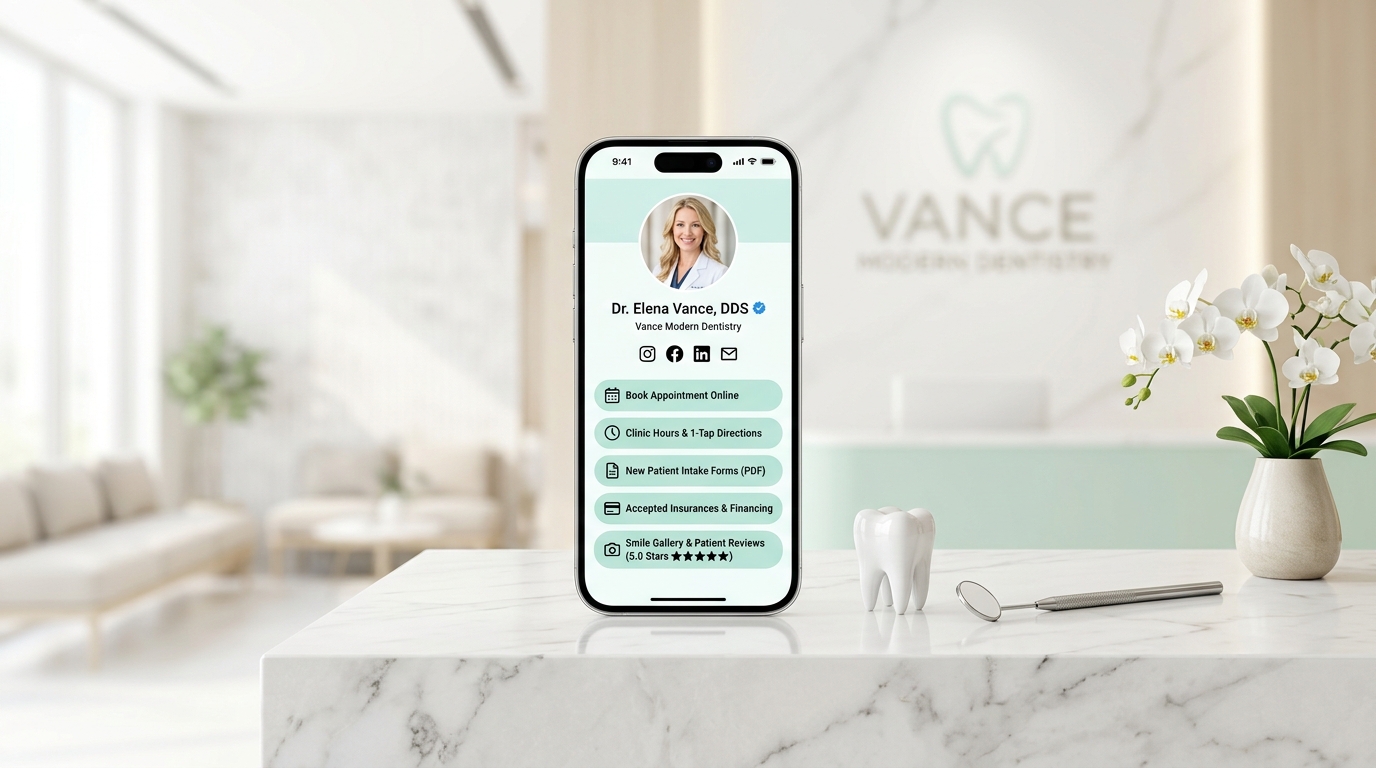
It is 8:15 AM on a Monday morning. The doors to your dental practice just unlocked.
Before your dental hygienists have even seated their first patients, the front desk telephone is already ringing incessantly:
- 📞 Call 1: “Hi, I chipped my front tooth over the weekend eating breakfast. Do you have an emergency opening this morning, or what is your after-hours emergency line?”
- 📞 Call 2: “I’m scheduled for a cleaning at 9:00 AM, but I can’t find your parking garage entrance. Are you in Suite 300 or 400?”
- 📞 Call 3: “Do you accept Delta Dental PPO, and do you offer monthly payment plans for clear aligners?”
- 📞 Call 4: “I had a tooth extracted on Friday and lost my paper care slip. Can I drink warm tea today, or is that going to dislodge the blood clot?”
- 📞 Call 5: “Can you email me the new patient forms? I don’t want to spend 20 minutes in your waiting room filling out a clipboard with a pen that twenty other people touched.”
If you manage a dental practice, orthodontic clinic, or pediatric dental studio in 2026, this high-stress morning scramble is all too familiar.
Dentistry is an intimate, high-trust healthcare discipline. Patients place their oral health, comfort, and smile confidence into your hands. Yet, while clinical technology has made quantum leaps—with digital 3D intraoral scanners, pain-free laser cleanings, and AI-assisted diagnostics—the way dental clinics communicate logistics, book appointments, and distribute patient resources online remains trapped in the past.
Most dental offices still rely on clunky, 18-page desktop websites weighed down by stock photos of generic models, slow-loading forms, and phone-only appointment requests.
The consequences are severe: front office staff spend over 35% of their working day acting as human directories, prospective patients bounce to competing local clinics that offer instant online booking, and anxious patients lose critical post-op instructions.
The modern solution is an ultra-clean, ethical, light-themed Dental Online Information Hub built on OnlyLink.click.
In this complete guide, we will unpack how leading dental practices use mobile-first information hubs to eliminate front-desk phone tag, why light-theme visuals are mandatory in healthcare design, and how to create an authoritative digital patient portal in under a day.
The 3 Critical Bottlenecks Damaging Modern Dental Practices
Dental patients make treatment decisions differently than retail shoppers. They are often balancing dental anxiety, tight work schedules, and complex insurance benefits.
Over 86% of patients discover and research local dental clinics directly on their smartphones—often at 10:30 PM when a dull toothache flares up, or during a 15-minute lunch break.
Yet, traditional dental digital marketing creates three major points of friction:
1. The “Call During Office Hours” Scheduling Barrier
Modern patients—especially millennials and Gen Z—strongly dislike phone calls. If a working parent or busy executive lands on your clinic page at 9:00 PM and only sees a “Call 555-0101 to schedule an appointment” prompt, they will not wait until 8:30 AM tomorrow. They will return to Google or Instagram, find a clinic offering instant real-time online booking, and reserve a slot in 60 seconds.
2. Buried Logistics & Clinic Arrival Confusion
Finding a dental office shouldn’t feel like an escape room puzzle. When your physical clinic address is buried under three navigation tiers on a slow desktop site, patients arrive late, park in the wrong commercial garage, or wander through corporate office towers searching for your suite.
Every late arrival ripples across your schedule, causing waiting room delays, frustrated hygienists, and lost production hours.
3. The Lost Paper Post-Operative Care Slip
After a surgical extraction, dental implant placement, or root canal therapy, patients are numb, groggy, and cognitively fatigued.
Handing them a single physical sheet of printed aftercare instructions almost guarantees it will be left in a car cupholder or misplaced in a trash bin. When post-op pain or swelling peaks at 11:00 PM, panicked patients flood your emergency voicemail or end up in urgent care.
Disorganized Dental Practice vs. The OnlyLink Light-Theme Hub
To visualize how an integrated clinic hub modernizes patient flow and staff productivity, compare the traditional fragmented workflow with an OnlyLink clinic hub:
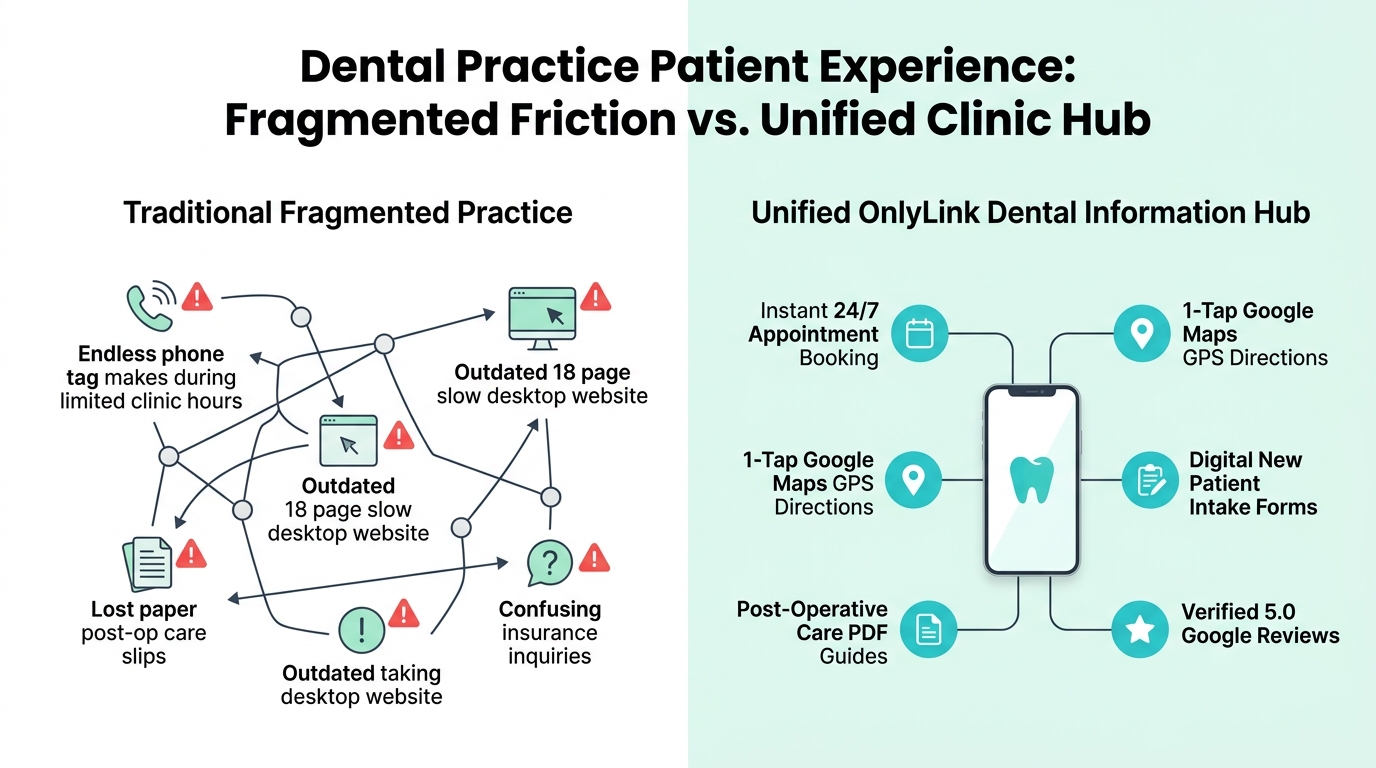
Side-by-Side Comparison: Traditional Practice vs. OnlyLink Dental Hub
| Feature | 🌪️ Traditional Fragmented Dental Clinic | ⚡ OnlyLink Light-Theme Dental Hub |
|---|---|---|
| First Impression | Outdated 18-page desktop site with slow scripts | Pristine, luminous healthcare light theme (#FFFFFF & #F0FDF9) |
| Mobile Speed | 4–7 seconds with heavy stock graphics | Sub-second instant load (< 0.4s) on any mobile device |
| Booking Accessibility | Limited to phone calls during office hours (9–5) | 24/7 instant online booking (NexHealth / LocalMed / Dentrix) |
| Clinic Directions | Static text address that patients manually copy | 1-tap Google Maps GPS navigation straight to your parking entrance |
| Patient Intake | Physical clipboard and pen in crowded waiting room | Downloadable & digital pre-arrival intake forms (PDF/Web) |
| Aftercare Guides | Crumpled paper slips that get lost immediately | Permanent, mobile-optimized digital Post-Op Care Guide library |
| Insurance Transparency | Vague “We accept most insurances” text | Clear list of accepted PPO networks, in-house plans & financing |
| Emergency Triage | Generic voicemail or confusing after-hours menu | Prominent 1-tap “Emergency Toothache Hotline” button |
| Review Generation | Inconsistent verbal reminders at checkout | Direct 1-tap link to 5-star Google & Healthgrades review portal |
Why Light-Theme Visuals Are Essential for Healthcare & Dentistry
In medical and dental branding, visual psychology directly governs patient trust, anxiety reduction, and emotional comfort.
While dark themes and neon highlights have become trendy in gaming, streetwear, or software development, dental care is fundamentally defined by clinical purity, sterile hygiene, warmth, and transparent daylight clarity.
┌────────────────────────────────────────────────────────────────────────┐
│             THE LIGHT-THEME PSYCHOLOGY IN DENTAL BRANDING              │
├────────────────────────────────────────────────────────────────────────┤
│                                                                        │
│   Pristine White Canvas (`#FFFFFF`) ➔  Evokes Sterilization & Purity   │
│   Soft Medical Teal (`#0D9488`)     ➔  Instills Calm, Trust & Healing   │
│   Gentle Mint & Sky Blue            ➔  Soothes Dental Anxiety & Fear   │
│   Slate Charcoal Typography         ➔  Guarantees Daylight Legibility  │
│                                                                        │
└────────────────────────────────────────────────────────────────────────┘
Key Advantages of Light-Theme UI for Dental Practices:
- Subconscious Perception of Sterility & Hygiene: Patients naturally associate crisp white and soft mint surfaces with sterilized dental operatories, autoclaved instruments, and high standards of cleanliness. A dark-themed dental page feels heavy, shadowy, and counter-intuitive to healthcare hygiene.
- Combating Dental Anxiety (Odontophobia): Over 36% of the population suffers from dental fear or anxiety. Dark backgrounds and aggressive contrasts can elevate subconscious tension. Soft, welcoming light layouts featuring generous whitespace and gentle teal accents lower heart rates and reassure hesitant patients that your clinic is gentle and modern.
- Flawless Sunlight Legibility on the Road: Patients frequently check your clinic address while driving or walking toward your medical building in broad daylight. A high-contrast light theme prevents screen glare and ensures hours, suite numbers, and parking details are instantly readable.
The 4-Stage Dental Patient Journey & Booking Funnel
Transforming casual local searchers and social media followers into loyal, lifelong dental patients requires a frictionless path from initial curiosity to scheduled hygiene:
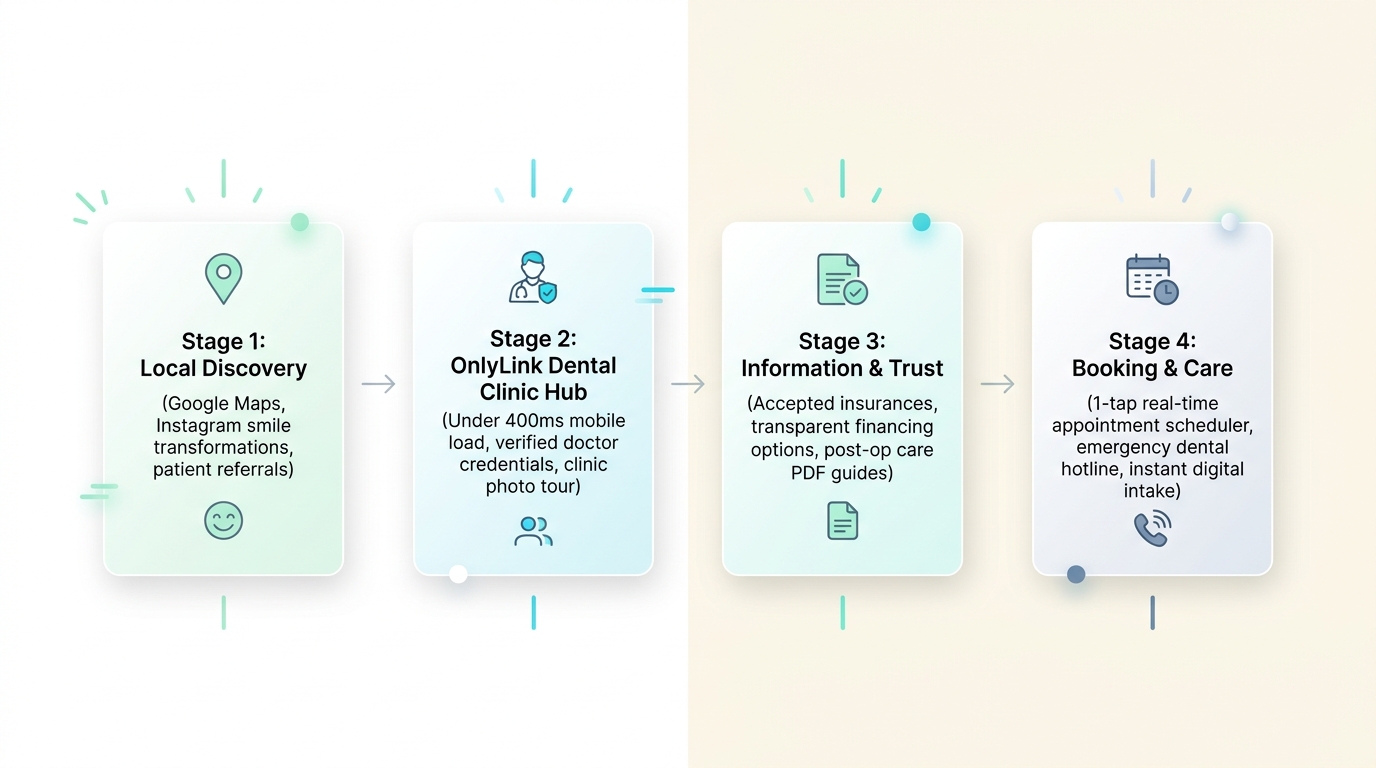
Stage 1: Local Discovery
Patients discover your dental practice through primary local channels:
- Searching “dentist near me” or “emergency dentist” on Google Maps.
- Instagram and TikTok Reels showcasing smile makeover before-and-afters, teeth whitening results, or friendly clinic culture.
- Word-of-mouth recommendations from friends, coworkers, and family.
- Local business directory listings and seasonal sponsorship programs.
Every channel funnels traffic to your clean, memorable OnlyLink address: onlylink.click/vancedental.
Stage 2: The OnlyLink Light Clinic Hub
The patient taps your link and lands on a page that loads in under 400 milliseconds. They are immediately greeted by a friendly, smiling portrait of the lead dentist, a verified practice badge, and clear operating hours.
Stage 3: Information & Confidence Building
Before committing to an appointment, patients self-qualify:
- They verify that you accept their dental insurance (or offer CareCredit/in-house dental savings plans).
- They review your 4.9-star rating across 240+ verified Google reviews.
- They browse your clear practice capabilities: preventive cleanings, pediatric dentistry, Invisalign, or dental implants.
Stage 4: Booking & Care
With all hesitation removed, the patient acts:
- They tap the primary button to book an appointment directly into your practice schedule.
- They download the new patient intake packet to complete at home.
- In urgent situations, they tap the red emergency button to reach your on-call triage line.
The Anatomy of an Award-Winning Dental Clinic Bio Hub
Here is what an elite, patient-centered light-theme dental information hub looks like on a modern smartphone:
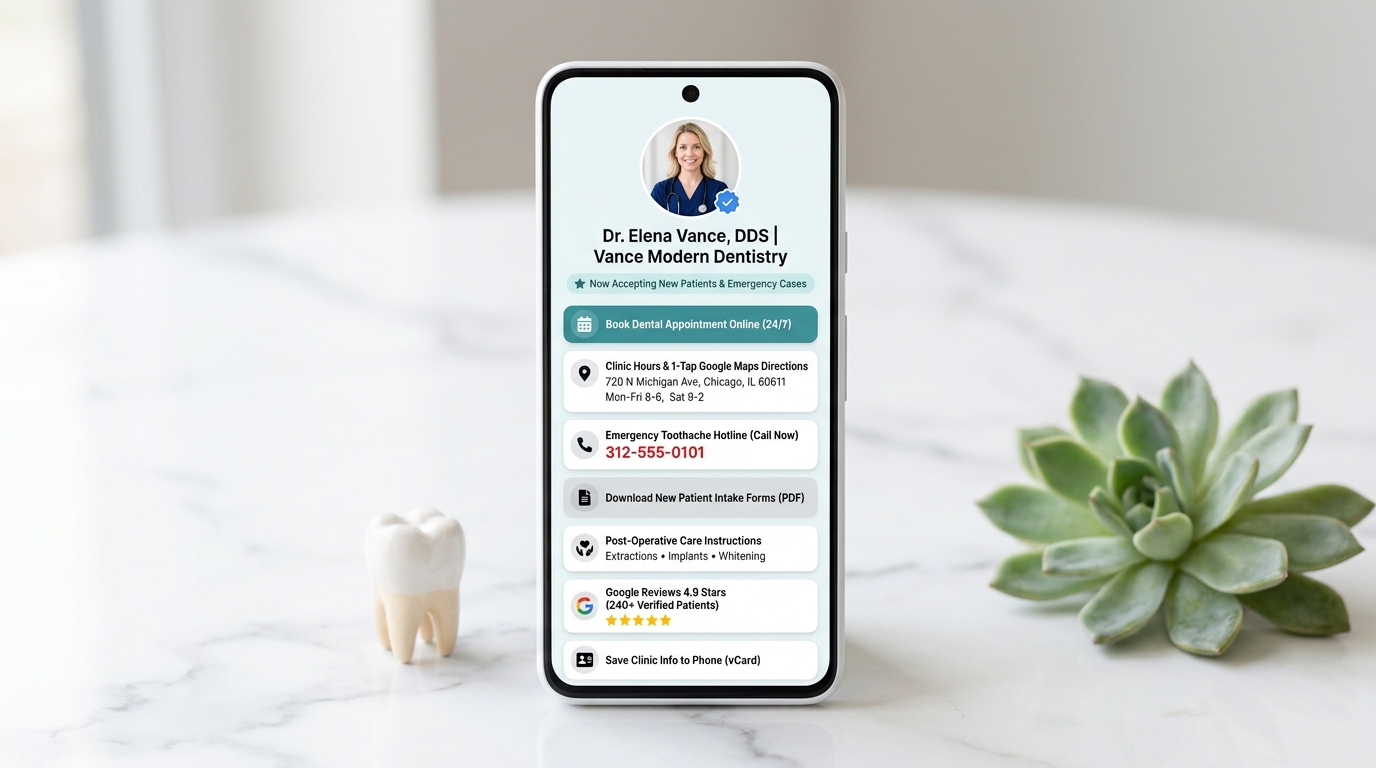
Structural Breakdown of the Hub Architecture
<!-- Structural Outline of a High-Converting Dental Clinic Hub -->
<section class="dental-clinic-hub">

  <!-- 1. Doctor & Practice Verification -->
  <header class="clinic-header">
    <img src="/avatar-dr-elena-vance.jpg" alt="Dr. Elena Vance, DDS" class="doctor-avatar">
    <h1>Dr. Elena Vance, DDS</h1>
    <p class="clinic-name">Vance Modern Dentistry | Family & Cosmetic Care</p>
    <div class="availability-pill">✨ Now Welcoming New Patients & Same-Day Emergencies</div>
  </header>

  <!-- 2. Primary High-Conversion Action Button -->
  <div class="primary-action">
    <a href="#book-online" class="btn-medical-teal">📅 Book Dental Appointment Online (24/7) →</a>
  </div>

  <!-- 3. Clinic Location, Hours & Directions -->
  <div class="card-group">
    <a href="https://maps.google.com/?q=Vance+Modern+Dentistry" class="location-card">
      <div class="icon">📍</div>
      <div class="info">
        <h3>Clinic Hours & 1-Tap Google Maps Directions</h3>
        <p>720 N Michigan Ave, Suite 400, Chicago, IL · Mon–Fri 8–6, Sat 8–2</p>
      </div>
    </a>
  </div>

  <!-- 4. Urgent Emergency Triage Line -->
  <div class="emergency-action">
    <a href="tel:3125550101" class="btn-emergency">🚨 Emergency Toothache Hotline: Call (312) 555-0101</a>
  </div>

  <!-- 5. Patient Intake & Digital Forms -->
  <div class="card-group">
    <a href="/forms/new-patient-intake-packet.pdf" class="resource-card">
      📄 <strong>New Patient Portal:</strong> Download Intake & Health History (PDF)
    </a>
    <a href="/insurance-and-financing" class="resource-card">
      💳 <strong>Accepted Insurances:</strong> PPO Networks, CareCredit & In-House Dental Plan
    </a>
  </div>

  <!-- 6. Post-Operative Care Digital Library -->
  <div class="card-group">
    <div class="aftercare-accordion">
      <h3>🩹 Post-Operative Aftercare Instructions</h3>
      <p>Instant care guides for Extractions, Root Canals, Implants & Whitening</p>
    </div>
  </div>

  <!-- 7. Verified Social Proof -->
  <div class="review-badge-card">
    <div class="stars">⭐⭐⭐⭐⭐</div>
    <p><strong>4.9 Stars on Google</strong> · Based on 240+ Verified Patient Reviews</p>
  </div>

  <!-- 8. Mobile Contact Persistence -->
  <div class="vcard-action">
    <a href="/vance-dentistry.vcf" class="btn-vcard">📲 Save Clinic Contact & Address to Phone (vCard)</a>
  </div>

</section>
Visual Styling Guidelines for Dental Hubs:
- Background Canvas: Pure optical white (
#FFFFFF) or soothing medical alabaster (#FBFDFD). - Card Design: Pristine white containers with ultra-subtle borders (
border: 1px solid #E6F0EE), gentle 16px corner radii, and featherweight elevation shadows (box-shadow: 0 2px 10px rgba(13,148,136,0.04)). - Accent Palette: Medical teal (
#0D9488), seafoam mint (#14B8A6), and deep slate gray (#1E293B) for crisp, readable typography. - Emergency Accent: Clean, controlled medical red (
#DC2626) reserved strictly for the urgent emergency hotline card.
4 Key Pillars of an Online Dental Information Hub
Pillar 1: 24/7 Automated Appointment Scheduling & Emergency Triage
Your front desk cannot answer phones 24 hours a day, but your OnlyLink hub can book patients while you sleep.
By embedding a direct link to your real-time practice management scheduling tool (such as NexHealth, LocalMed, Dentrix, Eaglesoft, or Curve Dental), prospective patients can:
- Select their appointment reason (e.g., Routine Hygiene Cleaning, Tooth Pain, Teeth Whitening Consultation, or Orthodontic Evaluation).
- Choose their preferred provider (e.g., Dr. Vance or a specific hygienist).
- View live open calendar slots and confirm instantly with SMS confirmation.
For acute trauma—such as a knocked-out tooth or severe abscess—include a prominent 1-Tap Emergency Hotline that routes callers directly to your on-call dentist or emergency messaging service.
Pillar 2: Frictionless Logistics, GPS Navigation & Virtual Office Tours
Eliminate arrival confusion with dedicated logistical cards:
- 1-Tap Google Maps Navigation: A single click launches turn-by-turn GPS navigation directly to your clinic entrance or parking garage.
- Clear Parking Instructions: Explicitly state parking rules (e.g., “Free 2-hour validated parking in Building Garage B; take elevator to 4th floor”).
- Operating Hours Matrix: Display exact weekday and Saturday hours so patients never arrive to locked doors.
- Virtual Office Tour Link: Embed a 60-second video walkthrough of your clinic. Showing modern operatory chairs, soothing ceiling screens, and friendly hygienists drastically calms first-time patient anxiety.
Pillar 3: Digital Patient Resources & Post-Operative Care
Replace outdated clipboards and lost paperwork with organized digital resources:
- Pre-Arrival Intake Packet: Allow new patients to download and complete their medical history, HIPAA disclosures, and consent forms on their own computer or phone before arrival.
- Digital Post-Operative Care Library: Organize aftercare instructions by procedure:
- Post-Extraction Care (Gauze management, dry socket prevention, soft food guidelines).
- Dental Implant & Bone Graft Healing Protocol.
- Crown & Bridge Temporary Precautions.
- Professional Teeth Whitening Sensitivity Care.
- Insurance & Financial Options: Clearly outline accepted PPO providers (Aetna, MetLife, Cigna, Delta Dental) and highlight flexible financing alternatives like CareCredit, Sunbit, or your In-House Dental Membership Plan for uninsured patients.
Pillar 4: In-Office Operatory QR Codes & Review Generation
Your OnlyLink hub is an essential tool inside your physical dental clinic:
- Operatory Chair QR Code Standees: Place small, elegant acrylic QR standees on the tray tables in each dental hygiene room:
- “Scan to join clinic Wi-Fi, view your post-op care instructions, or leave Dr. Vance a review!”
- The Checkout 1-Tap Review Engine: When a patient is happy with their freshly polished teeth at checkout, your front desk coordinator can point to the QR code: “Scan right here to leave us a quick 5-star Google review before you head out!”
- vCard Contact Persistence: Allow patients to save your clinic telephone, text messaging line, and office address into their smartphone contact book with a single tap.
To learn more about offline physical placement, check out our guide on bringing your bio link offline with QR codes.
4-Day Implementation Roadmap for Dental Practices
Modernizing your dental clinic’s online information hub doesn’t require weeks of IT consultation. Follow this proven 4-day rollout plan:
┌────────────────────────────────────────────────────────────────────────┐
│               4-DAY DENTAL PRACTICE HUB IMPLEMENTATION                 │
├────────────────────────────────────────────────────────────────────────┤
│                                                                        │
│  DAY 1: Digitalize Intake & Post-Op Aftercare Resources                │
│  • Convert paper forms into clean downloadable PDFs. Draft FAQs.       │
│                                                                        │
│  DAY 2: Build Your OnlyLink Light-Theme Clinic Hub                     │
│  • Select a clinical white/mint palette. Upload doctor headshot.       │
│  • Configure booking button, clinic hours, and 1-tap Google Maps.      │
│                                                                        │
│  DAY 3: Connect Practice Management & Emergency Hotlines               │
│  • Link NexHealth / LocalMed online scheduler. Connect emergency line. │
│  • Upload insurance & CareCredit financing badges.                     │
│                                                                        │
│  DAY 4: Deploy Across Digital Channels & Print In-Clinic QR Codes      │
│  • Update Google Business Profile, Instagram bio, and SMS reminders.   │
│  • Place QR standees in waiting areas and operatory hygiene rooms.     │
│                                                                        │
└────────────────────────────────────────────────────────────────────────┘
Day 1: Digitalize Intake & Aftercare Guides
- Audit the questions your front desk answers most frequently every week.
- Digitize your new patient intake questionnaire and aftercare sheets into clean, readable PDFs.
- List your primary accepted dental insurance networks and financing partners.
Day 2: Build Your OnlyLink Light-Theme Hub
- Register your clinic’s custom link at OnlyLink.click (
onlylink.click/yourpractice). - Choose a soothing light-theme palette (crisp white canvas, soft medical teal highlights, dark slate text).
- Upload a warm, smiling photo of your clinical team and insert your practice credentials.
Day 3: Connect Online Scheduling & Navigation
- Link your real-time practice management scheduling portal directly to the top primary button.
- Configure the 1-tap Google Maps direction link with exact suite and parking instructions.
- Add your emergency toothache hotline button with direct click-to-call functionality.
Day 4: Deploy & Print Operatory QR Standees
- Update the website link on your Google Business Profile, Facebook page, Instagram bio, and automated appointment reminder text messages.
- Download your high-resolution OnlyLink QR code. Order small acrylic standees for your front reception desk and operatory hygiene rooms.
For more inspiration on designing professional identity pages, explore our tutorial on designing a bio page that matches your brand.
Frequently Asked Questions (FAQ)
Is using an OnlyLink hub HIPAA-compliant for dental clinics?
Yes. An OnlyLink hub serves as an informational directory and navigational gateway. It does not store protected health information (PHI). When a patient taps your “Book Online” or “Patient Portal” buttons, they are securely routed to your existing HIPAA-compliant software (such as NexHealth, Dentrix, or Modento) which handles encrypted medical records.
How does this integrate with our Practice Management Software?
OnlyLink integrates seamlessly with any software that provides a web-based link. Whether you use Dentrix, Eaglesoft, Open Dental, Curve Dental, NexHealth, or LocalMed, you simply paste your scheduling URL into your OnlyLink primary button.
How should we display dental insurance without turning cash patients away?
Never display a rigid “We do not accept XYZ” list. Instead, phrase your insurance section positively: “We accept all major PPO insurance plans and submit claims on your behalf.” Directly beneath, introduce your In-House Dental Savings Membership Plan and CareCredit 0% interest financing, reassuring uninsured patients that quality care is accessible.
Can patients use this to pay their dental bills online?
Yes! You can easily add a dedicated card titled “Pay Your Statement Online” linking directly to your practice’s secure payment gateway (such as Swell, Rectangle Health, or Clearent).
Conclusion: Upgrade Your Dental Practice’s Front Door
In modern healthcare, exceptional clinical care begins long before a patient sits in your dental operatory chair. It begins the moment they search for your clinic on their smartphone.
By replacing slow desktop pages, busy telephone lines, and crumpled paper aftercare slips with an elegant, light-themed OnlyLink clinic hub, you provide patients with the effortless, comforting experience they deserve.
You will dramatically reduce front desk telephone stress, capture new patients around the clock, and establish your clinic as the most progressive, patient-first dental practice in your community.
Ready to build your dental clinic’s information hub? Create your free OnlyLink page today and transform your patient experience in minutes.
Ready to build your link in bio?
Create your free OnlyLink page in under a minute unlimited links, analytics and custom designs.
Get started freeKeep reading
How Lawyers Can Build a Professional Online Information Hub
Discover how modern attorneys, solo practitioners, and boutique law firms build an ethical, high-speed, …
How Wedding Photographers Can Organize Packages, Galleries, and Booking Inquiries
Turn your Instagram, TikTok, and Pinterest followers into booked weddings. Discover how modern wedding …