
How Beauty Salons Can Create a Mobile-Friendly Appointment and Service Directory
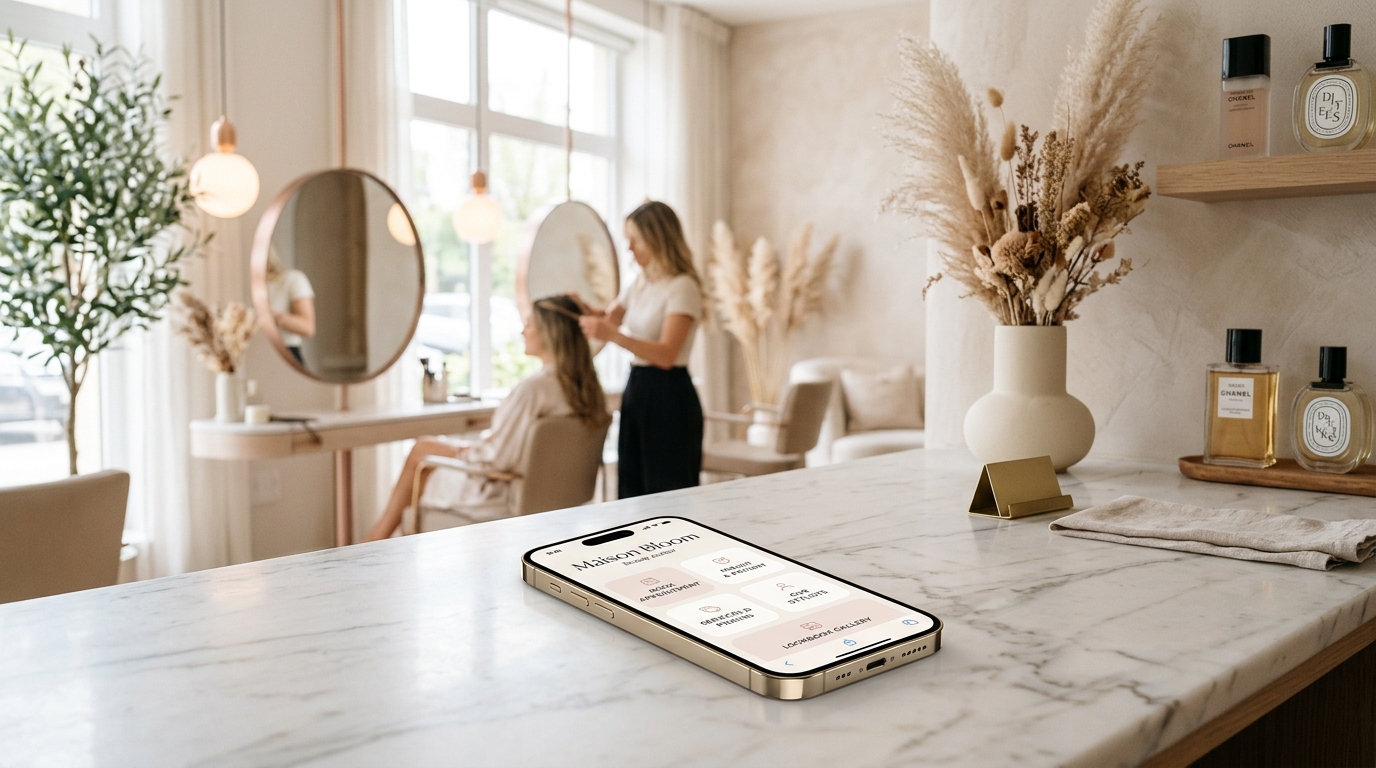
It is 2:45 PM on a buzzing Saturday afternoon. Every styling chair in your salon is occupied.
Blow dryers are roaring, foil highlights are processing under gentle heat lamps, and an intricate set of builder-gel nail art is being sculpted at the front bar. You have hair bleach on your gloves, a client in the shampoo bowl, and your smartphone is vibrating violently on your station tray:
- 💬 Instagram DM 1: “Hey babe! How much for a full dimensional balayage and haircut this Saturday? Also do you do curtain bangs or shadow roots?”
- 💬 Instagram DM 2: “Hi! Can I squeeze in for a Russian gel manicure and brow lamination tomorrow at 3:00 PM?”
- 📞 Missed Phone Call (Voicemail): “Hi, I’m wandering around Oak Street trying to find your salon entrance. Is it next to the coffee shop, and where is client parking?”
- 📩 Email / DM 3: “I had lash extensions applied on Thursday and a couple fell out on my left eye. Can you send me the aftercare instructions again?”
- 💬 TikTok DM: “Obsessed with your caramel blonde transformation reel! Where can I book with Chloe specifically, or are all your stylists booked for the month?”
If you own or manage a beauty salon, hair studio, nail bar, lash lounge, or aesthetic spa in 2026, this relentless multitasking pressure is your daily reality.
The beauty industry is built on visual artistry, personal transformation, and high-touch hospitality. Clients trust you with their self-esteem, wedding day preparations, and personal style. Yet, while professional tools, organic color lines, and cutting techniques have reached peak sophistication, the way beauty salons manage client inquiries, display service menus, and schedule appointments online remains trapped in chaotic friction.
Most salons still ask clients to “DM us to book”, bury their price lists in messy Instagram story highlights, or rely on heavy desktop websites that take 6 seconds to load on a smartphone.
The fallout is devastating: busy salon owners lose up to 10 hours every week fielding repetitive pricing messages, high-intent prospective clients bounce to competing salons with instant booking links, and chairs sit empty due to costly no-shows.
The modern solution is an ultra-chic, high-speed, light-themed Salon Appointment & Service Directory powered by OnlyLink.click.
In this comprehensive guide, we will examine how modern salons eliminate booking phone tag, explore why editorial light-theme aesthetics are mandatory in beauty branding, and show you step-by-step how to launch an irresistible mobile salon directory in under an hour.
The 3 Critical Bottlenecks Damaging Modern Beauty Salons
Modern beauty clients do not shop for salon appointments during traditional 9-to-5 banking hours. Over 74% of salon appointment searches and booking impulses happen between 8:00 PM and 11:30 PM—while clients scroll Instagram or TikTok in bed, noticing their roots growing out or an upcoming weekend event on their calendar.
Yet, traditional salon communication models erect three painful barriers:
1. The “DM to Book” Black Hole & Friction Tax
Forcing clients to send an Instagram Direct Message or text message to book an appointment creates instant drop-off.
When a prospective client sends a DM at 9:30 PM asking “Do you have any openings for highlights this Friday?”, you cannot respond immediately because you are resting or with family. By the time you reply at 9:15 AM the following morning, that client has already visited another salon’s profile, clicked a direct booking link, paid a deposit, and confirmed their slot.
Industry data shows that salons relying exclusively on manual DMs lose over 58% of prospective client inquiries before an appointment is ever finalized.
2. Pricing Ambiguity & Service Duration Confusion
Beauty services are inherently nuanced. Is a “Full Balayage” the same as “Babylights and Root Melt”? Does a “Gel Manicure” include cuticle prep and structured apex overlay?
When salons do not provide a clear, categorized mobile service directory with transparent starting prices and estimated service durations, two bad outcomes occur:
- Your front desk or stylists spend hours answering: “How much does X cost?”
- Clients book a 45-minute “Haircut & Blowout” online when they actually need a 3-hour “Color Correction”, completely wrecking your stylist’s afternoon schedule.
3. The Last-Minute Cancellation & No-Show Nightmare
Empty chairs do not generate revenue. The average salon loses $18,000 to $45,000 annually per styling station due to no-shows and last-minute cancellations.
Without a clear digital hub where clients must review your 48-hour cancellation policy, non-refundable deposit terms, and patch-test guidelines before securing a time slot, enforcing cancellation fees becomes an awkward and confrontational ordeal.
Disorganized Salon Operations vs. The OnlyLink Light-Theme Hub
To see how an integrated mobile salon directory revolutionizes your client acquisition and daily studio workflow, compare traditional fragmented operations with a unified OnlyLink hub:
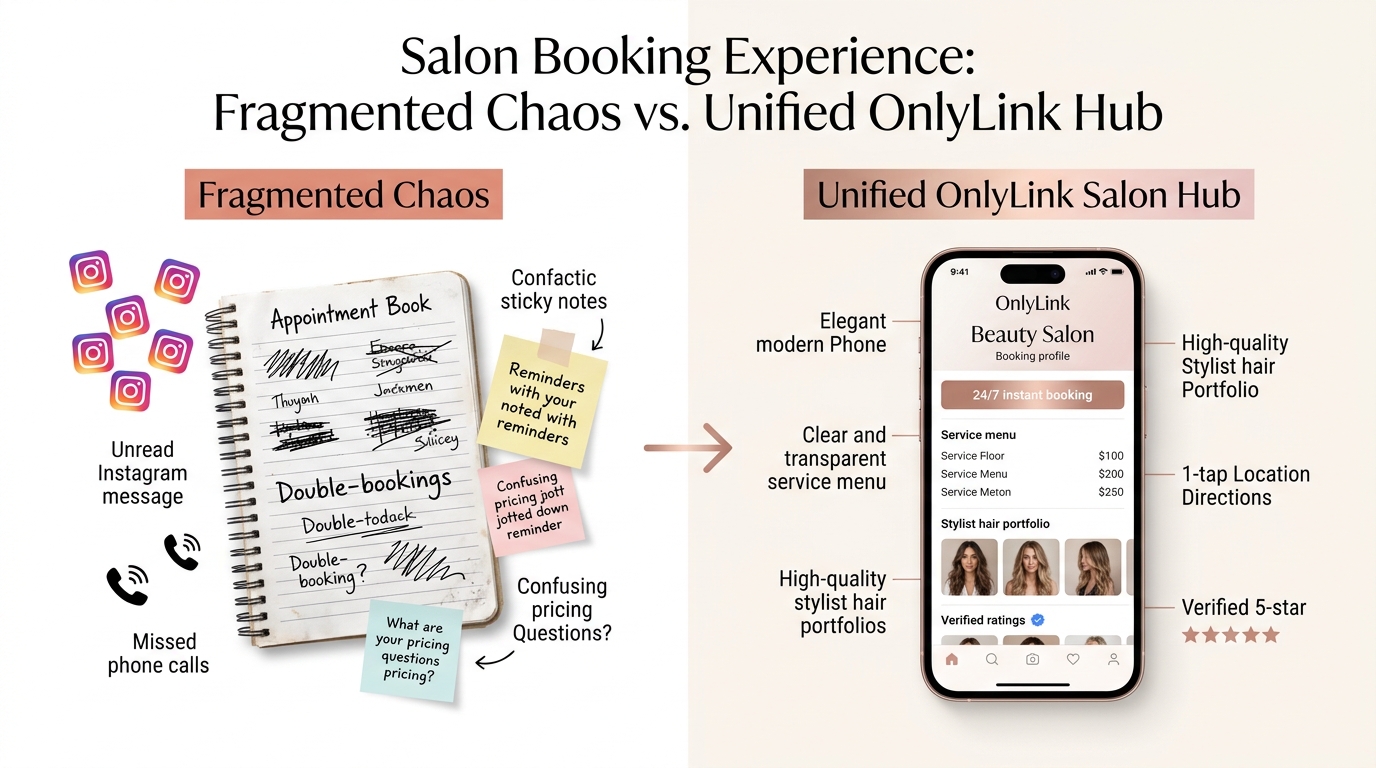
Side-by-Side Comparison: Traditional Salon vs. OnlyLink Salon Hub
| Feature | 🌪️ Fragmented Traditional Salon | ⚡ OnlyLink Light-Theme Salon Directory |
|---|---|---|
| First Impression | Outdated desktop site or generic, dark link tree | Luminous, editorial light-theme aesthetic (#FFFFFF & #FAF8F5) |
| Mobile Page Speed | 4–7 seconds with bulky uncompressed galleries | Sub-second instant load (< 0.4s) on 5G & mobile networks |
| Appointment Booking | “DM to book” or phone calls while shampooing hair | 24/7 instant self-service booking (Vagaro / Fresha / Boulevard) |
| Service Menu Clarity | Scattered across 14 expired Instagram Story highlights | Categorized, expandable service directory with starting prices |
| Stylist Lookbooks | Hard to find individual portfolios and specialties | Dedicated cards linking to each stylist’s portfolio & booking link |
| Cancellation Policies | Vague verbal warnings or buried fine print | Clear upfront policy cards covering deposits & 48-hr rules |
| Studio Navigation | Confused calls asking for parking and suite numbers | 1-tap Google Maps GPS navigation directly to your entrance |
| Prep & Aftercare Guides | Paper cards that get soaked or lost in handbags | Digital library for lash aftercare, blonde maintenance & tanning |
| In-Salon Reviews | Awkward verbal requests at checkout | Acrylic mirror QR code for instant 1-tap 5-star Google reviews |
| Contact Persistence | Paper business cards that get tossed in the trash | 1-tap vCard button saving salon phone, address & booking to phone |
Why Light-Theme Visuals Are Essential for Beauty Salons & Spas
In aesthetic industries like hair styling, skincare, lash artistry, and medical aesthetics, visual design communicates your standard of craftsmanship before a client ever reads a single word.
While dark themes, high-contrast neon gradients, or cyberpunk color schemes work well for gaming, crypto, and software development, luxury beauty and wellness is fundamentally anchored in daylight clarity, editorial sophistication, warmth, and pristine hygiene.
┌────────────────────────────────────────────────────────────────────────┐
│             THE LIGHT-THEME PSYCHOLOGY IN BEAUTY BRANDING              │
│                                                                        │
│   Pristine White & Soft Cream (`#FFFFFF` / `#FAF8F5`)                  │
│   ➔ Signals Sanitary Hygiene, Airy Elegance & Luxury Atelier Purity    │
│                                                                        │
│   Warm Rose Gold & Subtle Blush (`#E0A996` / `#FDF2F0`)                │
│   ➔ Evokes Pampering, Feminine Warmth, Radiance & Hospitality          │
│                                                                        │
│   Refined Champagne Beige & Soft Taupe (`#E8DFD8`)                     │
│   ➔ Communicates High-End Editorial Prestige (Vogue / Architectural)   │
│                                                                        │
│   Deep Charcoal Typography (`#262626`)                                 │
│   ➔ Guarantees Flawless Sunlight Legibility on Mobile Screens          │
│                                                                        │
└────────────────────────────────────────────────────────────────────────┘
Key Advantages of Light-Theme UI for Beauty Salons:
- Editorial Chic & Fashion Alignment: Walk into any luxury department store beauty floor (Nordstrom, Saks, Sephora) or flip through Vogue and Harper’s Bazaar. The aesthetic is luminous, sunlit, clean, and uncrowded. A light-themed bio link positions your salon as an upscale atelier rather than an amateur side hustle.
- Subconscious Association with Cleanliness & Hygiene: Whether you are administering chemical peels, performing microblading, or applying gel extensions, clients demand hospital-grade sanitization. Crisp white backgrounds and soft ivory card containers reinforce the perception of autoclaved tools, pristine treatment beds, and clean towels.
- True Color Fidelity for Hair & Nails: Dark backgrounds distort how human eyes perceive hair tones and skin undertones. Bright white and champagne light backgrounds provide a neutral, clean backdrop that lets your blonde balayage, copper reds, and pastel nail art pop with true-to-life brilliance.
- Daylight Legibility on the Go: Clients walking down sunny sidewalks or driving to their appointment check your address, parking instructions, and suite numbers in broad daylight. A high-contrast light theme prevents screen glare and squinting.
The 4-Stage Beauty Salon Client Journey & Booking Funnel
Transforming casual social media scrollers and local Google searchers into loyal, rebooking salon clients requires an intuitive, four-stage digital funnel:
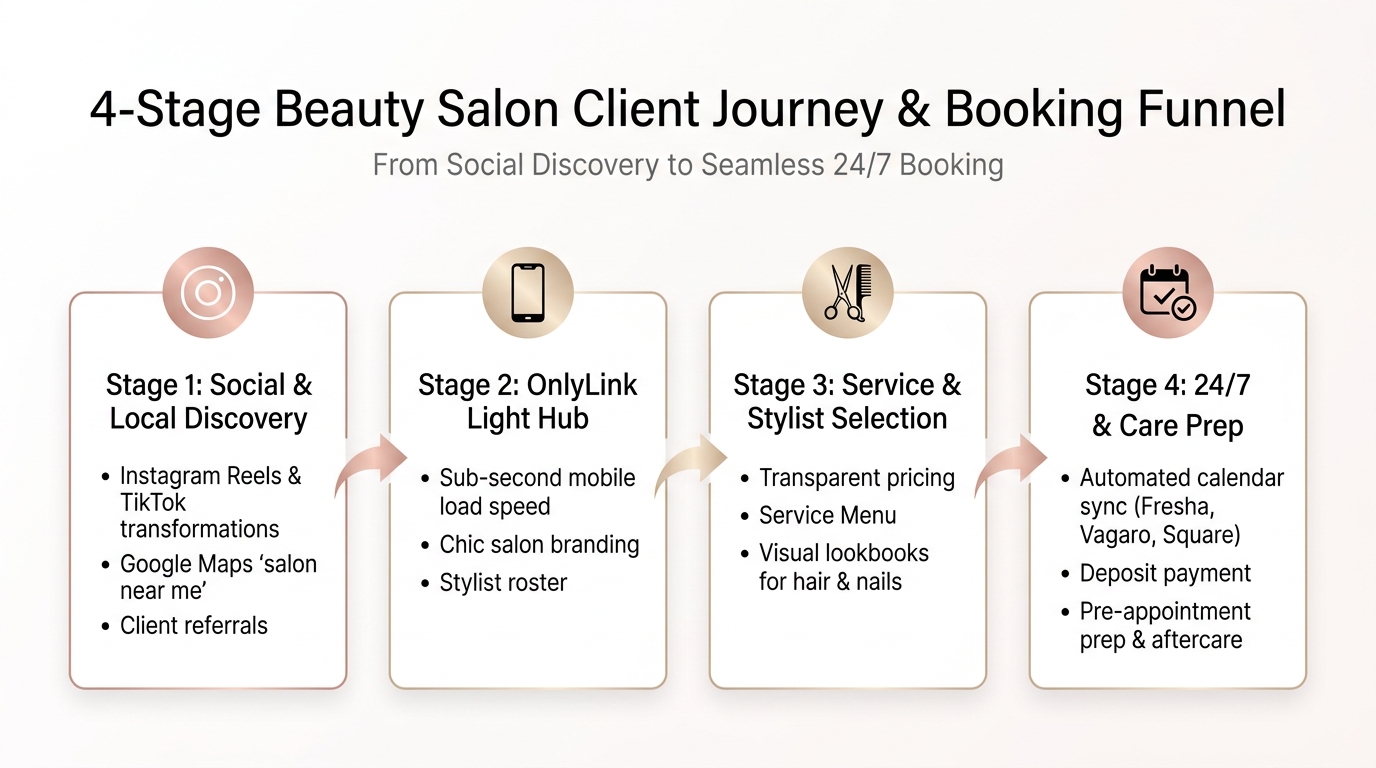
Stage 1: Social & Local Discovery
Prospective clients discover your salon across high-intent channels:
- Instagram Reels & TikTok: Eye-catching 5-second hair transformation reveals, nail art ASMR, or lash extension tutorials.
- Google Maps & Local SEO: Searching “best hair salon near me”, “blonde specialist downtown”, or “Russian manicure studio”.
- Client Word-of-Mouth: Satisfied friends sharing your salon handle when complimented on their fresh balayage.
- Neighborhood Foot Traffic: Pedestrians scanning a sleek window vinyl or sidewalk A-frame board outside your studio.
All traffic converges on a single, chic, memorable URL: onlylink.click/maisonbloom.
Stage 2: The OnlyLink Light Salon Hub
The client taps your link and your OnlyLink hub loads in under 400 milliseconds. They are immediately greeted by:
- An elegant salon brand logo or warm portrait of the salon team.
- A verified status badge: "✨ Accepting New Clients & Bridal Inquiries".
- Studio location, neighborhood, and general operating hours.
Stage 3: Service Exploration & Stylist Selection
Before booking, clients want certainty:
- They tap your Interactive Service Directory to see categorized menus (Hair Color, Cuts, Extensions, Lashes, Nails) with transparent starting prices and duration estimates.
- They explore your Stylist Roster to view individual specialties (e.g., “Chloe: Blonding & Balayage Master” vs. “Marcus: Precision Cuts & Texture Specialist”).
- They check your Before & After Lookbook to verify your salon’s signature aesthetic matches their personal vibe.
Stage 4: 24/7 Confirmed Booking & Care Prep
With all doubts resolved, the client completes the booking:
- They tap the primary "📅 Book Appointment Online (24/7)" button, which routes directly into your live scheduling software (Fresha, Vagaro, Boulevard, Square, or GlossGenius).
- They review your cancellation and deposit policy directly on the hub.
- They access pre-appointment prep guidelines (e.g., “Arrive with clean, dry hair for color consultations” or “Avoid caffeine before lash appointments”).
The Anatomy of an Award-Winning Beauty Salon Bio Hub
Here is what an elite, high-converting light-theme salon directory looks like on a modern smartphone:
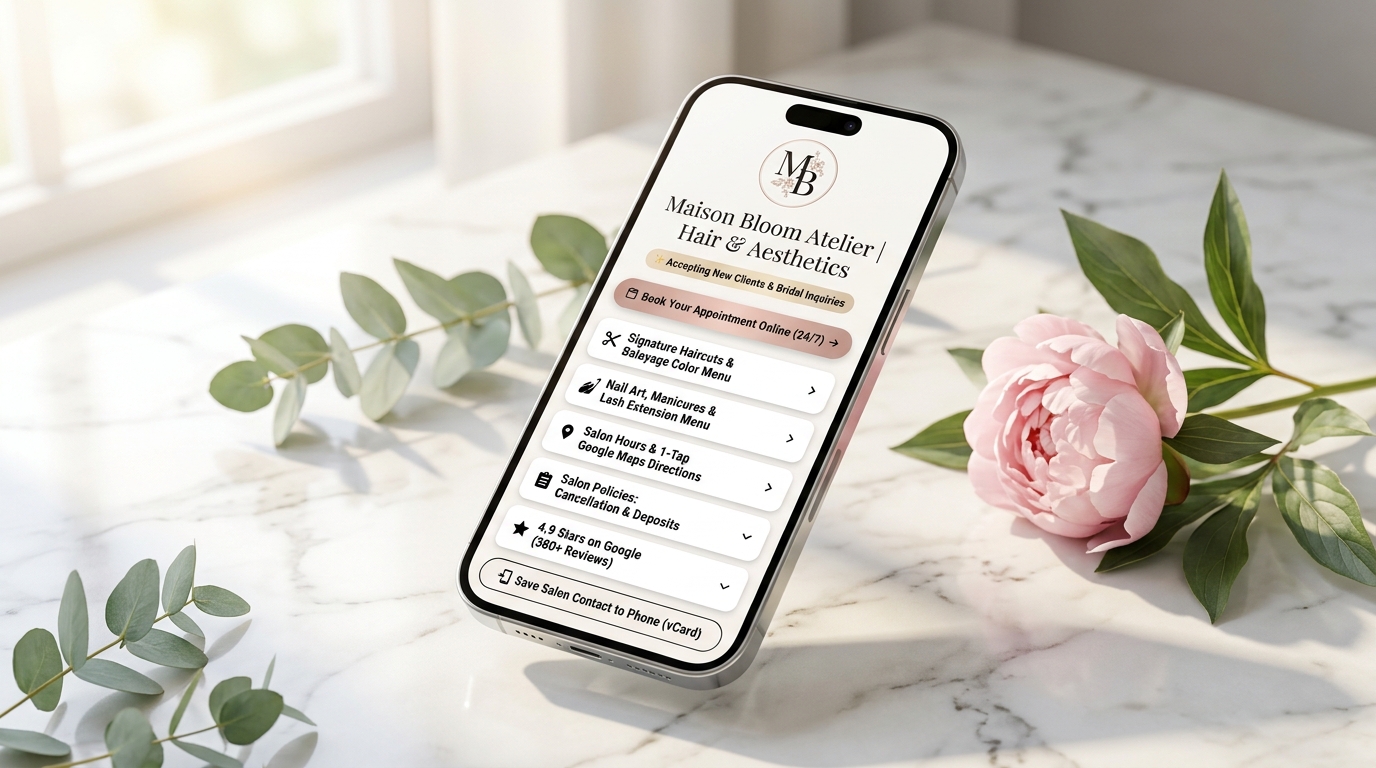
Structural Breakdown of the Hub Architecture
<!-- Structural Outline of a High-Converting Beauty Salon Hub -->
<section class="beauty-salon-hub">
<!-- 1. Salon Branding & Real-Time Availability Pill -->
<header class="salon-header">
<img src="/avatar-maison-bloom.jpg" alt="Maison Bloom Salon & Atelier" class="salon-logo">
<h1>Maison Bloom Atelier</h1>
<p class="salon-tagline">Luxury Hair, Balayage & Aesthetic Nail Studio</p>
<div class="availability-pill">✨ Now Accepting New Clients & Bridal Bookings</div>
</header>
<!-- 2. Primary High-Conversion Action Button -->
<div class="primary-action">
<a href="#book-online" class="btn-rose-gold">📅 Book Your Appointment Online (24/7) →</a>
</div>
<!-- 3. Categorized Service Directory & Pricing Cards -->
<div class="service-menu-group">
<a href="/services/hair-color-cuts" class="service-card">
<div class="icon">✂️</div>
<div class="info">
<h3>Hair Artistry & Dimensional Color</h3>
<p>Balayage, Babylights, Gloss Toners & Precision Cuts · From $85</p>
</div>
</a>
<a href="/services/nails-and-lashes" class="service-card">
<div class="icon">💅</div>
<div class="info">
<h3>Aesthetic Nails & Lash Extensions</h3>
<p>Russian Gel Manicures, Builder Gel & Volume Lash Sets · From $65</p>
</div>
</a>
</div>
<!-- 4. Stylist Roster & Individual Lookbooks -->
<div class="card-group">
<a href="/stylists" class="stylist-roster-card">
👩🎨 <strong>Meet Our Stylists:</strong> View Specialties, Lookbooks & Chair Availability
</a>
</div>
<!-- 5. Studio Location, Parking & 1-Tap Directions -->
<div class="card-group">
<a href="https://maps.google.com/?q=Maison+Bloom+Atelier" class="location-card">
<div class="icon">📍</div>
<div class="info">
<h3>Salon Location & 1-Tap Google Maps Navigation</h3>
<p>415 Newbury St, 2nd Floor, Boston, MA · Free Rear Garage Parking</p>
</div>
</a>
</div>
<!-- 6. Salon Policies & Pre-Service Prep -->
<div class="policy-card-group">
<a href="/policies/cancellations-and-deposits" class="policy-card">
📋 <strong>Studio Policies:</strong> 48-Hour Cancellation, Deposits & Patch Testing
</a>
<a href="/guides/lash-and-color-aftercare" class="prep-card">
🧴 <strong>Client Care Guides:</strong> Post-Balayage Care & Lash Maintenance Rules
</a>
</div>
<!-- 7. Verified Social Proof -->
<div class="review-badge-card">
<div class="stars">⭐⭐⭐⭐⭐</div>
<p><strong>4.9 Stars on Google</strong> · Based on 380+ Verified Client Reviews</p>
</div>
<!-- 8. Mobile Contact Persistence (vCard) -->
<div class="vcard-action">
<a href="/maison-bloom.vcf" class="btn-vcard">📲 Save Salon Contact & Booking to Phone (vCard)</a>
</div>
</section>
Visual Styling Guidelines for Beauty Salon Hubs:
- Background Canvas: Pure crisp white (
#FFFFFF) or soft French alabaster (#FAF8F5). - Card Containers: Pristine white boxes with ultra-fine borders (
border: 1px solid #F0EAE4), gentle 18px corner radii, and subtle elevation shadows (box-shadow: 0 4px 16px rgba(224, 169, 150, 0.08)). - Accent Palette: Warm rose gold (
#E0A996), dusty blush (#FDF2F0), champagne gold (#D4AF37), and deep espresso charcoal (#262626) for editorial typography. - Availability Pill: Soft champagne border with sparkling star emoji, indicating welcoming vibes and active booking availability.
4 Core Pillars of a High-Converting Salon Directory
Pillar 1: 24/7 Automated Scheduling & Booking Engine Integration
Your stylists cannot pick up the phone while applying lightener or shaping a cuticle apex, but your OnlyLink hub can book chairs while you sleep.
By embedding a direct link to your real-time salon management software—such as Fresha, Vagaro, Boulevard, Square Appointments, GlossGenius, Acuity, or Phorest—clients can:
- Select their desired service category (e.g., Full Dimensional Blonding, Root Touch-Up & Blowout, or Structured Gel Manicure).
- Choose their preferred stylist or opt for “First Available Provider”.
- View real-time calendar openings and instantly secure their slot with an automated SMS confirmation.
For high-ticket appointments—such as bridal hair trials, Great Lengths extensions, or multi-hour color corrections—you can add a dedicated "👰 Request Bridal & Group Consultation" button linking to a streamlined intake questionnaire.
Pillar 2: Transparent Service Menus & Stylist Portfolios
De-mystify your service offerings so clients never feel confused about what they are paying for:
- Categorized Service Menus: Group services logically:
- Color & Blonding Artistry (Balayage, Babylights, Bleach & Tone, Gloss Refresher).
- Precision Haircuts & Styling (Signature Blowout, Curly Hair Cuts, Keratin Smoothing).
- Lash & Brow Lounge (Lash Lift & Tint, Brow Lamination, Hybrid Full Sets).
- Nail Bar & Spa (Russian Manicure, Gel-X Extensions, Minimalist Nail Art).
- Transparent “Starting At” Pricing: Clearly indicate starting prices (e.g., “Full Balayage · Starting at $210 (includes toner & blowout)”). This filters out bargain hunters and attracts clients who value premium craftsmanship.
- Stylist Lookbooks: Give each booth renter or commissioned stylist their spotlight. Add sub-links to their individual Instagram profiles and direct booking links so clients can match with a stylist whose personal aesthetic resonates with their own.
Pillar 3: Proactive Prep Guides, Patch Tests & Cancellation Policies
Prevent salon headaches before they happen with prominent digital policy cards:
- Deposit & Cancellation Policy: Explicitly state your terms (e.g., “Appointments require a 30% card deposit. Rescheduling requires 48 hours notice to preserve deposit”). Having this clearly accessible on your bio link establishes clear boundaries.
- Pre-Appointment Prep Guide: Tell clients how to arrive:
- “For color services: Please arrive with dry, unwashed hair free of heavy root touch-up sprays.”
- “For lash appointments: Please remove all eye makeup, mascara, and contact lenses before arrival.”
- Post-Treatment Aftercare Library: Save hours of repetitive client questions by publishing digital guides:
- How to protect fresh blonde hair from brassiness (purple shampoo routine & water filters).
- Lash extension 48-hour moisture rules and oil-free cleansers.
- Post-facial skincare protocols (sun protection & active ingredient hiatus).
Pillar 4: In-Salon Station QR Codes, Digital Tip Jars & Review Engines
Your OnlyLink hub is just as valuable inside your salon as it is on Instagram:
- Styling Station Mirror QR Blocks: Place sleek acrylic QR stands at every styling station and shampoo basin:
- “Scan to connect to guest Wi-Fi, view our seasonal retail hair product menu, or leave your stylist a review!”
- Digital Tip Jars & Payment Links: Many clients no longer carry cash. Include links to Venmo, Cash App, or Zelle so clients can tip their assistant or shampoo specialist with zero friction.
- Checkout 1-Tap Google Review Engine: When a client looks in the mirror and squeals with joy at their fresh haircut, have your front desk coordinator point to the QR stand: “Scan right here to leave Sarah a quick 5-star Google review—it helps her grow her books!”
To learn how to implement physical QR codes effectively, read our in-depth guide on bringing your bio link offline with QR codes.
4-Day Implementation Roadmap for Beauty Salons
Upgrading your salon’s digital front door doesn’t take weeks or require hiring an expensive web agency. Follow this simple 4-day launch schedule:
┌────────────────────────────────────────────────────────────────────────┐
│                 4-DAY SALON DIRECTORY ROLLOUT PLAN                     │
├────────────────────────────────────────────────────────────────────────┤
│                                                                        │
│  DAY 1: Audit & Digitize Service Menus & Policies                      │
│  • Write down exact starting prices, service durations, and prep notes │
│  • Finalize 48-hour cancellation policy and deposit guidelines         │
│                                                                        │
│  DAY 2: Build & Brand Your Light-Theme OnlyLink Hub                    │
│  • Claim your unique username: onlylink.click/yoursalon                │
│  • Apply an editorial light palette (white, champagne, rose gold)      │
│  • Upload high-res salon logo, header bio, and availability badge      │
│                                                                        │
│  DAY 3: Connect Booking Engines, Navigation & Portfolios               │
│  • Link live calendar (Fresha / Vagaro / Boulevard / Square)           │
│  • Add 1-tap Google Maps directions and parking instructions           │
│  • Embed stylist portfolio lookbooks and aftercare guide links         │
│                                                                        │
│  DAY 4: Launch Across Socials & Print Mirror QR Standees               │
│  • Update Instagram bio, TikTok bio, Facebook page & Google Profile    │
│  • Print acrylic QR standees for styling station mirrors and reception │
│                                                                        │
└────────────────────────────────────────────────────────────────────────┘
Day 1: Audit & Digitize Service Menus & Policies
- Review the 10 questions your front desk or DMs answer most frequently every week.
- Group your treatments into 3–4 clean categories with starting prices and estimated chair times.
- Write down concise 3-sentence prep guides for color, lashes, or skin treatments.
Day 2: Build Your Light-Theme OnlyLink Hub
- Register your salon link at OnlyLink.click (
onlylink.click/yoursalon). - Choose a luminous, editorial light theme (pure white background, soft champagne or rose gold borders, dark charcoal typography).
- Add a professional brand logo and an inviting headline with your current booking status.
Day 3: Connect Booking, Navigation & Social Proof
- Place your 24/7 online booking portal link on the top primary action button.
- Configure the 1-tap Google Maps direction card with specific suite numbers and parking advice.
- Add your 4.9-star Google review badge linking directly to your verified review page.
Day 4: Deploy Across Digital Channels & Print In-Salon QR Codes
- Add your new OnlyLink URL to your Instagram bio, TikTok bio, Google Business Profile, and automated confirmation text messages.
- Download your high-resolution OnlyLink QR code. Order small acrylic standees for your front reception desk, styling station mirrors, and retail shelves.
For additional design inspiration, explore our guide on designing a bio page that matches your brand.
Real-World Case Study: How “Maison Bloom Atelier” Grew Bookings by 42%
To see the real-world impact of a mobile service directory, look at Maison Bloom Atelier, an 8-chair boutique salon in Boston specializing in balayage and luxury hair extensions.
The Problem Before OnlyLink:
- The DM Logjam: The owner, Sarah, was spending 2 to 3 hours every night answering Instagram DMs asking about balayage prices, open Saturday slots, and parking.
- The Scheduling Bottleneck: Clients frequently booked simple 45-minute blowouts online when they secretly wanted heavy foils, leaving stylists behind schedule for the rest of the day.
- Lost Walk-Ins: Pedestrians peeked through the boutique windows on weekends when stylists were busy, took a paper business card, and never followed up.
The Solution with OnlyLink:
- Sarah created
onlylink.click/maisonbloomwith a pristine, light-theme palette of soft ivory, champagne beige, and rose gold. - She added an interactive Service Directory outlining starting prices and duration requirements for color vs. cut.
- She embedded her live Boulevard booking scheduler at the top.
- She placed small, rose-gold acrylic QR blocks at every mirror station and an illuminated QR plaque on the exterior front window for evening window shoppers.
The Results After 60 Days:
- 📈 42% Increase in Online Bookings: Over 65% of bookings occurred between 8:00 PM and midnight without a single DM required.
- ⏱️ 12 Hours Saved Weekly: DMs dropped by 80% because all pricing, parking details, and prep rules were answered upfront.
- 🚫 70% Reduction in No-Shows: By enforcing deposit transparency through the directory, unconfirmed no-shows dropped to nearly zero.
- ⭐ 94 New 5-Star Google Reviews: Clients scanned the mirror QR codes while waiting for toners to process, boosting the salon to the #1 ranked hair studio in their neighborhood.
Frequently Asked Questions (FAQ)
Does OnlyLink replace our salon booking software (like Vagaro, Fresha, or Boulevard)?
No, OnlyLink is not a booking engine; it is the ultimate high-converting gateway and directory that leads into your booking engine. Most salon booking software generates long, generic URLs that look cluttered in social bios and fail to provide custom branding, categorized prep guides, or multi-stylist portfolios. OnlyLink packages your booking software, service menu, policies, lookbooks, and directions into one beautiful, lightning-fast mobile hub.
How do we handle independent booth renters who have their own booking links?
OnlyLink is ideal for both salon owners and multi-stylist studio suites. You can create a dedicated section titled “Our Stylist Roster” where each card features a stylist’s photo, specialty, and their own individual booking link (e.g., Jane’s Square link, Chloe’s GlossGenius link, and Marcus’s Vagaro link).
Can we sell our retail hair and skincare products through the directory?
Yes! You can easily add a card group titled “Shop Salon Retail Products” linking directly to your Shopify store, Amazon affiliate storefront, or salon e-commerce portal so clients can re-order their favorite shampoos, serums, and heat protectants from home.
How does a mobile directory reduce salon cancellations and no-shows?
By presenting your 48-Hour Cancellation & Deposit Policy clearly before the client enters the booking flow, clients acknowledge the financial commitment. Furthermore, having 1-tap Google Maps directions ensures first-time clients don’t get lost or arrive 20 minutes late.
Should we use light theme even if our salon interior has darker industrial decor?
Yes. On mobile screens, light-themed directories provide superior legibility, especially when clients browse in bright outdoor daylight or under salon ring lights. Even if your physical studio features exposed brick or dark industrial metal, pairing clean white cards with warm rose gold or charcoal accents preserves your chic brand identity while maximizing readability and conversion rates.
Conclusion: Elevate Your Salon’s Digital Front Door
In the beauty and wellness industry, luxury is defined by attention to detail. Every element of your client’s experience—from the playlist in your studio to the beverage you serve at the styling station—is curated to make them feel pampered, confident, and cared for.
Your online booking experience should feel just as effortless and luxurious as your salon chair.
By ditching chaotic “DM to book” routines and slow, confusing websites in favor of an elegant, light-themed OnlyLink salon directory, you remove every barrier between an interested client and a confirmed appointment.
You will save hours of administrative exhaustion every week, eliminate schedule-wrecking no-shows, and empower your clients to book their dream transformation whenever inspiration strikes.
Ready to transform your salon’s booking experience? Claim your salon’s free OnlyLink directory today and launch your high-converting digital front door in minutes.
Ready to build your link in bio?
Create your free OnlyLink page in under a minute unlimited links, analytics and custom designs.
Get started freeKeep reading
How Home Service Contractors Can Turn Social Profiles Into Quote Requests
Discover how plumbers, HVAC technicians, electricians, roofers, and general contractors turn social media …
How Dentists Can Share Appointment Booking, Clinic Details, and Patient Resources
Discover how modern dental clinics, orthodontists, and cosmetic practices build a high-speed, light-theme …