Freelance Developers: Turning Your Bio Link into a Portfolio
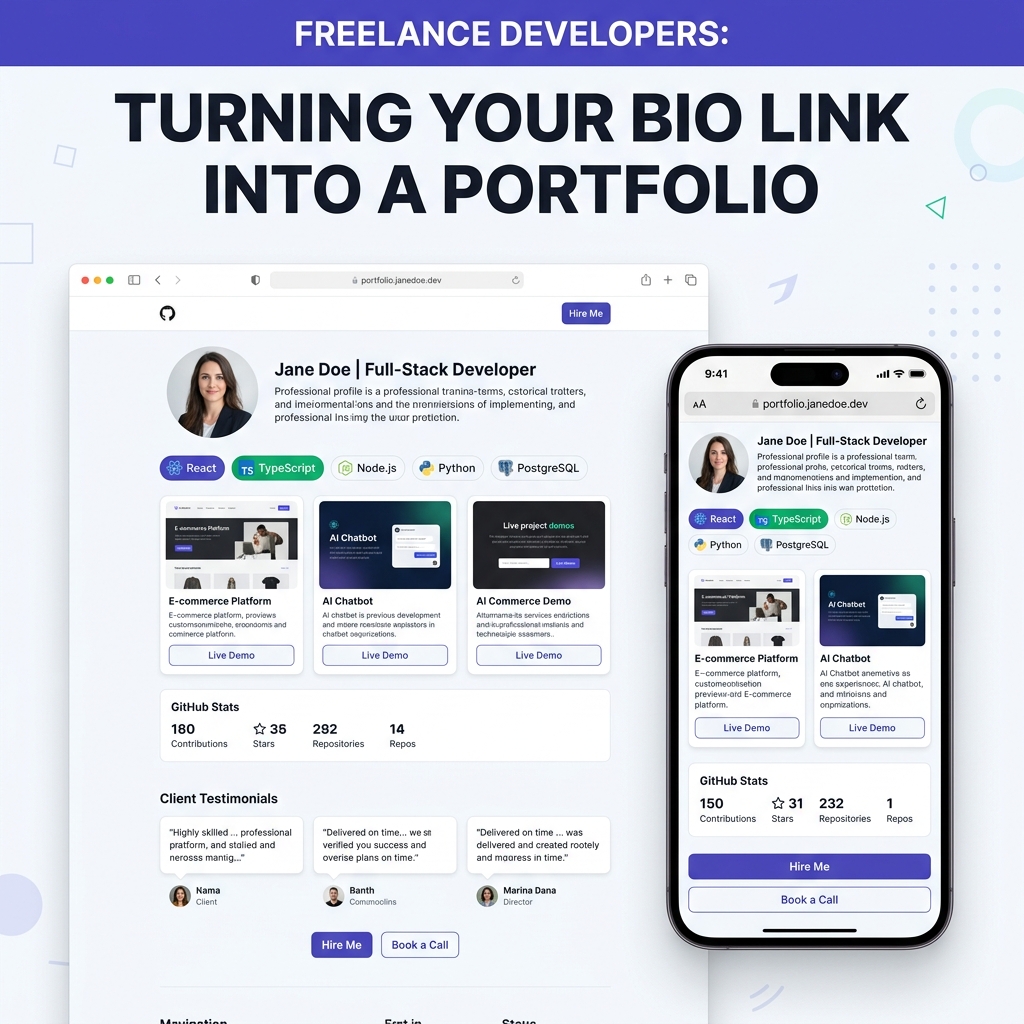
As a freelance software developer, contractor, or technical consultant in 2026, your skills in code are only half the battle. Your ability to attract high-value clients, validate your rates, and close deals hinges almost entirely on how quickly a prospect can verify your capabilities.
Whether you specialize in building full-stack Next.js applications, training custom AI models, engineering high-throughput backend microservices, or designing mobile apps in Flutter, prospective clients will click the link in your LinkedIn profile, X (Twitter) bio, GitHub account, or cold pitch email.
When they click that link, you have roughly 5 to 8 seconds to prove that you are the right engineer for their project.
Unfortunately, many freelance developers suffer from a common pitfall: they over-engineer heavy dark-mode canvas sites loaded with WebGL animations that take 4+ seconds to open on mobile networks—or they send clients a scattered list of 5 separate links across GitHub, Google Drive, and Upwork.
To stand out in today’s competitive freelance landscape, you need a streamlined, mobile-optimized, light-themed developer portfolio hub that presents your tech stack, live demos, client testimonials, and booking links with crystal-clear executive polish.
The Scattered Footprint Problem: Why Traditional Developer Portfolios Lose Deals
When a founder, agency director, or product manager looks to hire a freelance developer, they want answers to three fundamental questions immediately:
- What tech stack does this engineer specialize in?
- Can I see working live demos of their past projects?
- What do previous clients say about their code quality, communication, and reliability?
If answering those questions requires opening five browser tabs, downloading a 40MB PDF resume, or digging through 50 raw GitHub repositories with no README documentation, prospective clients bounce.
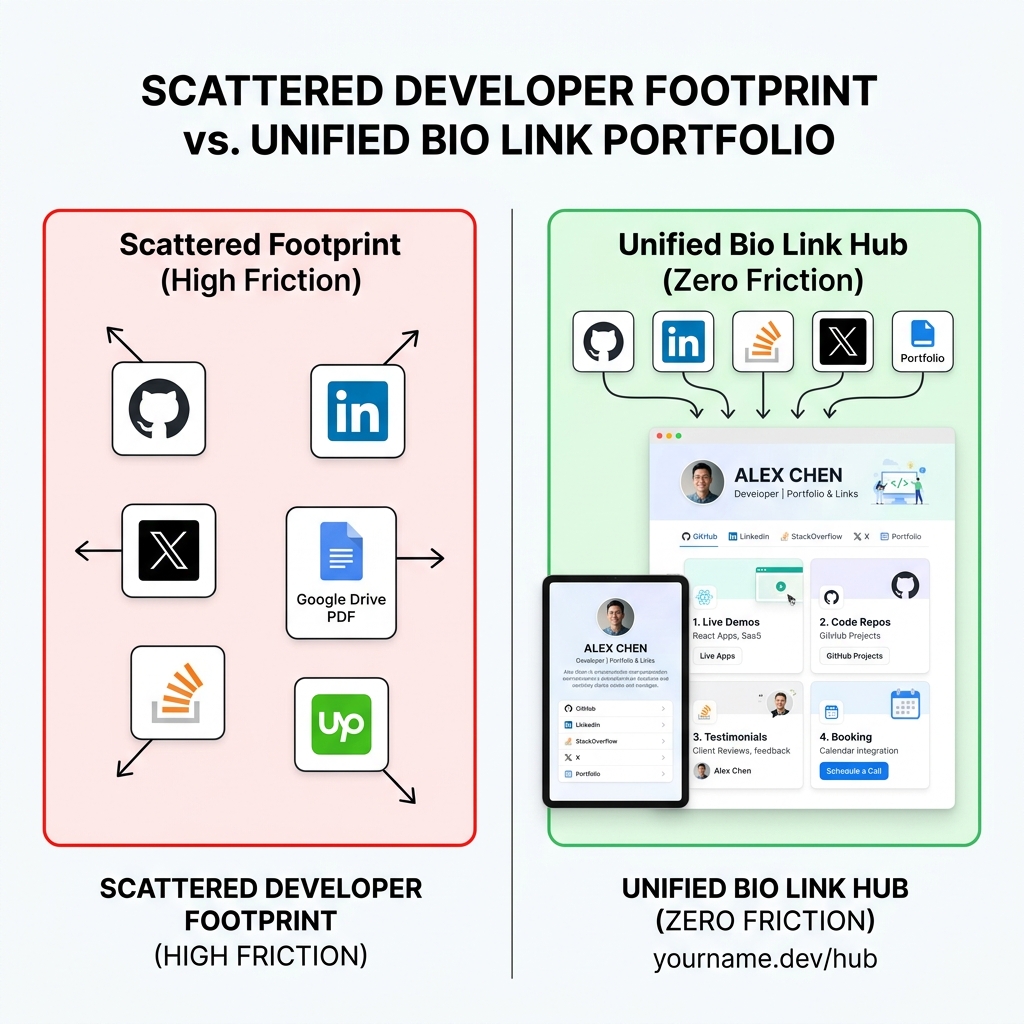
The High-Friction Freelancer Footprint vs. Unified Bio Link Hub
| Evaluation Metric | Scattered Freelancer Footprint ❌ | Unified Light-Theme Bio Link Portfolio ✅ |
|---|---|---|
| First Impression Speed | 4-6 seconds load time on mobile | Sub-second instant rendering |
| Visual Aesthetics | Dark low-contrast code themes with glares | Clean, light-themed executive UI with WCAG AAA readability |
| Project Previews | Raw code repos requiring local setup | Interactive card previews & live working demo buttons |
| Social Proof & Reviews | Hidden on Upwork or buried in PDF files | Highlighted client quotes & verified platform badges |
| Client Inquiry Path | Form hidden behind multiple clicks | Embedded 1-click Calendly / Cal.com booking & inquiry CTA |
As covered in our guide on how freelancers can showcase their portfolio with one link, eliminating navigation friction directly increases client conversion rates.
Why Light-Theme Visuals Are Essential for Developer Portfolios
While dark themes are popular in IDEs like VS Code, modern web design and client communications overwhelmingly favor light-themed visual design for executive and business presentation.
+-----------------------------------------------------------------------+
|                    LIGHT THEME UI ADVANTAGES                          |
+-----------------------------------------------------------------------+
| 1. High-Contrast Legibility (#0F172A Charcoal on #FAFAFC Light Slate) |
| 2. Zero Screen Glare for Daytime & Mobile Client Screening           |
| 3. Premium Executive Aesthetic (Matches Stripe, Apple, Vercel Docs)   |
| 4. Clean Card Elevations with Soft Borders & Subtle Shadows           |
+-----------------------------------------------------------------------+
Key Reasons Light Theme Wins for Client Acquisition:
- Superior Readability in Daytime Lighting: Clients screening candidates on mobile phones or laptops in bright office environments struggle with faint gray text on pitch-black backgrounds. Light backgrounds (
#FFFFFFor#FAFAFC) with deep charcoal text (#0F172A) achieve maximum WCAG AAA contrast ratio. - Executive Documentation Standard: Leading technology companies (such as Stripe, Vercel, Resend, and Apple) utilize pristine light backgrounds for their primary landing pages and developer documentation. Adopting a light-theme portfolio aligns your brand with industry-leading quality standards.
- Enhanced Visual Card Contrast: Project preview thumbnails, tech stack badges (
React,TypeScript,Node.js,PostgreSQL), and client testimonial cards pop with distinct visual hierarchy when placed on soft slate surfaces.
For a deeper dive into UI clarity for recruiters and engineering managers, read our guide on creating a developer portfolio that recruiters will love.
The 4 Architectural Pillars of a High-Converting Freelance Developer Bio Portfolio
To convert casual bio clicks into paid client discovery calls, structure your OnlyLink bio page using four core architectural pillars:
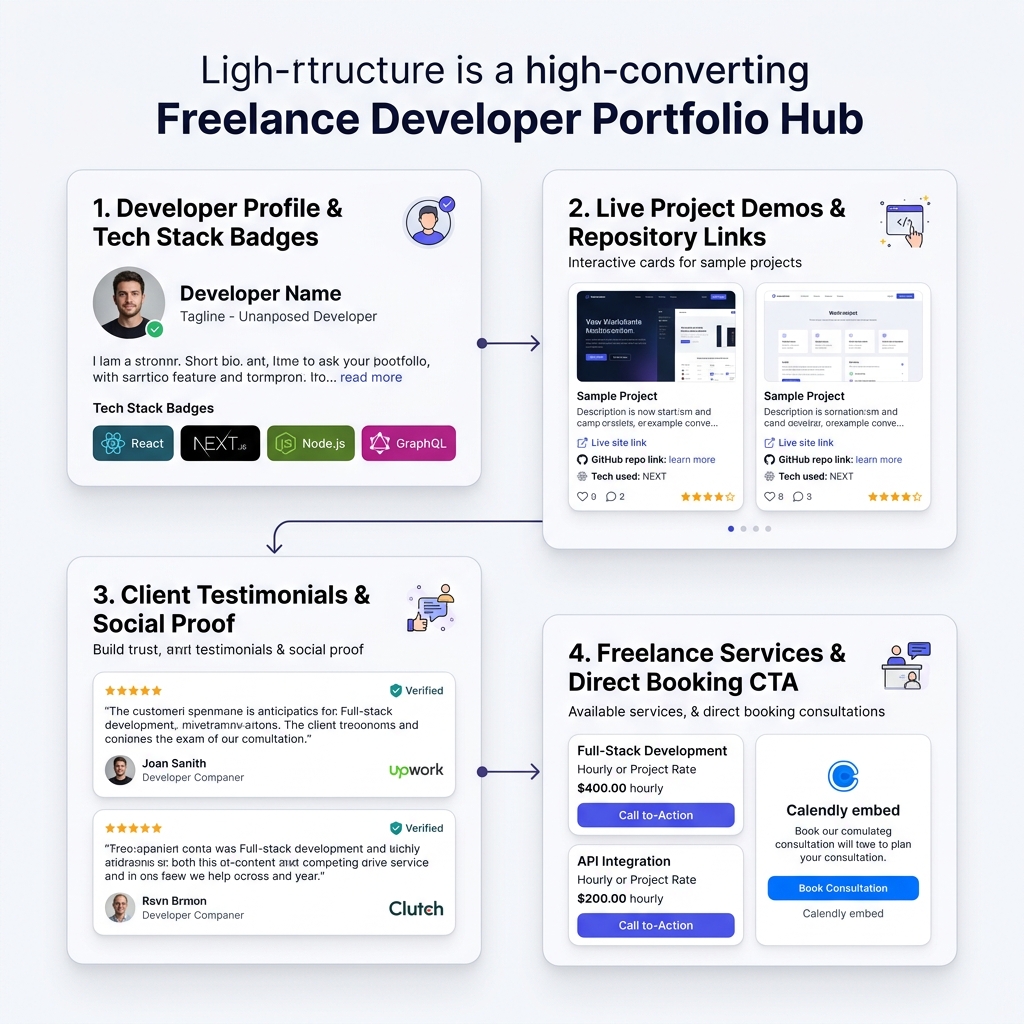
Pillar 1: Developer Profile & Tech Stack Badges
Start with a high-impact header that communicates your specialization instantly:
- Professional Avatar & Headline: High-resolution headshot paired with a clear value proposition (e.g., “Senior Full-Stack Developer — Building Scalable SaaS & React Web Apps”).
- Current Status Indicator: A green status badge (e.g., "🟢 Available for Q4 Freelance Projects & Contracting").
- Categorized Tech Stack Badges: Visual tags highlighting your primary skills (
TypeScript,React / Next.js,Node.js,Python,PostgreSQL,Docker,GraphQL,TailwindCSS).
Pillar 2: Live Demos & Outcome-Focused Project Cards
Instead of linking to a standard GitHub list, feature 3 to 5 key project cards with real-world business context:
### ⚡ CloudPulse — Real-Time API Performance Monitor
- **Live Demo:** [cloudpulse-demo.onlylink.click](https://onlylink.click)
- **Source Code:** [github.com/yourname/cloudpulse](https://github.com)
- **Tech Stack:** `Next.js 15` `Go` `Redis` `PostgreSQL` `TailwindCSS`
- **Key Outcome:** Architected distributed caching layer that handled 10M+ daily events with 99.99% uptime.
- Interactive Previews: Include live URL buttons so clients can test your software in one click.
- Quantitative Metrics: Focus on outcomes—speed improvements, revenue generated, or user scale achieved.
Pillar 3: Client Testimonials & Social Proof
Trust is the ultimate factor in freelance client acquisition. Showcase credible evidence of your work ethic and delivery standards:
- Client Testimonial Cards: Direct quote blocks from founders, agency owners, or CTOs praising your communication and code quality.
- Platform Badges: Display verified badges from Upwork (“Top Rated Plus”), GitHub (“Open Source Contributor”), or Clutch.
- Client Logos: A clean logo bar showing companies or startups you have contracted with.
Pillar 4: Clear Rates, Services & 1-Click Booking
Make it effortlessly easy for high-intent clients to initiate contact:
- Service Offering Cards: Clearly outline your engagement models (e.g., Full App Build, Technical Architecture Audit, Fractional CTO / Staff Augmentation).
- Pricing Indicators: Mention starting project rates or hourly bands (e.g., “Full-stack builds starting at $4,500” or "$120/hr").
- 1-Click Booking Integration: Embed a Calendly or Cal.com widget so prospects can schedule a 15-minute intro call directly from your bio link.
5 Design Rules for Building Your Light-Theme Bio Portfolio
When setting up your portfolio on OnlyLink, follow these design guidelines for maximum impact:
- Maintain Clean Whitespace: Avoid cluttering your bio page with 20 minor tutorial links. Stick to 5 to 7 high-impact elements.
- Use Soft Card Elevations: Give project cards and testimonials subtle borders (
1px solid #E2E8F0) and light box shadows (box-shadow: 0 4px 6px -1px rgba(0, 0, 0, 0.05)) for tactile depth. - Apply Accent Colors Strategically: Reserve vibrant accent colors (like indigo
#6366F1or emerald#10B981) for your primary Call-to-Action buttons (“Book Discovery Call” or “View Live Demo”). - Optimize for Mobile First: Over 80% of traffic coming from social media profiles will open on mobile devices. Ensure all text and buttons are easily tap-friendly.
- Keep Bio Links Updated: Periodically refresh your featured projects and availability status. Read our guide on when to refresh your bio link for optimal timing.
How to Set Up Your Freelance Developer Bio Link Portfolio in 5 Minutes
Setting up a professional light-themed developer portfolio hub is fast and straightforward:
- Claim Your Custom Handle: Register your handle at
yourname.onlylink.click. - Select a Light Theme Preset: Choose a crisp, high-contrast light theme template with clean typography and soft card styling.
- Add Your Profile & Tech Stack: Upload a high-quality headshot, write your headline, and add your technical skill tags.
- Create Project & Testimonial Cards: Add your top 3 live project URLs, GitHub repos, and client reviews.
- Embed Your Booking Link & Contact Options: Connect your Calendly, email, LinkedIn, and GitHub links.
- Publish to All Profile Bios: Add your new OnlyLink URL to your LinkedIn profile, X bio, GitHub website link, and email signature.
For more insights on integrating your technical footprint across platforms, check out our guide on showcasing GitHub, LinkedIn, and projects in one place and building your overall digital identity beyond LinkedIn.
Turn Your Bio Link into Your Best Sales Representative
As a freelance developer, your bio link shouldn’t be an afterthought or a generic text list. By transforming your bio link into a light-themed, high-converting portfolio hub, you provide prospective clients with an immediate, frictionless window into your talent and professionalism.
Stop losing potential clients to slow loading times and scattered links.
Ready to elevate your freelance engineering career?
Create your free OnlyLink developer portfolio today and claim your custom handle before someone else does!
Ready to build your link in bio?
Create your free OnlyLink page in under a minute unlimited links, analytics and custom designs.
Get started freeKeep reading

BookTok and Bookstagram: Building a Bio Page for Book Lovers
Discover how BookTokers and Bookstagrammers can design a stunning light-theme bio link page. Learn how to …

Travel Bloggers: How to Showcase Destinations in One Link (2026 Guide)
Turn viral travel Reels, TikToks, and YouTube vlogs into itinerary sales, hotel bookings, and email …