BookTok and Bookstagram: Building a Bio Page for Book Lovers
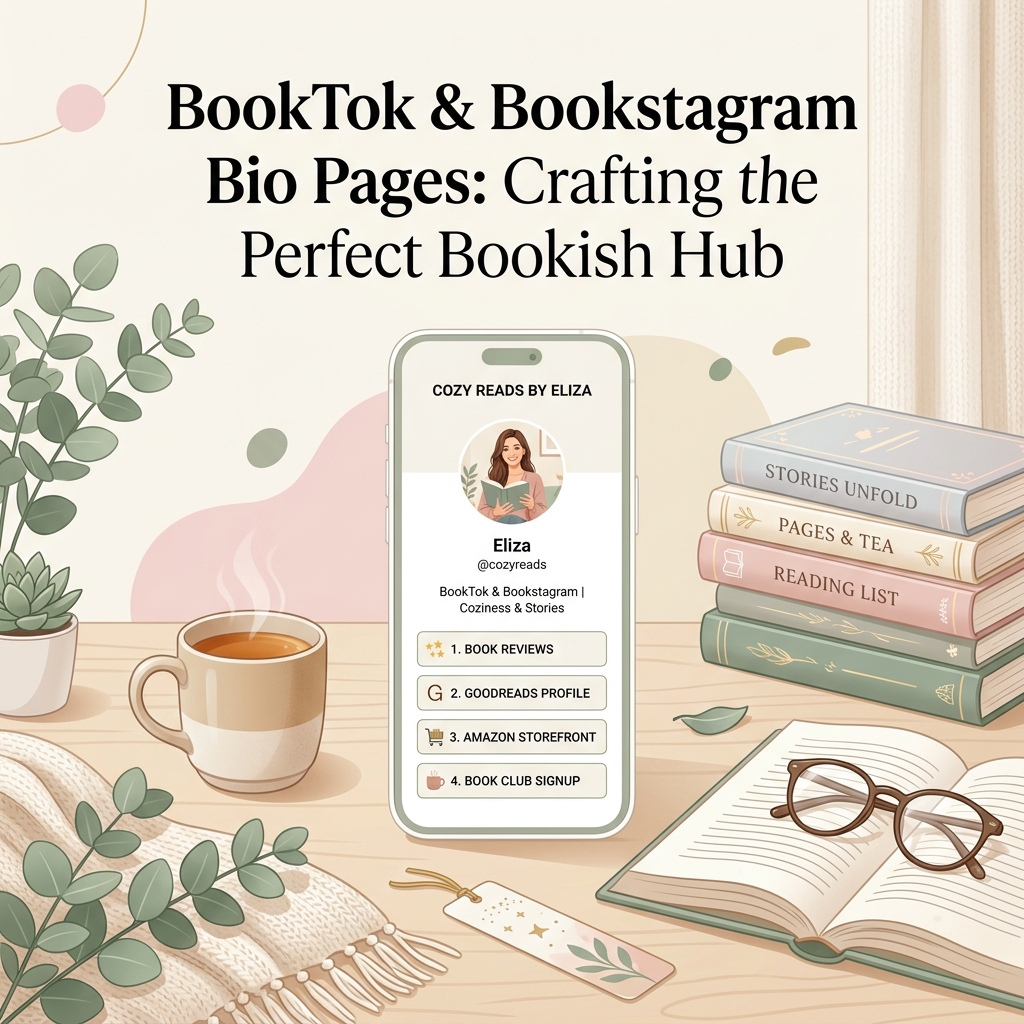
Over the past few years, the literary internet has undergone a massive revival powered by BookTok and Bookstagram. Every day, bibliophiles, book reviewers, and content creators captivate millions of readers with emotional book reaction videos, aesthetic bookshelf tours, annotated page tabs, cozy reading vlogs, and spicy fantasy recommendations.
However, book influencers face a common digital hurdle: converting viral short-form video views into active book sales, newsletter subscribers, and publisher partnerships.
When a follower watches your viral 15-second TikTok crying over a emotional plot twist or showcasing a 5-star fantasy series, their immediate reaction is: “What book is that, and where can I buy it?”
Because social platforms restrict profile bios to a single clickable URL, sending passionate readers to an unorganized link list or a generic blog homepage leads to high bounce rates and lost affiliate revenue.
Using OnlyLink.click, literary creators can build an elegant, light-themed bio landing page designed to celebrate books, organize recommendation lists, host book clubs, and monetize reading habits seamlessly.
Here is your complete guide on building the ultimate bio page for BookTokers and Bookstagrammers, complete with light-theme visual principles, layout architecture, and monetization strategies.
The BookTok & Bookstagram Bio Link Content Ecosystem
A high-converting bio link hub for book creators functions as a digital reading nook and creator storefront. Instead of forcing followers to search through past posts or guess book titles, a smart book bio link delivers instant access to featured reads, affiliate bookstore storefronts, book club discussions, and publisher review contact forms:
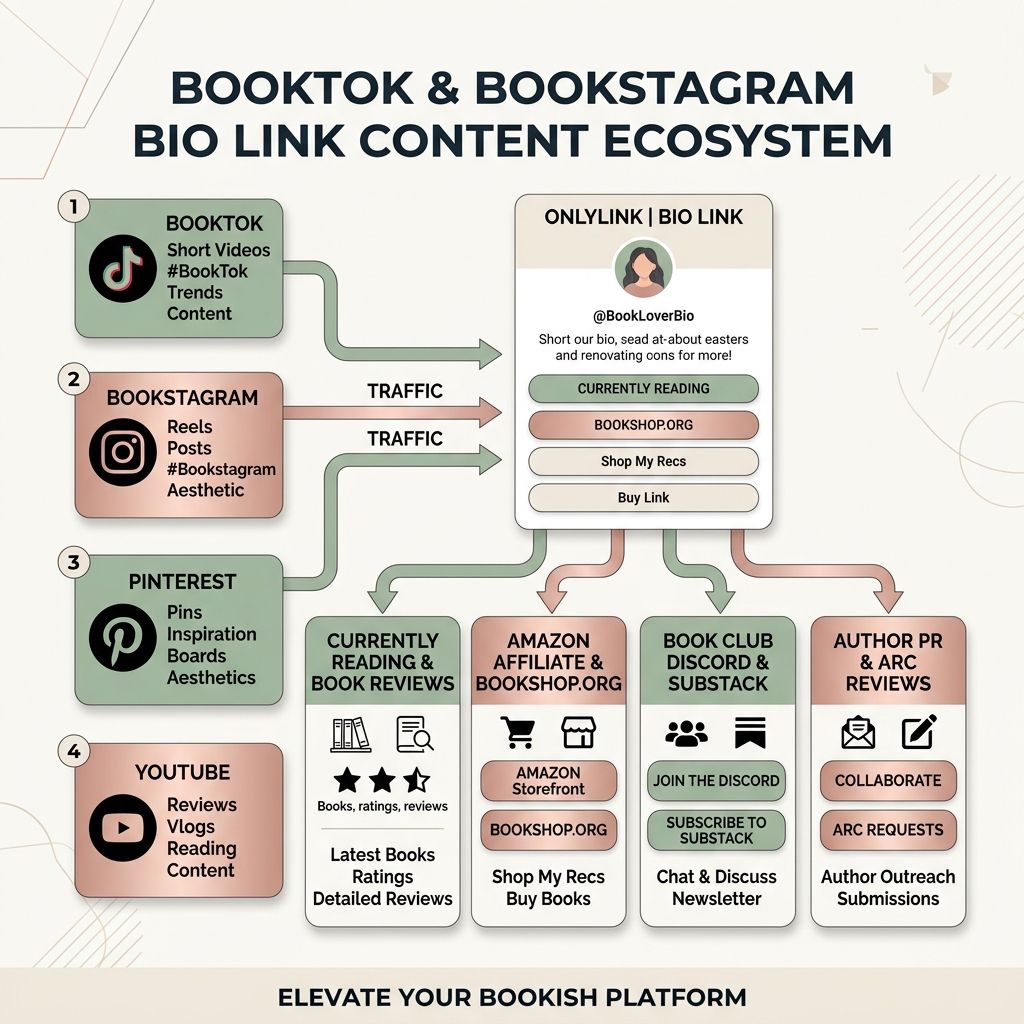
The 4 Pillars of the Literary Bio Ecosystem:
- Social Discovery Engines: Engaging short-form videos on TikTok, aesthetic grid photography on Instagram, curated mood boards on Pinterest, and deep-dive reading vlogs on YouTube.
- Central Book Bio Hub (OnlyLink): A fast-loading, mobile-optimized landing page hosted on OnlyLink.click styled with warm parchment visuals and clean light-mode typography.
- Instant Reading & Recommendation Routing: Direct links to your “Currently Reading” book spotlight, Goodreads/StoryGraph profiles, and curated genre lists (Romantasy, Psychological Thrillers, Cozy Mystery, Dark Academia).
- Monetization, Community & Publisher PR: Monetizing recommendations via Amazon Storefront and Bookshop.org affiliate links, building a subscriber community via Discord or Substack, and accepting Advanced Reader Copy (ARC) pitches from authors and publishers.
Why Light-Theme Visuals Are Essential for Book Lovers
Visual presentation sets the mood for any reading space. Just as book lovers adore sunlit reading nooks, natural oak bookshelves, crisp paper pages, and warm cups of tea, your bio page visual aesthetic should evoke warmth, clarity, and cozy elegance.
Dark-mode themes or oversaturated neon colors often feel jarring against soft book cover photography and can strain eyes when followers read your mini-reviews on mobile devices under bright lighting.
Essential Light-Theme Design Guidelines for Book Creators:
- Warm Parchment & Soft Cream Backgrounds: Use inviting neutral background tones (
#fdfbf7,#faf8f5, or#f5f2eb) that mimic physical book paper, linen covers, and cozy reading nooks. - Cozy Earth & Warm Pastel Accent Colors: Select warm terracotta (
#c2410c), soft sage green (#15803d), muted rose gold (#be123c), or deep espresso (#78350f) for action buttons and badge tags. - Elevated White Cards with Soft Drop Shadows: Group recommendation links into clean white container cards (
#ffffff) featuring smooth border radii (12px-16px) and delicate drop shadows (box-shadow: 0 4px 12px rgba(0,0,0,0.04)). This creates a physical bookmark or library catalog card feel. - High-Contrast Charcoal & Espresso Typography: Use sharp dark charcoal or deep brown serif/sans typography (
#1c1917) to guarantee effortless readability across all device screens.
The Ultimate Bio Link Layout for Book Lovers (Top to Bottom)
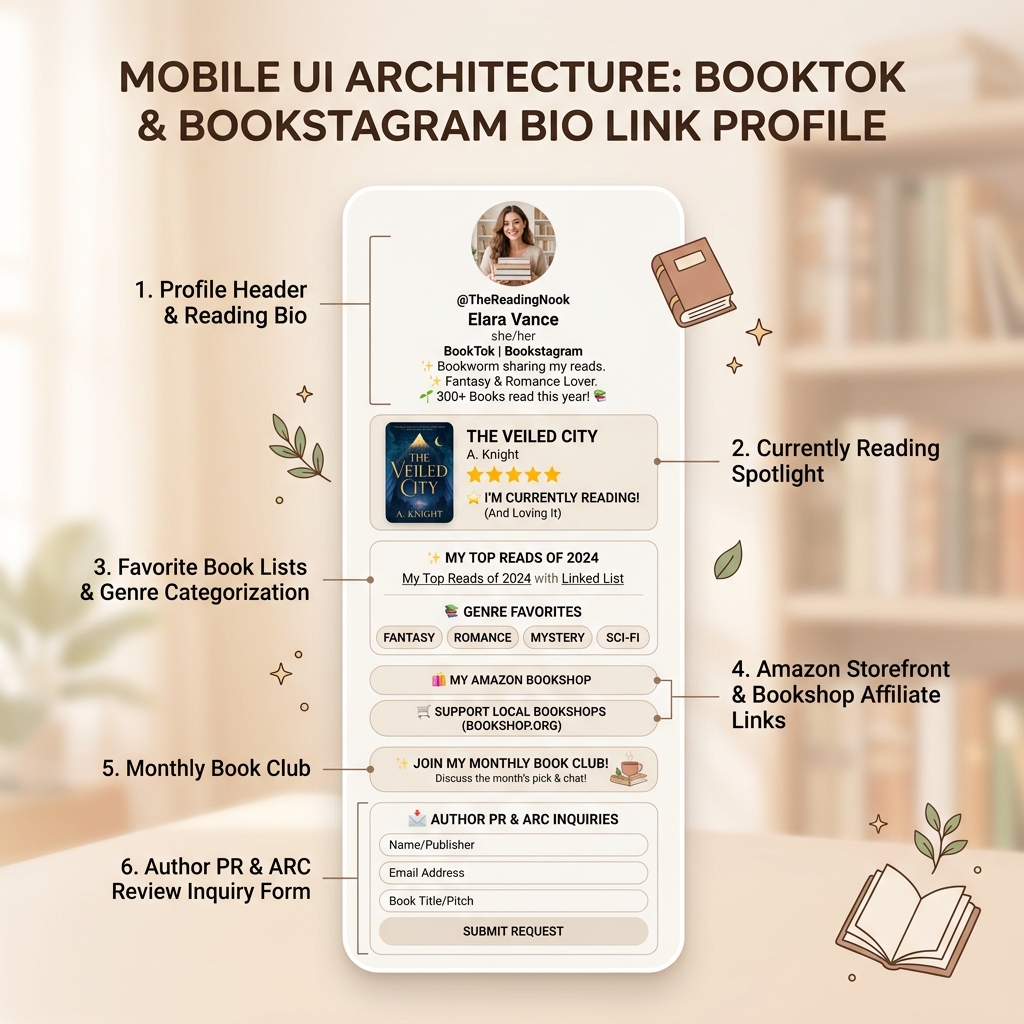
To maximize click-through rates and guide fellow bookworms smoothly through your content, structure your OnlyLink page into clear, logical zones:
Zone 1: Profile Header & Aesthetic Credibility Tagline
Keep your header warm, personal, and focused on your literary niche:
- Avatar: High-resolution portrait holding a current read or standing in front of your favorite bookshelf.
- Bio Copy: Clear literary tagline with star ratings and reading challenge progress:
"📖 Romantasy & Thriller Obsessed | 📚 2026 Reading Challenge: 45/75 Books | ☕ Coffee & Plot Twists | 👇 Shop My Favorite Reads Below!"
Zone 2: Dynamic “Currently Reading” Spotlight Card
Place your active book read right at the top of your profile. When followers see your latest video talking about a page-turner, they can instantly find out what it is:
- Visual Card: Embedded thumbnail of the book cover, book title, author, and your initial star-rating prediction.
- Button CTA: "📖 CURRENTLY READING: ‘The Veiled City’ by A. Knight (⭐⭐⭐⭐⭐ Prediction)"
- Pro Tip: Update this card every time you start a new book or post a book review reel.
Zone 3: Curated Genre Recommendations & Favorite Booklists
Help followers discover your top recommendations categorized by genre or mood:
- 🐉 Top 10 Romantasy Series That Will Ruin Your Life
- 🔪 Unputdownable Psychological Thrillers with Insane Plot Twists
- ☕ Cozy Autumn & Rainy Day Reads
- 🎓 Dark Academia & Boarding School Mysteries
- 📊 My Goodreads & StoryGraph Profiles
Zone 4: Monetizing Your Recommendations (Affiliate Storefronts)
Turn your passion for reading into passive income by linking your affiliate storefronts:
- Amazon Storefront Link: "🛒 Shop My Amazon Bookshop & Annotating Supplies" (high-lighters, sticky tabs, book lights, Kindle sleeves).
- Bookshop.org Link: "📚 Support Local Indie Bookstores (Buy via Bookshop.org)" — builds massive goodwill with readers who prefer supporting independent booksellers.
Zone 5: Book Club Community & Subscriber Growth
Build an engaged community that you own outside of volatile social algorithms:
- Book Club Discord / Geneva: "✨ Join My Monthly Book Club Discord (October Pick: Fantasy Edition)"
- Substack / Newsletter: "📩 Subscribe to ‘The Cozy Bookmark’ Weekly Newsletter for Secret Book Recs"
Zone 6: Author PR & ARC Review Request Form
Make it effortless for authors, publicists, and publishers (like Penguin Random House, HarperCollins, or indie presses) to reach out with Advanced Reader Copies (ARCs):
- Integrated Contact Card: "✉️ Author PR & ARC Review Request Form" (accepting review inquiries, sponsored unboxings, and book tour requests).
Bio Link Feature Comparison for Book Influencers
| Feature | Standard Link List | OnlyLink.click Book Lover Layout |
|---|---|---|
| Visual Aesthetic | Generic dark/plain template | Warm parchment, soft cream light-theme design |
| “Currently Reading” Feature | Static text button | Dynamic spotlight card with cover thumbnail & star rating |
| Monetization Support | Single basic URL link | Embedded Amazon Storefront & Bookshop.org affiliate cards |
| Indie Bookstore Integration | Unsupported | Native Bookshop.org support to support indie sellers |
| Publisher PR & ARC Requests | Mailto link only | Custom contact card & structured review pitch form |
| Performance & SEO | Slow script loads | Fast load speed with automated schema meta tags |
| First-Party Analytics | Basic click counts | Comprehensive click-through rates, platform referral tracking |
5 Tips to Maximize Engagement on Your Book Bio Page
- Update Your “Currently Reading” Card Weekly: Keeping your top spotlight card fresh gives your followers a reason to click your bio link every single week.
- Use Star Ratings & Aesthetic Emojis: Visual cues like ⭐⭐⭐⭐⭐, 📖, 🕯️, and ☕ add personality and help scrollers scan your recommendations quickly.
- Always Disclose Affiliate Links: Include a small note like (Affiliate links help support my channel at no extra cost to you!) to maintain total transparency and trust with your audience.
- Highlight Annotating & Reading Accessories: Book lovers love gear! Include affiliate links to your favorite book lights, page tabs, custom bookmarks, and Kindle clear cases.
- Add Your Bio Link to Every Social Profile: Put your custom OnlyLink URL in your Instagram bio, TikTok bio, Pinterest bio, and YouTube channel header so readers can connect with you on any platform.
How to Build Your Book Bio Page with OnlyLink in 5 Minutes
Creating your literary bio page is quick, easy, and completely free:
- Claim Your Handle: Head to OnlyLink.click and claim your personalized link (
onlylink.click/yourbookname). - Apply a Warm Light Theme: Select one of OnlyLink’s warm parchment or soft cream light-theme presets.
- Add Your Book Spotlight & Genre Links: Create your “Currently Reading” hero card, genre lists, and affiliate store buttons.
- Set Up Community & PR Links: Add your Book Club Discord link and publisher ARC request contact form.
- Publish to Your Social Bio: Copy your brand new OnlyLink profile URL into your TikTok and Instagram bio fields!
Elevate Your Bookish Platform Today
As BookTok and Bookstagram continue to shape the publishing industry, having a dedicated, beautifully styled bio page ensures that every viewer can instantly discover your top reads, buy your recommended books, join your community, and collaborate with top publishers.
Ready to transform your social profile into the ultimate digital reading nook? Build your free light-theme OnlyLink page today!
Ready to build your link in bio?
Create your free OnlyLink page in under a minute unlimited links, analytics and custom designs.
Get started freeKeep reading
Travel Bloggers: How to Showcase Destinations in One Link (2026 Guide)
Turn viral travel Reels, TikToks, and YouTube vlogs into itinerary sales, hotel bookings, and email …
The Best Bio Link Layout for Food and Recipe Creators (2026 Guide)
Turn viral TikTok recipe clips and Instagram Reels into cookbook sales, website traffic, and affiliate …