
Best Personal Branding Tips for Software Developers in 2026
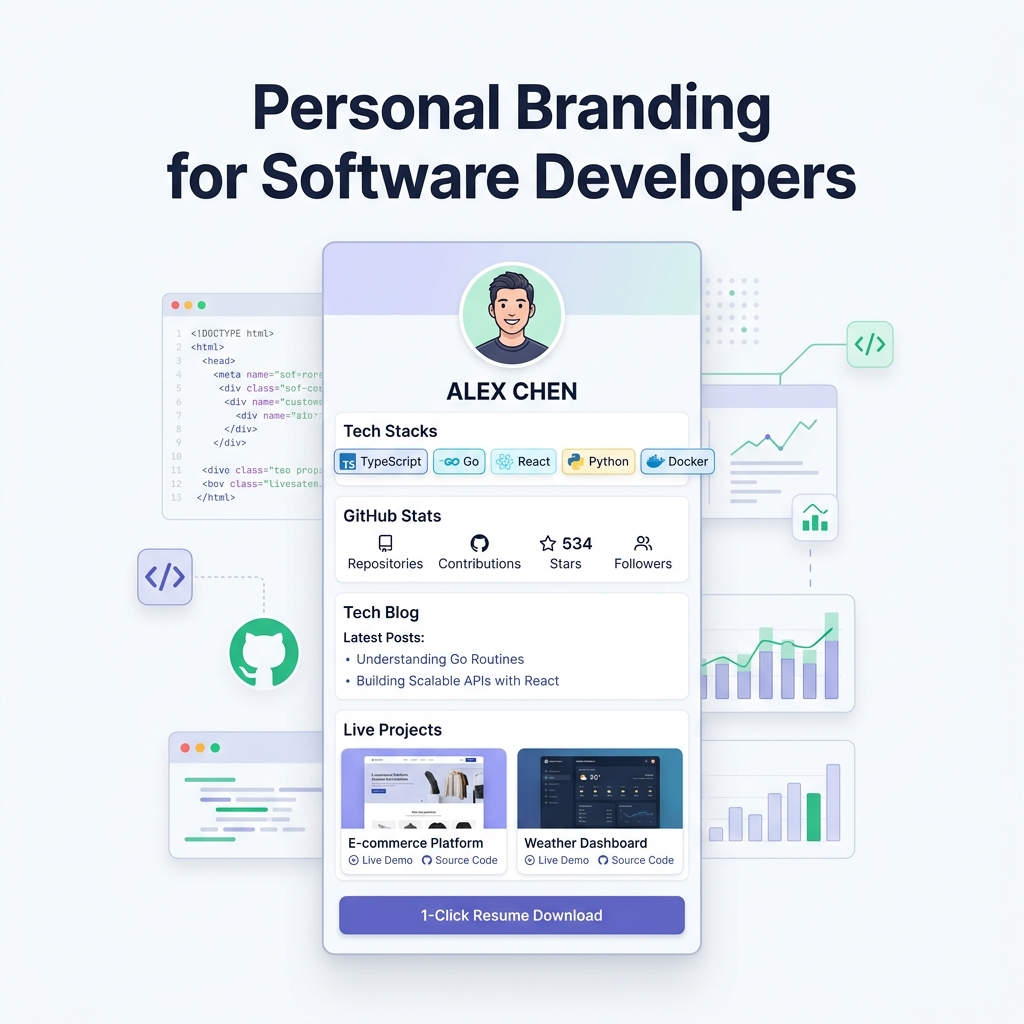
In today’s fast-evolving software industry, being a skilled engineer is no longer enough to guarantee top-tier career opportunities, high-paying consulting contracts, or leadership roles.
With thousands of developers applying for the same remote positions, technical skill acts merely as table stakes. What truly sets elite engineers apart in 2026 is personal branding.
A strong technical personal brand elevates you from an “anonymous coder” pushing commits into a void to a recognized technical authority. It transforms job hunting from endlessly submitting cold applications into receiving inbound inquiries from recruiters, founders, and engineering executives.
In this guide, we reveal the best personal branding tips for software developers, explain how to structure your proof of work, and explore why presenting your developer identity with clean, light-theme visual design builds immediate credibility.
The Paradigm Shift: Why Developers Need Personal Branding
Traditionally, developers believed that “code speaks for itself.” While clean code and solid architecture matter tremendously, code hidden inside private repositories or buried under obscure GitHub handles doesn’t reach decision-makers.
Technical recruiters and hiring managers spend an average of 6 to 10 seconds screening candidate profiles. They do not have time to clone your GitHub repository, install npm packages, and debug environment variables just to evaluate your capabilities.
What Personal Branding Does for Engineers:
- Generates Inbound Opportunities: Founders and recruiters reach out directly because your expertise is visible online.
- Commands Higher Salary & Rates: Recognized domain experts negotiate higher compensation than unbranded peers with identical technical skills.
- De-risks Hiring Decisions: Published writing, live project demos, and open-source contributions provide concrete proof of work.
- Unlocks Alternative Career Paths: Opens doors to developer advocacy, technical writing, consulting, advisory roles, and startup co-founding.
The Developer Personal Branding Framework
Building a multi-channel developer brand requires connecting your technical assets into a single cohesive ecosystem:
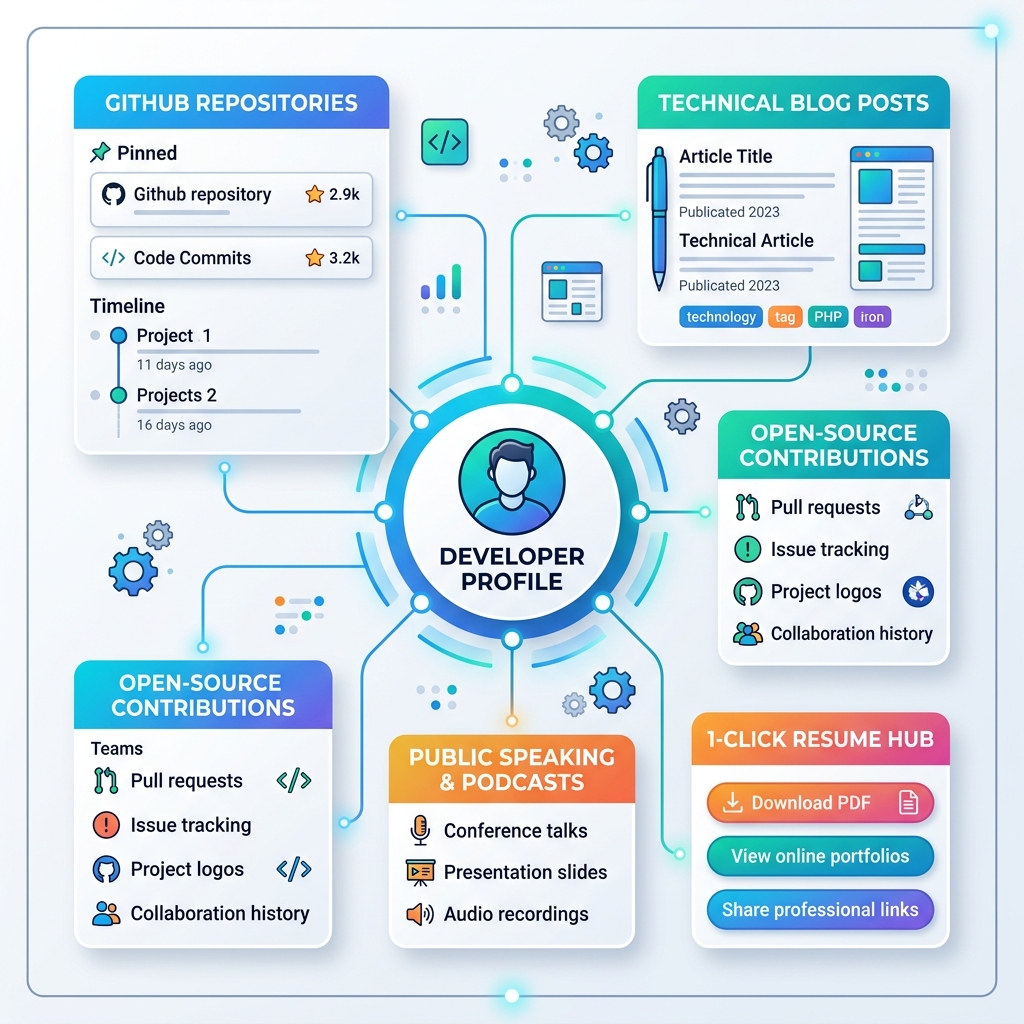
| Aspect | Invisible Developer | Branded Technical Leader |
|---|---|---|
| Online Footprint | Scattered links (LinkedIn, GitHub, Google Drive CV) | Single light-theme bio hub (alexchen.onlylink.click) |
| Proof of Work | 50 unmaintained, unpinned GitHub repos | Curated top 3 projects with live demo URLs & metrics |
| Content Strategy | Consumes content silently | Publishes technical articles, case studies, or dev logs |
| Recruiter Friction | Must open 4+ tabs and dig for resume PDF | 1-click resume download & interactive project cards |
| Visual Aesthetics | Dark, low-contrast desktop sites with heavy loading | Clean light-theme surface cards, high WCAG contrast, sub-second speed |
7 Best Personal Branding Tips for Software Developers
1. Curate Proof of Work Over Quantity
Quality always trumps quantity when showcasing software projects. Instead of listing 40 half-finished tutorial repositories on your profile, curate your top 2 to 4 flagship projects.
For each featured project, provide:
- The Core Problem: What real-world user or technical friction did this software resolve?
- Tech Stack Badges:
TypeScriptGoReactPostgreSQLDocker - Key Quantified Outcome: “Engineered custom caching layer that reduced database query latency by 60%.”
- 1-Click Live Demo: A direct URL where visitors can interact with the live running application without running local setups.
2. Write Technical Content & Share Your Learning Journey
Writing technical articles is one of the fastest ways to build authority. You don’t need a PhD or 15 years of experience to write valuable articles.
Great topics for developer articles include:
- Post-Mortems: “How we debugged a memory leak in our Node.js production service.”
- Architecture Comparisons: “Why we migrated from GraphQL to REST with OpenAPI in 2026.”
- Tutorials: “Building real-time WebSockets with Go and React.”
Publish your articles on Substack, Medium, or your personal blog, and feature your latest posts prominently on your personal bio hub.
3. Unify Your Digital Footprint with a Light-Theme Bio Hub
Sending recruiters or prospective clients separate links for your GitHub, LinkedIn, Substack, YouTube channel, and PDF resume creates link friction.
Using a single, unified bio link platform like OnlyLink consolidates all your professional touchpoints into one recruiter-friendly dashboard.
[!TIP] Place your custom OnlyLink URL (
yourname.onlylink.click) in your GitHub profile bio, LinkedIn headline, X bio, and email signature for maximum consistency.
4. Contribute to Open-Source & Community Ecosystems
Contributing to open-source projects demonstrates your ability to write production-grade code, follow contribution guidelines, handle code reviews, and collaborate across global time zones.
Feature your merged Pull Requests (PRs), starred repositories, and open-source maintainer status directly on your identity hub.
5. Leverage Social Proof & Peer Endorsements
Include real validation on your profile hub:
- Recruiter & Manager Quotes: Excerpts from LinkedIn recommendations or manager reviews.
- Hackathon & Competition Awards: Badges from competitions or hackathons.
- Conference Speaking & Podcast Guest Spots: Playable audio or video embeds of technical talks you have delivered.
6. Showcase System Design & Architecture Skills
As developers progress from junior to senior and staff levels, system design and architectural decision-making become far more important than syntax syntax memorization.
Highlight system architecture diagrams (using clean SVG or Mermaid syntax) inside your case studies to demonstrate high-level engineering maturity.
7. Optimize for Mobile Recruiter Screening
Over 60% of recruiter profile reviews happen on mobile devices during commutes or between meetings. If your developer portfolio takes 5 seconds to load or uses non-responsive desktop layouts, candidates drop off immediately.
Ensure your portfolio hub renders in under 500ms on mobile devices with touch-friendly action buttons.
Why Light-Theme Visual Aesthetics Elevate Developer Credibility
While dark mode is popular in code editors, clean light-theme design systems dominate executive documentation, high-level technical specs, and SaaS dashboards (such as Stripe, Vercel, and Apple Developer docs).
Advantages of Light Theme UI for Developer Portfolios:
Maximum Contrast & Accessibility (WCAG AAA): Dark text (
#0F172A) on soft off-white or neutral light backgrounds (#F8FAFC) delivers maximum visual clarity, ensuring legibility under bright office fluorescent lights or direct sunlight.Executive Polish & Cleanliness: Light backgrounds paired with generous white space give your code snippets, tech badges, and project cards room to breathe—signaling visual taste and UI/UX design awareness.
High-Impact Accent Focus: Vibrant indigo (
#4F46E5), cyan (#0EA5E9), or emerald (#10B981) accent colors on light backgrounds guide recruiters’ eyes naturally toward key actions like “Download PDF Resume” or “View Live Demo”.
Blueprint Architecture: Light-Theme Developer Bio Hub
Here is an optimized architectural layout for structuring a high-converting developer profile hub:
┌─────────────────────────────────────────────────────────────┐
│                 LIGHT-THEME DEVELOPER CARD                  │
│  [ Profile Avatar ]  Alex Chen  ✔ Senior Systems Engineer   │
│  Headline: Go | Rust | Distributed Systems | Cloud Native   │
│  Location: Seattle, WA | ✉️ alex@example.com                │
├─────────────────────────────────────────────────────────────┤
│                 PRIMARY ACTION BUTTONS                      │
│  [ 📄 Download CV ] [ 🐙 GitHub Profile ] [ 💼 LinkedIn ]  │
├─────────────────────────────────────────────────────────────┤
│                 TECH STACK & COMPETENCIES                   │
│  `Go` `Rust` `TypeScript` `PostgreSQL` `Docker` `Kubernetes`│
├─────────────────────────────────────────────────────────────┤
│                 FEATURED LIVE PROJECTS                      │
│ 🚀 Distributed Rate Limiter Service                         │
│ • Tech: Go, Redis, WebSockets                               │
│ • Metric: Processed 50,000 req/sec with <5ms latency        │
│ [ Live Demo ] [ GitHub Repo ]                               │
├─────────────────────────────────────────────────────────────┤
│                 LATEST TECHNICAL ARTICLES                   │
│ 📝 "Optimizing Go Garbage Collection for Real-Time APIs"    │
│ 📝 "Why We Replaced Redis with Custom In-Memory Caching"    │
├─────────────────────────────────────────────────────────────┤
│                 DIRECT CONTACT & BOOKING                    │
│ 📅 Book a 15-Min Technical Consultation or Interview Call  │
│ [ Schedule Call ]                                           │
└─────────────────────────────────────────────────────────────┘
How to Build Your Developer Brand in 10 Minutes with OnlyLink
- Claim Your Handle: Register your custom handle on OnlyLink.click (e.g.,
yourname.onlylink.click). - Choose a Light Theme Preset: Select a sleek, light-theme template featuring high-contrast typography and minimalist card layouts.
- Add Your Tech Stack & Projects: Embed live demo links, GitHub repositories, and tech stack badges.
- Attach Your Resume & Contact Options: Add direct 1-click buttons for downloading your PDF resume and contacting you via email or LinkedIn.
- Publish & Share: Add your single OnlyLink URL across your GitHub README, LinkedIn profile, X bio, and email signature.
Related Developer Career & Portfolio Guides
Read more about building your tech identity on the OnlyLink blog:
- Showcase GitHub, LinkedIn, and Your Projects in One Place
- Create a Developer Portfolio That Recruiters Will Love
- Build Your Professional Identity Beyond LinkedIn
- Create a Digital Business Card with OnlyLink
Start Building Your Developer Personal Brand Today
Your technical skills deserve to be seen by the right people. By shifting from an invisible developer to a branded technical leader with a unified light-theme bio hub, you unlock better career opportunities, higher compensation, and professional independence.
Create your free developer identity hub on OnlyLink today and take control of your career growth.
Ready to build your link in bio?
Create your free OnlyLink page in under a minute unlimited links, analytics and custom designs.
Get started freeKeep reading
How Wedding Photographers Can Organize Packages, Galleries, and Booking Inquiries
Learn how wedding photographers can streamline packages, curate real client galleries, and capture high-value …
How Teachers Can Create a Central Hub for Online Classes and Learning Resources
End the 20-tab link chaos. Discover how modern teachers, professors, and tutors build a high-speed, …